Creating a BACnet/SC network topology with building- and floor hub
The BACnet/SC network’s logical topology is based on the hub-and-spoke principle. You need to assign nodes to hubs to enable devices to deliver messages between each other. This building- and floor hub topology is particularly suitable for large projects. A simple flat structure with one hub can be chosen for smaller projects (maximum 100 nodes for a hub).
Creating a BACnet/SC network topology requires the following steps.
- Define which devices will act as building hubs
 , floor hubs
  , failover hubs
  or nodes
  .
.
Note: Structure the BACnet/SC network according to the traffic on the network. - Assign the nodes to their respective hub and select one of those devices to act as a fail-over hub. Check that the number of nodes per hub is within the limits of 100.
- You can adjust configuration parameters in the properties of each device if required.
What is BACnet Secure Connect?

Some device types can only be nodes. Check the corresponding controller documentation for more information.
- BACnet/SC is supported from PXC4/5/7 version 1.2.
- Building- and floor hub is supported from version 1.4.
- Check your devices for updates before creating a BACnet/SC network topology.
Updating device versions
Topology of a large BACnet/SC project
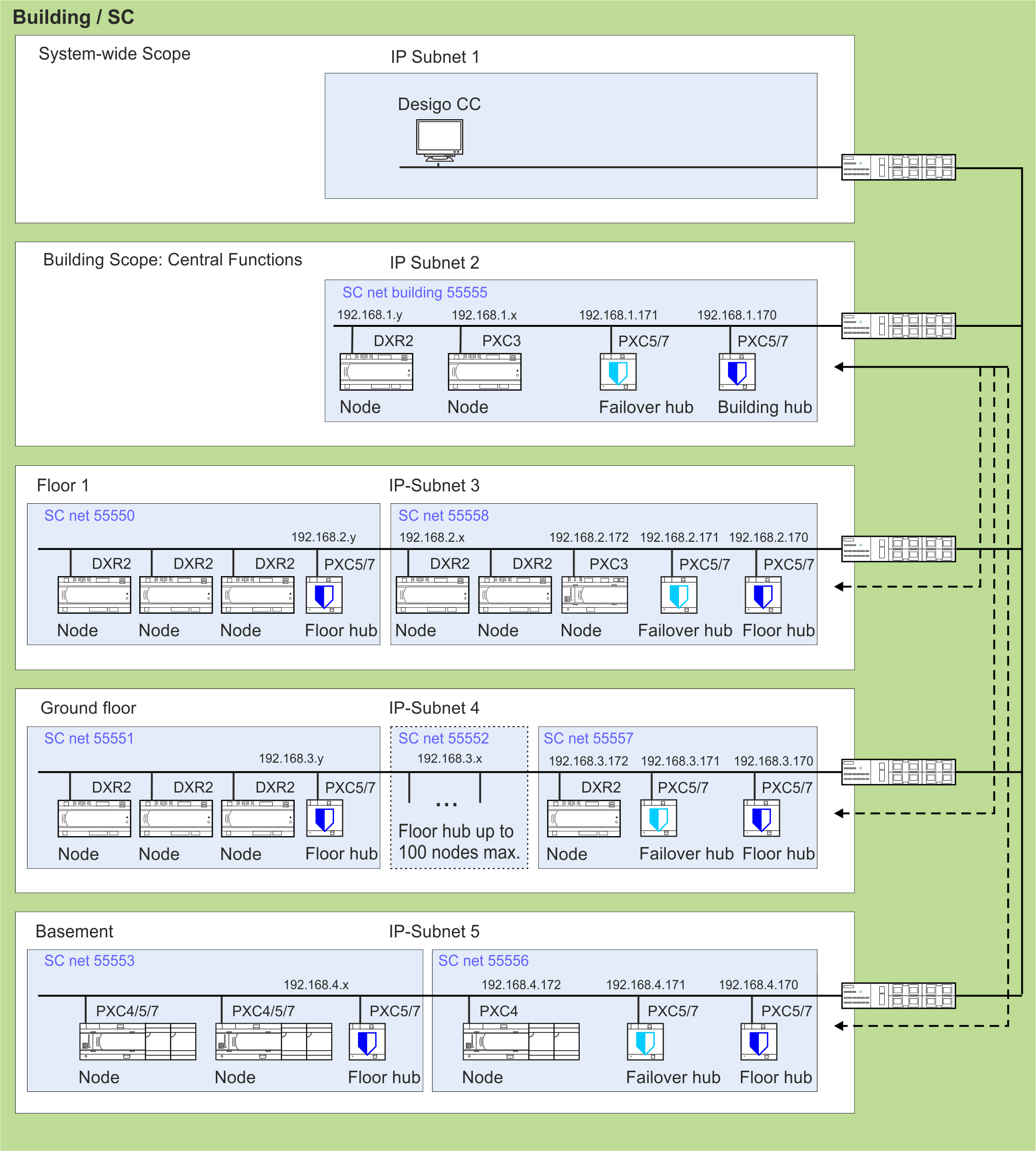
NOTICE

Desigo CC must connect directly to every floor and plant hub and not to the building hub. This avoids funneling all traffic indirectly through the building hub and prevents the building scope hub from being overloaded by traffic.
How is the BACnet/SC topology structured?
Typically, the BACnet/SC structure will be set up to resemble the building structure. This simplifies commissioning and maintenance in the future. In order for communication to function properly, some rules must be followed:
- If data exchange is required in different floor networks, they must be connected in a building hub network, e.g. central function, weather station, outside air temperature, human centric lighting.
- Structure the BACnet/SC network in such a way that network traffic can also be reduced.
- Each floor hub has its own BACnet/SC network number.
- Desigo CC requires an individual port for each hub connection.
Large floors may require multiple hubs per floor.
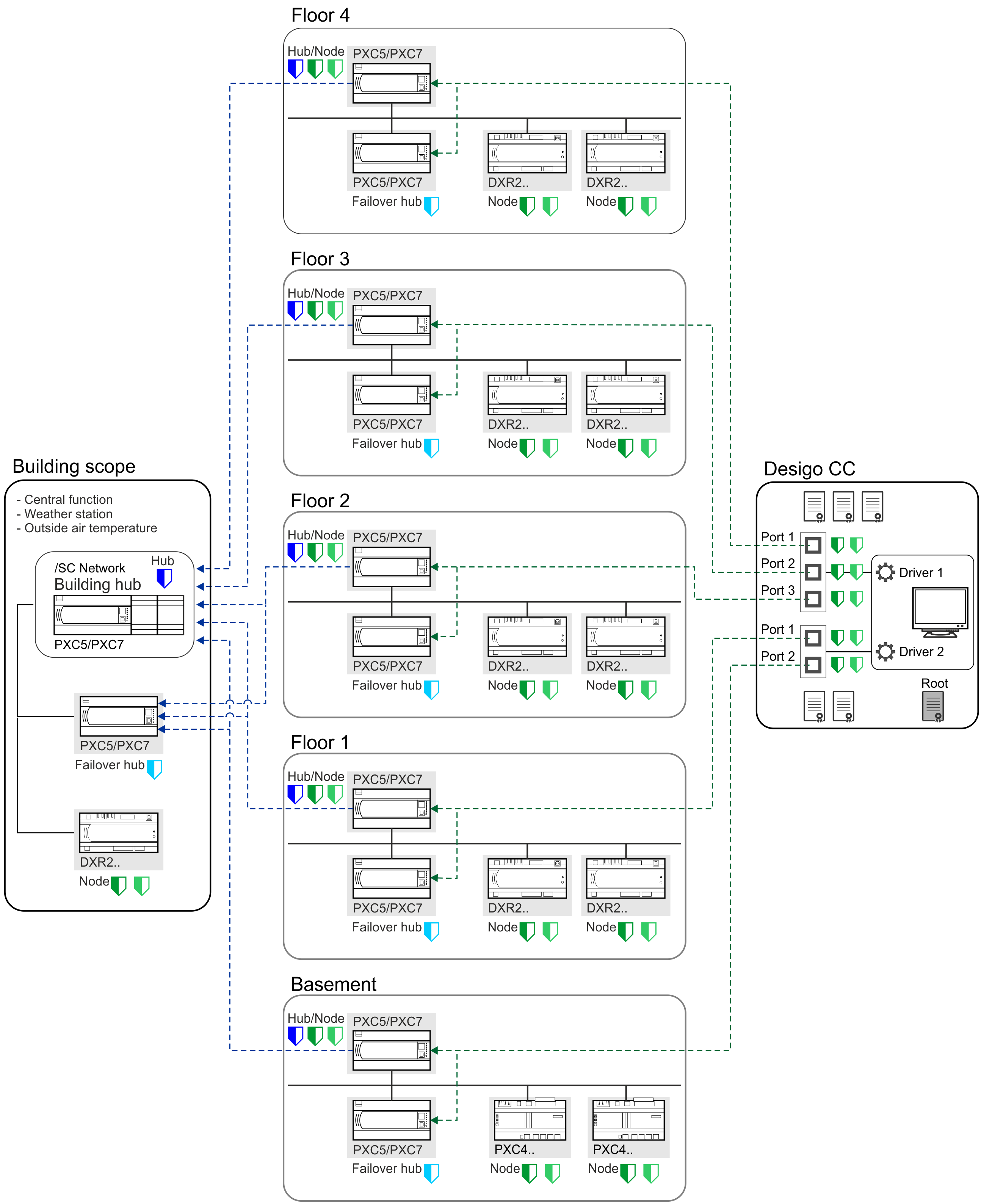
| Description |
|---|---|
| Device is a hub. In a BACnet/SC environment, the name changes to a building hub (one building hub in a project) or a floor hub. The functionality is the same as a hub. |
| Device is a failover hub. Note: A failover hub is always a node too. |
| Device connects to a hub. |
| Device is a node with a failover hub defined. |
| Desigo CC links to all floor hubs or failover hubs. Do not connect Desigo CC to the building hub. |
| A floor hub link to the building hub. |


How many Desigo CC certificates are needed?
In any case a root and an operational certificate is the minimum to operate with Desigo CC (see example 1). But there are various possibilities according to your customer’s request.
| Hub 1 / Port1 | Hub 2 / Port 2 | Hub 3 / Port 3 | Total of external certificates from ABT Site needed | Recommended file name |
Example 1 |
|
|
|
|
|
| Root (1) | Root | Root | 1 | [root_server] |
| Client (2) | Client | Client | 1 | [client_server] |
Example 2 |
|
|
|
|
|
| Root | Root | Root | 1 | [root_server] |
| Client 1 | Client 2 | Client 3 | 3 | [client_driver?_port?] (3) |
(1) ABT Site functionality Export root certificate to Desigo CC.
(2) ABT Site functionality Sign external CSR for the Desigo CC Client certificate.
(3) [client_driver?_port?] = Siemens_DesigoCC_client_driver1_port1
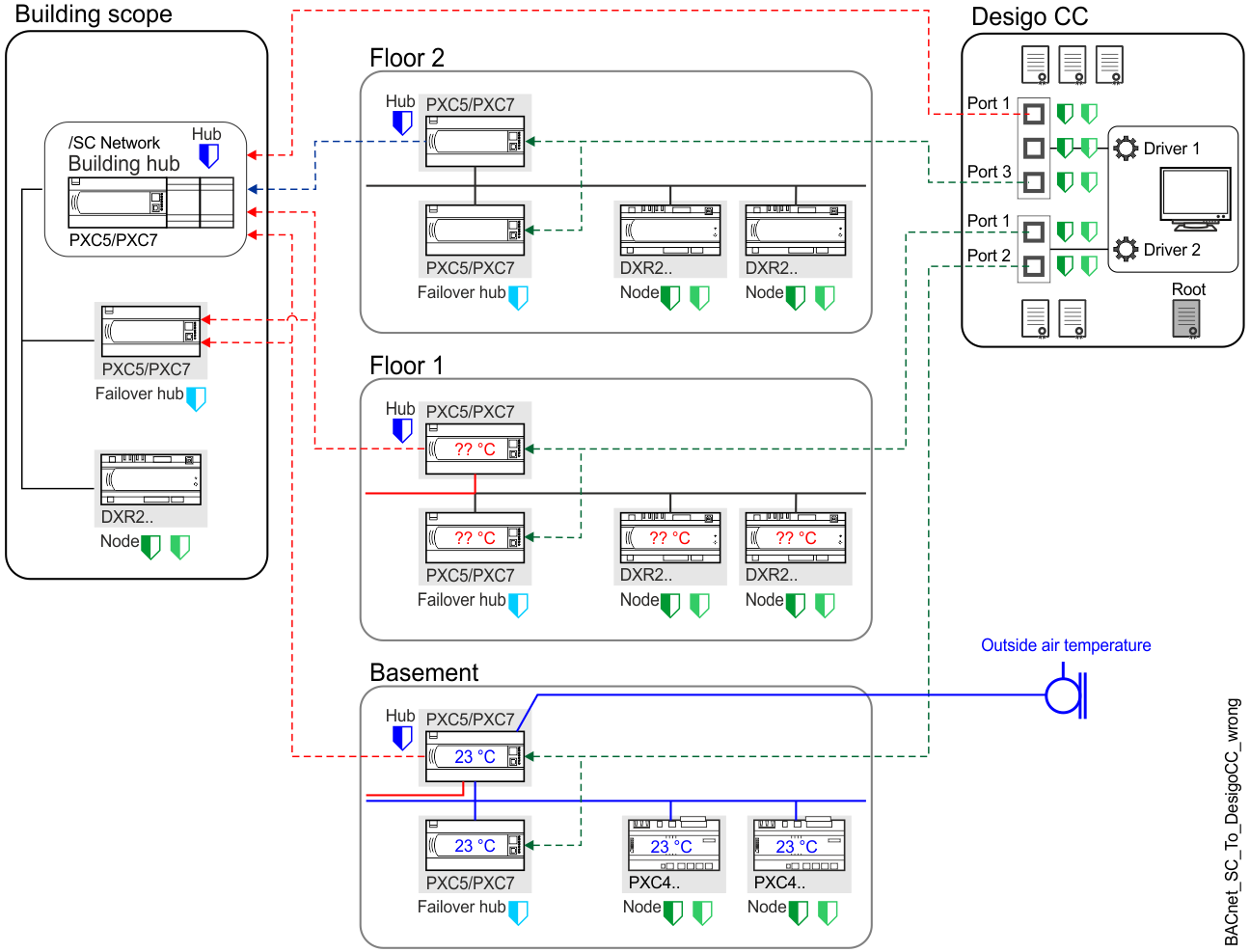
Not allowed hub configurations within BACnet/SC topology
At an early stage of engineering, take care to ensure that data required in several networks are correctly assigned to the building hub, for examples, outside air temperature, weather station, central functions and so on. Find below examples of configurations that do not work and require your attention:
- The data point measuring outside air temperature cannot share data with other BACnet/SC networks. Data exchange cannot be routed from a BACnet/SC network to another BACnet/SC network through the building hub.
- If Desigo CC is connected to the building hub, there will be traffic overload because all nodes can be reached by Desigo CC.
Notice: Do not connect Desigo CC to the building hub.
Behavior when replacing a device
A device replacement always requires a new certificate for the corresponding device. The following must be observed:
- The certificate contains information about the ABT Site project and the device serial number. Thus, the certificate can only be created by the respective project.
- Commissioning must always be carried out with an IP configuration before the BACnet/SC certificates can be loaded.
- A full download is always required the first time to have the BACnet/SC certificate available on the device.
Downloading a control program to a device
The certificates can then be renewed with Only updated certificates.
Downloading an updated certificate to a device - As the private key is stored in ABT Site project data, never make a second certificate signing request (CSR). Otherwise the system will not recognize the private key when receiving the certificate back from the signing authority (first one).
- If you perform a second export by accident, this CSR has to be sent to the signing authority and then later on to be loaded to the device.
If access to the defunct device is still possible, then do not forget to decommission the device properly securely. That is, delete its certificates and any other engineering data on device properly and reset it to factory mode.