[TMR_FNCT] Impulse and delay
Function block TMR_FNCT handles pulse signals.
TMR_FNCT handles pulse signals:
- Limit, harmonize, or extend pulse length
- Delay switch-on or switch-off
- Save switch-on
One of the following functions is active as per the set timer mode [TiMod].
- In general, a change of input value [In] starts the delay time or pulse length.
- Upon [Reset], the timer is reset and output [Out] is reset ([Out] = 0).
- Upon [ResetTi], the timer is reset and output [Out] is reset ([Out] = 0 or [In]).
1: Pulse (limit pulse length)
The pulse at input [In] is shortened to the maximum possible pulse length [Ti].
A pulse at [Reset] and [ResetTi] resets the output immediately to [Out] = 0.
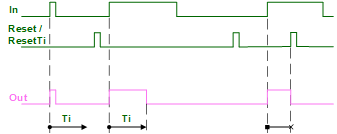
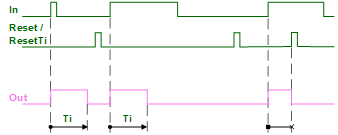
2: Expanded pulse (Constant pulse length)
The pulse at input [In] is extended or shortened to the constant pulse length [Ti].
A pulse at [Reset] and [ResetTi] resets the output immediately to [Out] = 0.
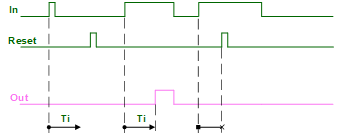
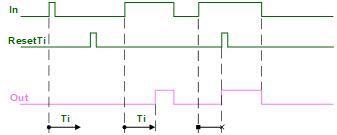
3: Switch On delay
The pulse at input [In] is switched to output [Out] only after delay time [Ti]. Pulses shorter than [Ti] are ineffective.
A pulse at [Reset] resets the output immediately to [Out] = 0.
A pulse at [ResetTi] resets the output immediately to [Out] = [In].
4: Stored switch On (Switch-on delay with saving property)
A pulse at input [In] switches output [Out] constantly to 1 after delay time [Ti].
A pulse at [Reset] only resets the output to [Out] = 0.
A pulse at [ResetTi] resets the output immediately to [Out] = 1 (cannot reset to [Out] = 0).
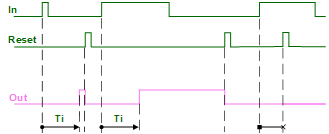

Since there is no use case for a reset that sets the output immediately to [Out] = 1, there is no graphic available for a pulse at [ResetTi].
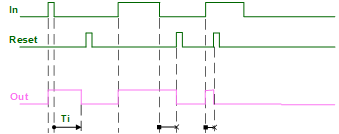
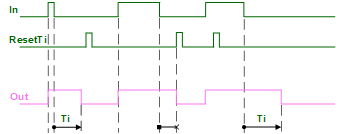
5: Switch off delay (Pulse extension)
The pulse at input [In] is extended by the delay time [Ti].
A pulse at [Reset] resets the output immediately to [Out] = 0.
A pulse at [ResetTi] resets the output immediately to [Out] = [In].
Reset
Upon [Reset], all started times are reset and output [Out] is reset.
If [Reset] and [In] appear at the same time, reset takes priority. If the start condition reappears during the timer's runtime, the time restarts.
ResetTi
Upon [ResetTi], all started times are reset and output [Out] is set according to the selected function of the Timer mode.
If [ResetTi] and [In] appear at the same time, reset takes priority. If the start condition reappears during the timer's runtime, the time restarts.
Input | Description | Data type | Default value |
|---|---|---|---|
In | Input | Boolean | 0 |
Ti | Time | Time | 1m_40s |
0 ms: No delay time or pulse length | |||
TiMod | Timer mode | Integer | 2: Expanded pulse |
1: Pulse - Limits the pulse length. | |||
Reset | Reset (Out always 0) | Boolean | 0 |
0 - No reset done. | |||
ResetTi | Reset times (Out = In) | Boolean | 0 1ms...24d |
0 - No reset done. | |||
Output | Description | Data type | Default value |
|---|---|---|---|
Out | Output | Boolean | 0 |
TiEld | Elapsed time The time expired to date is pending. After reaching [Ti], [TiEld] is reset to 0. | Time | 0 ms |
- Time delays and pulses (with the aid of an input signal).
The cycle generator CYCLEGEN function block can be used for pulses without start condition. - Switch-on and switch-off delays, minimum runtimes, minimum breaks for a component (by combining several TMR_FNCT).
Operating modes
- Pulse: The damper function is monitored by ensuring that it reaches the end position within a specified time after startup.
- Expanded pulse: Stairwell automation switches on the light for a specific time via button.
- Switch On delay: A presence detector switches on a fan only after a specific time after entering the room.
- Stored switch On: An automatic escalator switches on with the first customer.
- Switch Off delay: A bathroom exhaust switches off only after a specified time after the light is switched off.