ABT Site and devices signing with external CA
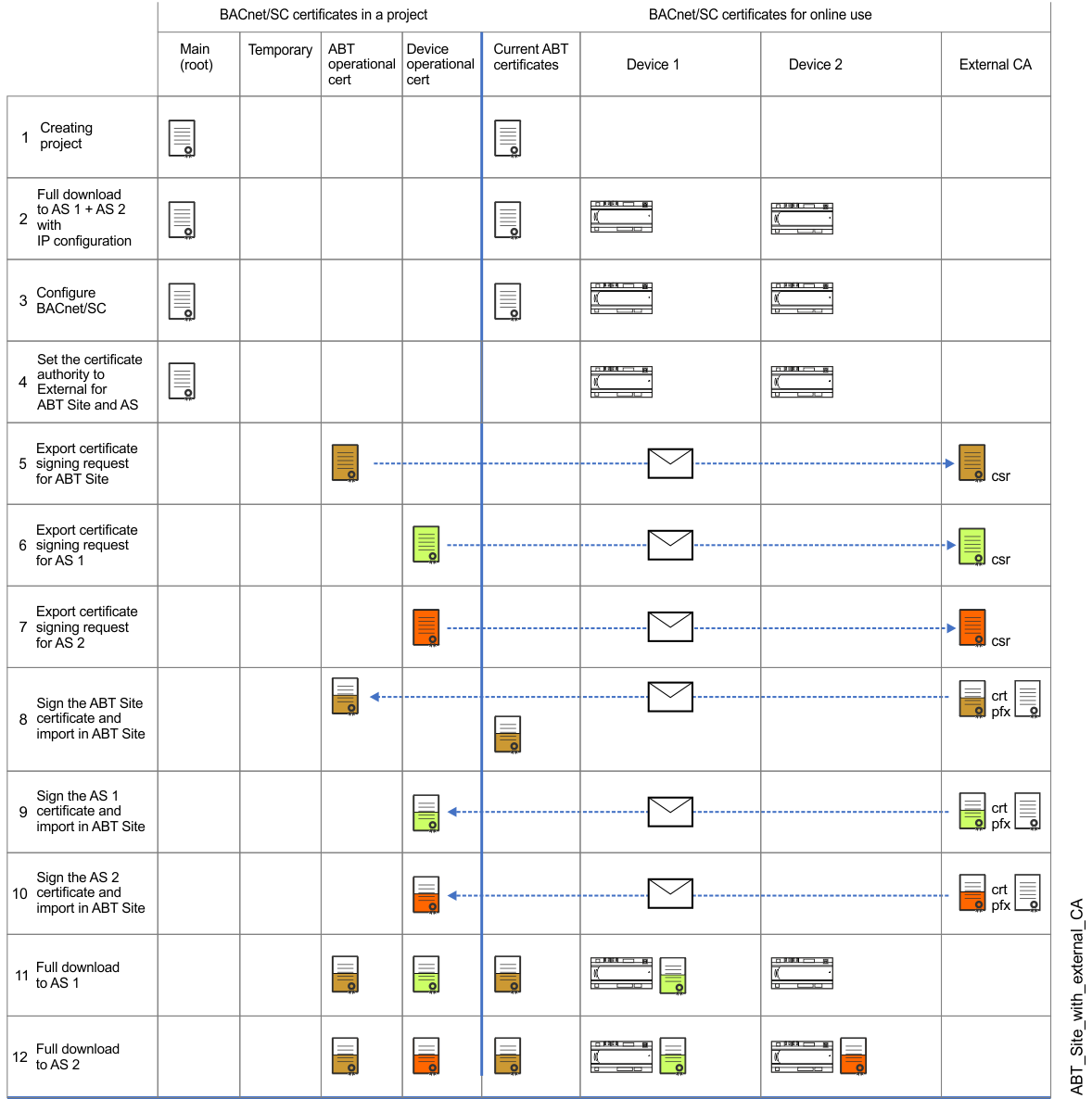
If the certificate is only valid, for example, for 1 or 2 years, the renewal of the certificates is repeated several times before the certificates have to be renewed. This example shows ABT Site and devices signing with an external CA (certification authority) for the BACnet/SC network. Certificates for ABT Site, devices, Desigo CC or 3rd party devices have to be signed by the same CA.
The certificate color shows when a change is made in the workflow.

The diagram shows the process with the same certificate validity length. If the certificate is only valid, for example, for 1 or 2 years, the renewal of the certificates is repeated several times before the certificates have to be renewed. This may lead to additional costs for Siemens and the external CA and must be taken into account accordingly.
NOTICE

Devices do not work correctly if parameters or program structure are not correct
This can lead to high cost for reengineering and commissioning of plants or items
- Obtain the latest control program from the ABT Site project
- Commissioning with the IP configuration is completed.
- Always first upload parameter data or control program on customer site.
- Always perform the first time a full download of the control program with BACnet/SC certificate. Afterwards, use Only updated certificates to update BACnet/SC operational and root certificates.
- Organize the signed certificates from the external certification authority
| Description |
1 | A root certificate (white) and an ABT Site operational certificate (green) are created at the time the ABT Site project is created. This root certificate is not used in case of an external CA and therefore obsolete. |
A full download is required for downloading the control program with IP configuration. At this point, no certificate has to be loaded into the device. | |
Configure BACnet/SC with hubs, failover hubs and nodes. | |
Set the certification authority in the Certification management task to External. | |
Export the ABT Site operational certificate and send it to the external CA. | |
Export the device AS 1 operational certificate and send it to the external CA. Multi-selection of devices is supported and their certificates are combined in a zip file. | |
Export the device AS 2 operational certificate and send it to the external CA. | |
The ABT Site operational certificate is signed by an external CA and sent back to Siemens. Import the ABT Site external signed operational certificate into ABT Site. | |
The device AS 1 operational certificate is signed by an external CA and sent back to Siemens. Import the device AS 1 externally signed operational certificate into ABT Site. | |
The device AS 2 operational certificate is signed by an external CA and sent back to Siemens. Import the device AS 2 externally signed operational certificate into ABT Site. | |
A full download is required for downloading the operational certificate into the device AS 1. After the download, the device can be operational with BACnet/SC. Note: All devices should be loaded promptly, otherwise the data exchange between the individual devices will be interrupted. | |
A full download is required for downloading the operational certificate in the device AS 1. After the download, the device can be operational with BACnet/SC. |