Importing customized notification classes into the project
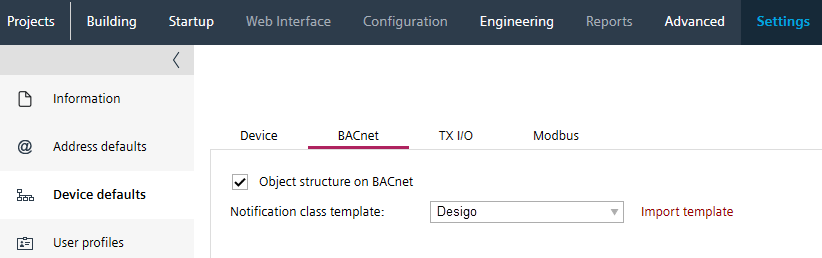
If the notification class template is adapted for the project, the modified template must first be imported into the project. The notification class template can also be changed at a later point in time, but then a subsequent assignment must be made for all devices.
In a project, all notification classes must have the same assignment. This also applies to 3rd devices that are integrated in the project.
Alarm management by notification class

A valid notification class template must have unique entries in the definition of the:
- Notification class number
- Instance number
- Part name
Notification classes
- Go to Settings.
- Open the Device defaults task.
- Select the BACnet tab.
- In the Notification class template section, click Import template.
C:\ProgramData\Siemens\Desigo\ABT\Libraries\HQ\NotificationClasses
or
C:\ProgramData\Siemens\Desigo\ABT\Libraries\RC\NotificationClasses. - Select the appreciate notification class template file.
- Click Open.
- The customized notification class file is imported but not assigned to any device.
- In an existing project, all devices must be loaded with this notification classes. This also applies to 3rd party devices that are integrated in the project.
Replace a notification class template of a device
If you import new notification class, old customized would delete from list and new one would be available for selection.