Alarm management by notification class
Intrinsic reporting
With intrinsic reporting, the alarm object itself assumes alarm identification and state machine for alarm handling. However, the subsequent distribution of alarm messages to alarm clients and the alarm management is no longer the responsibility of the alarm source itself, but of a Notification Class object assigned to the alarm source. The Notification Class object is both a function block and a standard BACnet object, which contains all the information required for the distribution of alarms and system events within the system.

In ABT Site, the information of a Notification Class object is handled by an XML file and not visible in the control program. If the standard behavior does not match with the customer’s requirements, the notification class file can be modified according to the customer’s needs.
If several alarms are triggered due to a field device status is “Device-Missing” (perform an alarm shower), only the “Device-Missing” alarm is sent to the corresponding recipients. This ensures that the user does not receive and have to acknowledge multiple alarms.
Algorithmic reporting
With algorithmic reporting, alarm detection and the state machine for alarm handling normally are taken over by an alarm-capable BACnet object or the Event Enrollment object. In this case, alarm management is also set up in an alarm source via assigned Notification Class object.
Notification Class
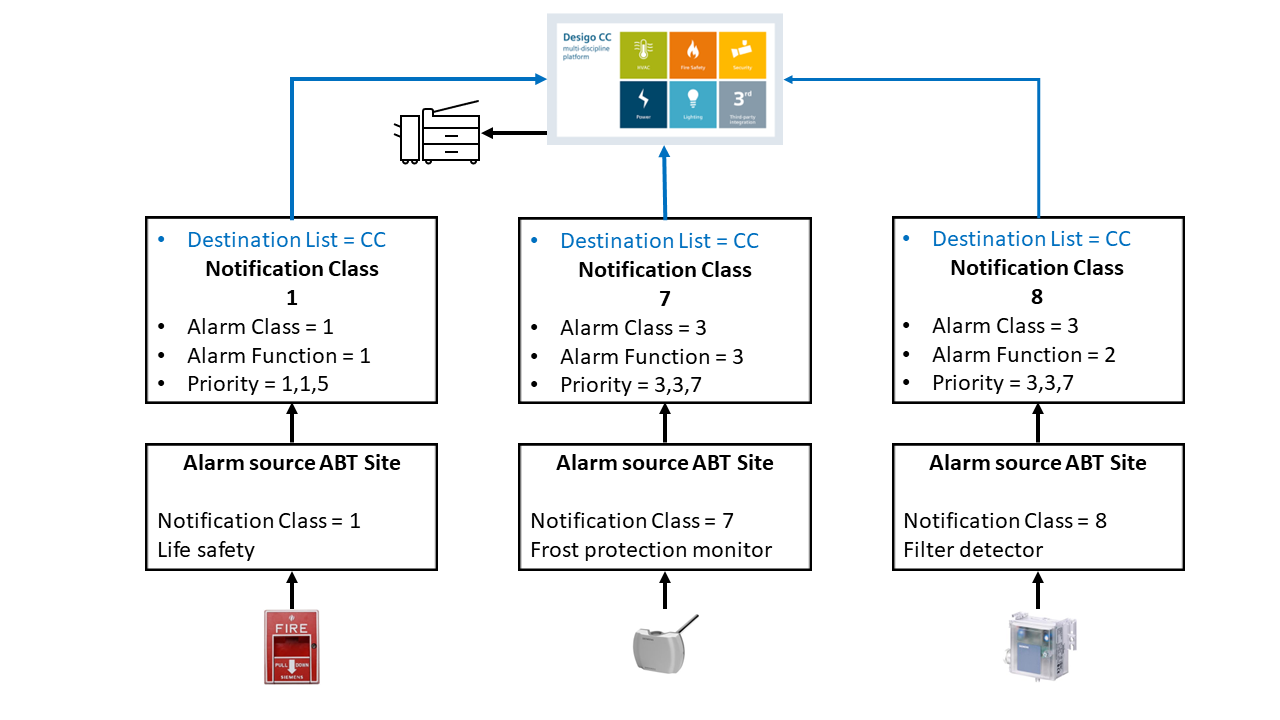
Each alarm-generating object is assigned one notification class [NotifCl] only, but one notification class can be used by more than one alarm-generating object. This makes it possible to create a Notification Class object for each group of alarms (e.g., HVAC alarms, fire alarms etc.). Each alarm source in a given alarm group is assigned to the [NotifCl] for that group.
There are global and local notification class objects:
- Global notification class: One set of max. 18 global notification class objects per site.
- Global notification classes exist on all Desigo devices of a site.
Notification classes template in the project
Replace a notification class template of a device
Verifying the notification classes in an existing device
Notification Classes in the Desigo system
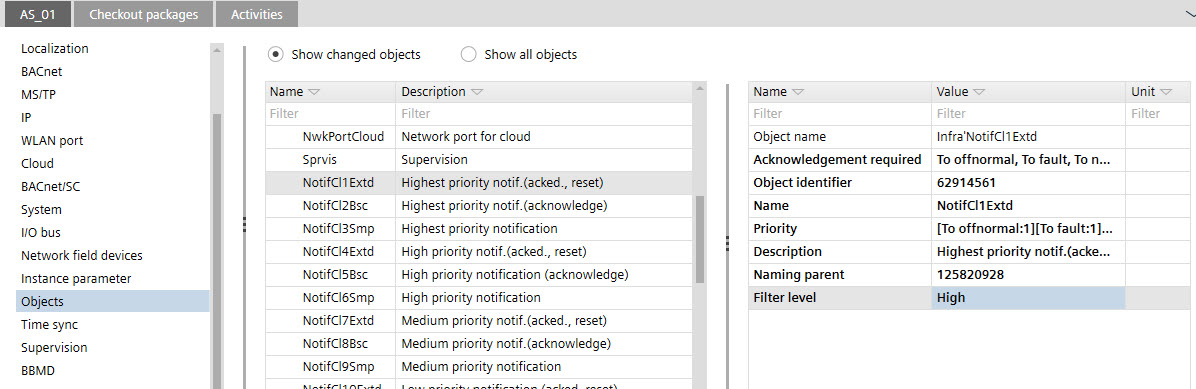
There are 18 predefined global notification classes. The notification class is identified with the two independent variables AlarmFunction and AlarmClass, and referenced in the alarm source:
- AlarmFunction [Simple(1), Basic(2), Extended Alarm(3)]
- AlarmClass [UrgentAlarm (1), HighPrioAlarm (2), NormalAlarm (3), LowPrioAlarm (4), UserDefinedAlarm (5) and OffLineTrend (6)]
Alarm Class1 [AlmCl] | Alarm Subclass2 [AlmFnct] | Default property values | ||||
|---|---|---|---|---|---|---|
Priority3 | NC | Ack. Req. | ||||
1 | Urgent | 3 | Extended | 1,1,5 | 1 | T,T,T |
1 | Urgent | 2 | Basic | 1,1,5 | 2 | T,T,F |
1 | Urgent | 1 | Simple | 1,1,5 | 3 | F,F,F |
2 | High Priority | 3 | Extended | 2,2,6 | 4 | T,T,T |
2 | High Priority | 2 | Basic | 2,2,6 | 5 | T,T,F |
2 | High Priority | 1 | Simple | 2,2,6 | 6 | F,F,F |
3 | Normal | 3 | Extended | 3,3,7 | 7 | T,T,T |
3 | Normal | 2 | Basic | 3,3,7 | 8 | T,T,F |
3 | Normal | 1 | Simple | 3,3,7 | 9 | F,F,F |
4 | Low Priority | 3 | Extended | 4,4,8 | 10 | T,T,T |
4 | Low Priority | 2 | Basic | 4,4,8 | 11 | T,T,F |
4 | Low Priority | 1 | Simple | 4,4,8 | 12 | F,F,F |
5 | User defined | 3 | Extended | 5,5,9 | 13 | T,T,T |
5 | User defined | 2 | Basic | 5,5,9 | 14 | T,T,F |
5 | User defined | 1 | Simple | 5,5,9 | 15 | F,F,F |
6 | Offline Trend | 3 | Extended | 2,2,2 | 16 | T,T,T |
6 | Offline Trend | 2 | Basic | 2,2,2 | 17 | T,T,F |
6 | Offline Trend | 1 | Simple | 2,2,2 | 18 | F,F,F |
1 FB variable
2 FB variable AlmFnct
3 FB variable priority (To-Offnormal, To-Fault, To-Normal)
T = True
F = False
Notification Class in a building environment
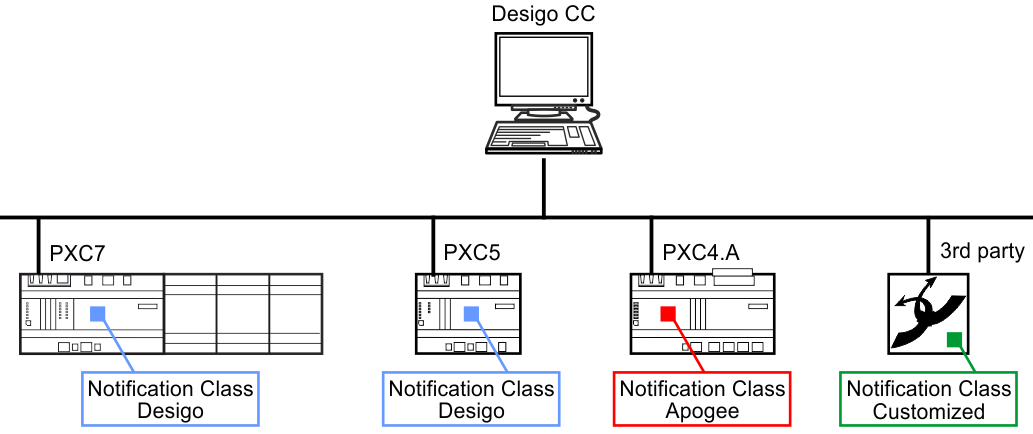
In a larger building or campus, you have to integrate different devices that contain different notification classes. To ensure that the alarms from different devices are forwarded to the management station, ABT Site has the option of assigning them individually to the devices. In a new or existing project, the default setting is used and can then be adjusted for the corresponding device. Thus, requirements of KBOB and AMEV can be supported.
Project situation wrong:
It is not allowed to have different notification class profiles in one project. All notification class profiles must have the same notification class assignments.
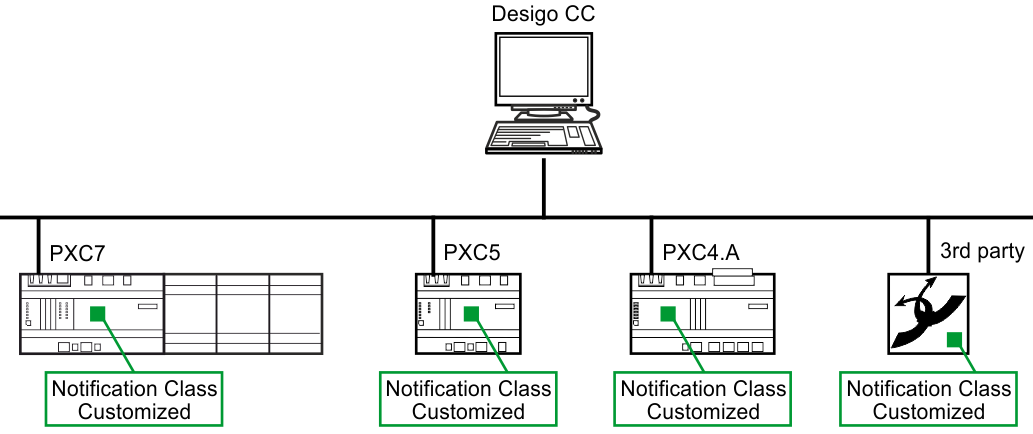
Project situation correct:
In a project, all notification classes must have the same assignment. This must applies to 3rd devices that are integrated in the project.
Location of the stored notification class files
The notification class function block [NotifCl] is the means by which functionality is transferred from the BACnet standard into the programming environment. The headquarter template files Desigo, KBOB and AMEV are located here: C:\ProgramData\Siemens\Desigo\ABT\Libraries\HQ\NotificationClasses.
Notification classes from regional headquarters are given and stored in the location:
C:\ProgramData\Siemens\Desigo\ABT\Libraries\RC\NotificationClasses.
Interface definition in the notification class file
A valid notification class template must have unique entries in the definition of the:
- Notification class number (7)
- Instance number (2)
- Part name (3)
The file is validated during the import process. Error message with the reason of the cause is displayed in the Log tab.
Importing customized notification classes into the project
Example of a notification class XML file.
Notification class | |||
1 | Notification class name Do not change | 2 | Notification class instance number Must be unique within the file. |
3 | Custom alarm class Displays the alarm class value behavior. Shows the text if the TextRef in 4 is deleted. (PartName data range: 0 – 80) | 4 | System data alarm class Refers to the standard system data. In a customized file, delete this entry to show the text from 3. |
5 | Custom alarm class description Displays the alarm class description. Shows the text if the TextRef in 6 is deleted. (Des data range: 0 – 255) | 6 | System data alarm class description Refers to the system data. In a customized file, delete this entry to show the text from 5. |
7 | Notification class number Notification class number can be different from Notification class instance number. (NotifCl data range: 0 - 2097152) | 8 | Alarm priority Defines priority with the alarm class. (Prio data range Index: 0 - 2) (Prio data range Value: any value) |
9 | Alarm priority Defines priority with the alarm class. (Prio data range Value: any value) | 10 | Alarm priority Defines priority with the alarm class. (Prio data range Value: any value) |
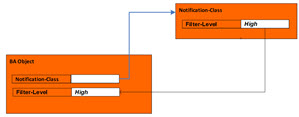
11 | Acknowledge Defines the acknowledge behavior. (Data range Value: true/false) | 12 | Filter level Filter level is configured in the Notification Class object and reflected in the alarm extension of a BA object as a status value for the state aggregation. (Data range FiltrLvl: 0 = low, 1 = medium, 2 = high)
|
Recipient list within the Notification class
This destination list contains the preconfigured alarm recipients as well as weekdays and timeframe to operate the alarm recipient.
Part of reception list only | |||
1 | Valid days The set of days of the week on which this destination is used during the value From Time (FromTi), To Time (ToTi). 0 = Monday (Data range Value: true/false) | 2 | From time Defines the start time from which an event is forwarded to the recipient. |
3 | To time Defines the end time until an event will be forwarded to the recipient. | 4 | BACnet recipient type The identifier of an event notification client device. Can be defined with: device ID (Device) or network number (NwkNr) and MAC address (MACAddress) |
5 | Process identifier A numeric identifier used by the alarm notification client to route the event to an internal task, process, application, etc.. | 6 | Confirmed notifications Alarms should be sent to this client as confirmed or unconfirmed notifications. (Data range Value: true/false) |
7 | Transitions Alarm state transitions that are relevant to this client. Implemented as a set of three flags; one flag is provided for each state transition (to-normal, to-fault, to-offnormal). 0 = To-Offnormal (Data range Value: true/false) |
|
|
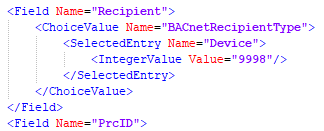
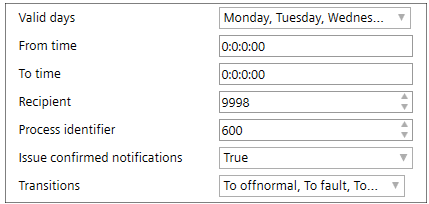
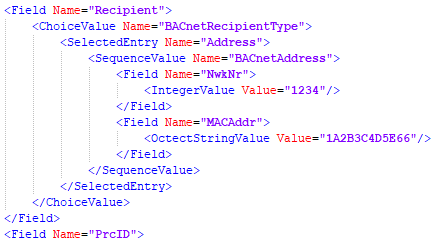
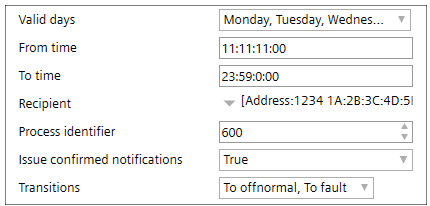
Configuring the recipient list
 CAUTION

Alarms are no longer forwarded
Supervisors are not informed, so that no suitable measures can be taken.
- This adjustment may only be carried out by trained personnel.
- After a change, always check all notification classes for functionality.
- Changes may only be made to the properties listed below. Labels must not be changed.
Error log message is shown in case of the same notification class name. Check in:
- ABT Site: In the Engineering tab, open the BACnet objects task and click Check.
- ABT Pro: Click Apply notification class in the Room programming editor.
Priority [Prio]
This defines the alarm priority on the basis of which alarm and system events are to be transmitted to the receivers. Every transition can be described individually with this BACnet property, data type ARRAY of INTEGERS [TO_OFFNORMAL; TO_FAULT; TO_NORMAL]. Priority levels can range in value from 0 to 255.
The lower the value, the higher the priority. In Desigo only priorities 1 to 9 are used.
Alarm function [AlmFnct]
Alarm function types: Simple, Basic or Extended. [AlmFnct] is only supported by Desigo devices.
Acknowledge transition per filter level for state aggregation
Indicators for acknowledge transitions per filter level are consisting of:
- High-Acked-ToNormal
- High-Acked-ToOffNormal
- High-Acked-ToFault
- Medium-Acked-ToNormal
- Medium-Acked-ToOffNormal
- Medium-Acked-ToFault
- Low-Acked-ToNormal
- Low-Acked-ToOffNormal
- Low-Acked-ToFault
Since 3rd party objects do not have a filter level associated, they are considered as low level. This can be changed by integrating using reference objects.