Downloading Building X integration data
In order for Building X to be able to access the data, the integration data must be loaded for each device. With a full load, this data is not loaded to the device.
- A device is connected and discovered.
- The control program is downloaded.
- Open the Startup > Configure and download task.
- In the Engineered devices tab, right-click a device that matches a discovered device.
- Select Load and then Building X integration data.
- The Load Building X integration data dialog opens.
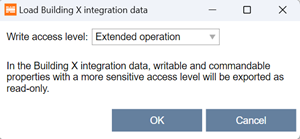
- From the Write access level drop-down list, select the write access level to assign to the cloud.
Note: Any points that require a more sensitive level of access are exported as read-only and cannot be controlled via the cloud. Normally, all objects of type outputs and setpoints are commandable/writable, but some sensors could also be defined as commandable. - Click OK.
- You have downloaded the Building X integration data to a device.
- Onboard the device to the Cloud and activate the required data points.
Onboarding the device to cloud from Building X

The Building X integration data must be loaded into the devices each time the device is re-engineered, for example, to add new I/O data points, new alarms, new trend data, etc.
For more information, see Building X Data Setup User Guide A6V12481797.
To remove the Building X data from the device, a Clear device or Clear application task must be performed. Read more about Clear device or Clear application in section:
Configure and download
Access levels
Access level | Name | Description |
|---|---|---|
1 | Internal | Access to all BACnet objects and properties for very specialized actions e.g. during development. |
2 | Extended service | Not used by HQ solutions yet. |
3 | Basic service | Access to BACnet objects and properties used for commissioning, e.g. configuration value extensions, I/O extensions, etc. |
4 | Administrator | Not used by HQ solutions yet. |
5 | Extended operation | Access to BACnet objects and properties for extended operation and monitoring such as network and device objects. All I/Os are visible |
6 | Standard operation | Access to BACnet objects and properties for standard operation and monitoring (daily business), .e.g. room and plant information on a management station. |
7 | Basic operation | Access to BACnet objects and properties for a room user e.g. data points visible on a room unit. |