[PULSEPRD] Periodic pulse
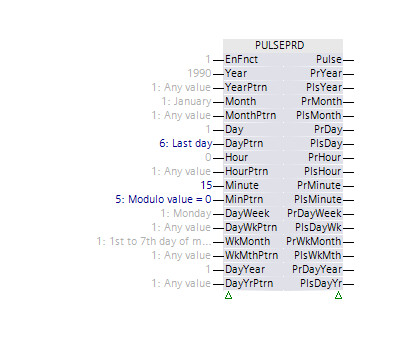
Function block PULSEPRD generates impulses in time according to the user configuration.
PULSEPRD generates impulses in time according to the user configuration.
Enable and disable the function
If the function is enabled (EnFnct = 1), then the function block gets the controller time and generates impulses according to the user configuration. If the function is disabled, then no impulses are generated. The current controller time is still provided at the outputs.
Configuration
PULSEPRD can generate an impulse at a specific moment in time. This time is configured at inputs [Year], [Month], [Day], [Hour] and [Minute]. PULSEPRD receives the controller time and compares it to the configured time. When the controller time matches the configured time, an impulse is generated at the output [Pulse]. Values at inputs [Year], [Month], [Day], [Hour] and [Minute] are considered in the function block as specific time values if the corresponding pattern inputs [YearPtrn], [MonthPtrn], [DayPtrn], [HourPtrn] and [MinPtrn] have the value "Value at input".
PULSEPRD can periodically generate impulses at the [Pulse] output. Periodic impulses can be achieved by configuring some of the pattern inputs with a value different from "Value at input". For example, if [YearPtrn], [MonthPtrn] and [DayPtrn] have "Any value", [HourPtrn] and [MinPtrn] have "Value at input", [Hour] has value "12" and [Minute] has value "0", then the impulses will be generated at the [Pulse] output every day at 12:00.
The value "Module value = 0" at pattern inputs is used to generate periodic impulses with a period configured by the user. For example, the value "Module value = 0" for [DayPtrn] and value "3" for [Day] triggers an impulse generation every third day.
Generated impulses can be limited by configuring inputs [DayWeek], [WkMonth] and [DayYear]. For example, the value "Monday" at [DayWeek] allows impulses to be generated only when the current day is "Monday". Like the configuration inputs for a specific time, limiting inputs also have corresponding pattern inputs: [DayWkPtrn], [WkMthPtrn] and [DayYrPtrn]. These pattern inputs are used in a similar way as the patterns for specific time configuration.
Impulses generated at the [Pulse] output consider all configuration inputs of the function block.
If all pattern inputs have the value "Any value", then no impulses are generated at the [Pulse] output.
Additional impulses
In addition to the impulses at the [Pulse] output, impulses are also generated at outputs [PlsYear], [PlsMonth], [PlsDay], [PlsHour], [PlsMinute], [PlsDayWk], [PlsWkMth] and [PlsDayYr]. These additional impulses consider only the corresponding configuration inputs. For example, impulses generated at [PlsDay] depend only on the configuration at inputs [Day] and [DayPtrn]. If [DayPtrn] has the value "Any value", the impulse is generated every time the day value in the controller time changes.
Controller time
Outputs [PrYear], [PrMonth], [PrDay], [PrHour], [PrMinute], [PrDayWeek], [PrWkMonth] and [PrDayYear] provide the current controller time as integer values. They are used in control program logic to generate impulses for the cases which cannot be covered by the function block.

Due to the time synchronization of controllers, PULSEPRD may not generate all desired impulses, or it may generate an impulse twice.
PULSEPRD does not validate its configuration. For invalid configurations, impulses are not generated at the [Pulse] output. For example, the combination of [WkMthPttrn] = "Last week", [DayPtrn] = "Value at input" and [Day] = "1" does not generate impulses at [Pulse].
Weeks of month used for the configuration inputs [WkMonth] and [WkMthPtrn] are not Monday-Sunday periods. Weeks for these inputs are considered as seven days period: "first 7 days of the month", "second 7 days of the month" etc.
Example:
1: Day 1 to 7 of month
2: Day 8 to 14 of month
3: Day 15 to 21 of month
4: Day 22 to 28 of month
5: Day 29 to 31 of month
Values for all configuration inputs used in combination with "Value at input" patterns are limited to the range specified in the table "Pins". The minimal value for all configuration inputs used in combination with "Modulo value = 0" pattern, is 2.
Examples for the impulse behavior
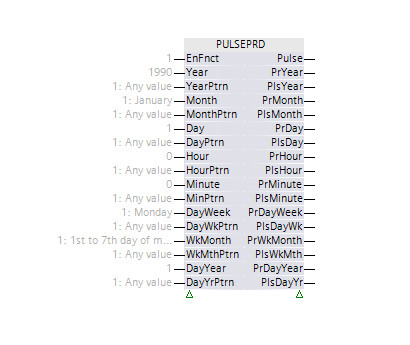
| [Pulse] – No impulses are generated. |
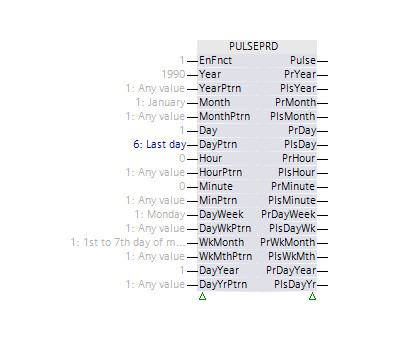
| [Pulse] – Impulse at the beginning of the last day of every month. |
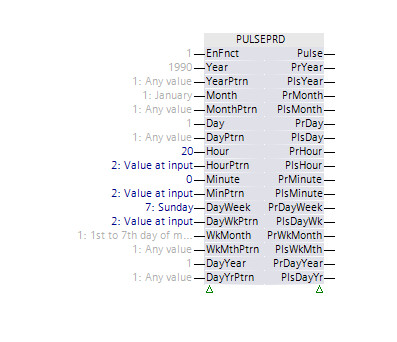
| [Pulse] – Impulse every Sunday at 20:00. |
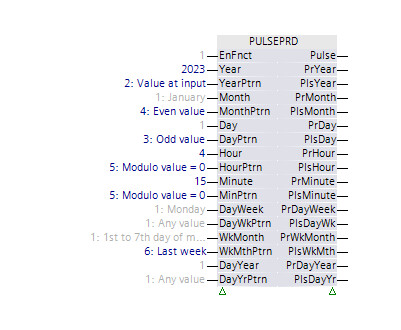
| [Pulse] – For the year 2023, in every even month, impulses are generated for every odd day. |
| [Pulse] – Impulse every 15th minute for the last day of the month. |
Input | Description | Data type | Default value |
|---|---|---|---|
EnFnct | Enable function Enables the function. | Boolean | 1 |
0 - The function is disabled. | |||
Year | Year Specific year or modulo value for a year | Integer | 1990 1990...2089 |
|
YearPtrn | Year pattern | Integer | 1: Any value |
1: Any value | |||
Month | Month Specific month or modulo value for a month | Integer | 1: January |
1: January | |||
|
MonthPtrn | Month pattern | Integer | 1: Any value |
1: Any value | |||
Day | Day Specific day or modulo value for a day | Integer | 1 1...31 |
|
DayPtrn | Day pattern | Integer | 1: Any value |
1: Any value | |||
Hour | Hour Specific hour or modulo value for an hour | Integer | 0 0...23 |
|
HourPtrn | Hour pattern | Integer | 1: Any value |
1: Any value | |||
Minute | Minute Specific minute or modulo value for a minute | Integer | 0 0...59 |
|
MinPtrn | Minute pattern | Integer | 1: Any value |
1: Any value | |||
DayWeek | Day of week Specific day of the week or modulo value for a day of the week | Integer | 1: Monday |
1: Monday | |||
|
DayWkPtrn | Day of week pattern | Integer | 1: Any value |
1: Any value | |||
|
WkMonth | Week of month Specific week of the month or modulo value for a week of the month | Integer | 1: Day 1 to 7 of month |
1: Day 1 to 7 of month | |||
|
WkMthPtrn | Week of month pattern | Integer | 1: Any value |
1: Any value | |||
DayYear | Day of year Specific day of the year or modulo value for a day of the year | Integer | 1 1...366 |
|
DayYrPtrn | Day of year pattern | Integer | 1: Any value |
1: Any value | |||
Output | Description | Data type | Default value |
|---|---|---|---|
|
Pulse | Pulse | Boolean | 0 |
|
PrYear | Present year | Integer | 1990 |
|
PlsYear | Pulse, year | Boolean | 0 |
|
PrMonth | Present month | Integer | 1: January |
1: January | |||
|
PlsMonth | Pulse, month | Boolean | 0 |
|
PrDay | Present day | Integer | 1 |
|
PlsDay | Pulse, day | Boolean | 0 |
|
PrHour | Present hour | Integer | 0 |
|
PlsHour | Pulse, hour | Boolean | 0 |
|
PrMinute | Present minute | Integer | 0 |
|
PlsMinute | Pulse, minute | Boolean | 0 |
|
PrDayWeek | Present day of week | Integer | 1: Monday |
1: Monday | |||
|
PlsDayWk | Pulse, day of week | Boolean | 0 |
|
PrWkMonth | Present week of month | Integer | 1: Day 1 to 7 of month |
1: Day 1 to 7 of month | |||
|
PlsWkMth | Pulse, week of month | Boolean | 0 |
|
PrDayYear | Present day of year | Integer | 1 |
|
PlsDayYr | Pulse, day of year | Boolean | 0 |