Changing BACnet object properties (CSV)
Create data export
- Go to Building > Building structure.
- Select a device or a hierarchy object.
- Right-click and select Create export.
- The Create export dialog box opens.
- Select the type of content to export. Click BACnet object properties (PXC4/5/7 only).
- (Optional) Enter a comment. 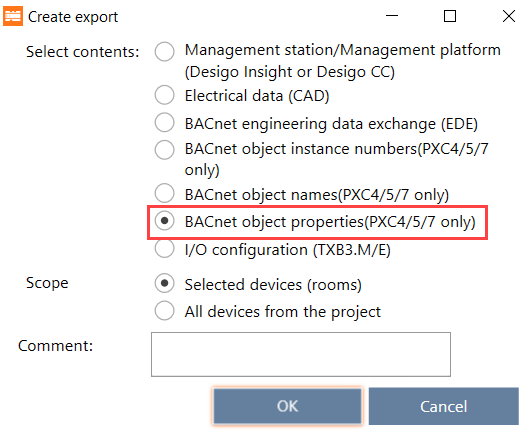
- Click Ok.
- A Confirm export dialog box opens, requesting the user to confirm the action.
- Click Yes.
- The selected content is exported to the default directory for exports [drive]:\Users\Public\Documents\Siemens\DESIGO\Exports.
- The Create export dialog box displays allowing you to open the folder with csv file.
- Click Open folder.
- The file explorer opens.
- Extract the created zip.file.
- For each device is a csv.file created with the corresponding device name.