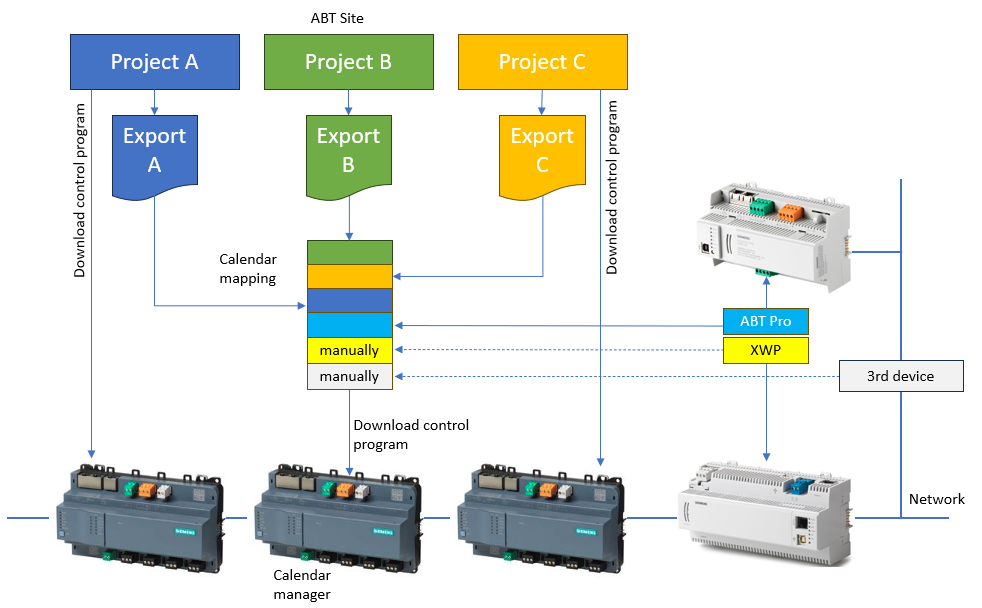
Exporting the calendar information of the entire project
- Go to Building > Building structure.
- Select the building hierarchy
 or a floor hierarchy
  .
. - Right-click and select Export calendars in project.
- The Export calendar dialog opens.
- Click Open folder.
- Select the exported calendar file and open it with Excel.
Configure the calendar manager the first time (with Excel)
- The export file is stored at the default location
C:\Users\Public\Documents\Siemens\Desigo\Exports\[Export{Date and Time}.csv]
or
according the Projects and paths settings.
Settings

In a big project where more than one ABT Site project is available with the same network, the export must be performed for each project. Afterwards, the export files must be merged and imported in one step. For calendars that have not been created with ABT Site, for example, Desigo PX, Apogee or 3rd party calendars, the device ID and object ID must be entered manually in the calendar manager.