Creating project-specific user designations
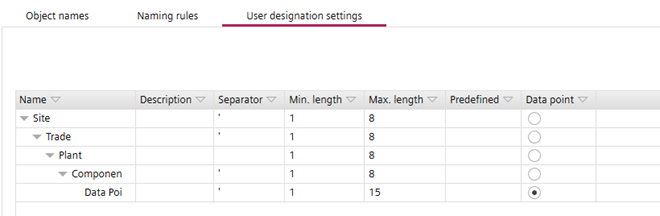
A user designation is made up of individual structure items which are defined in Settings > Naming defaults > User designation settings.
User designation settings tab
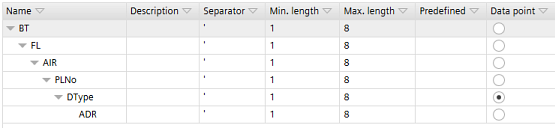
A user designation may have a minimum and a maximum character length. Consecutive structure items may be delimited by separators. One specific structure item must be marked as data point. The data point can be any kind of BACnet object. The data point marks the structure item that separates the hierarchy from the data point-specific part. The data point is not necessarily the last item of the user designation defined in Settings > Naming defaults > User designation settings.
User designation settings tab
Always define a data point in the User designation settings. If the data point is not defined, you cannot create user designations in the User designation task.
User designation
Create a user designation
- In Settings > Naming defaults > User designation settings, click Add level to create the structure items of your user designation.
- Select the created structure items and enter the project-specific names.
- Click the option button in the Data point column to select which of the structure item will be the data point.
INFO: Do not use the characters : and * for Desigo CC. The Alias field in Desigo CC cannot handle these characters. - You have defined the project-specific user designation settings.
- Go to Advanced > User designation.
- In the User designation view, click Add root.
User designation - Select the created root element and click Add element to add the defined structure items.
- Select a device from the Building structure view.
- The BACnet objects of the selected device are displayed in the I/Os and devices view.
- Drag and drop the BACnet objects to the User designation view on the left.
INFO: You can assign several BACnet objects provided that the objects are children of the same node. - Click Save.
- You have created a project-specific user designation.
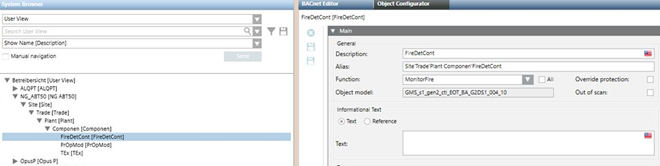
User designation defined with space and imported in Desigo CC
Definition in ABT Site |
|
User view in Desigo CC |
|