Modifying template properties
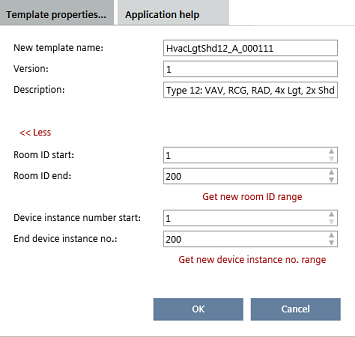
The Template properties dialog box is available in the following tasks when changing an application template:
- Configuration > Application configuration
- Configuration > Default values
- Configuration > I/O assignment

Manually entering or changing device instance number values and device instance number ranges can result in duplicate device instance numbers, when application templates or ABT Pro projects have already been created. Make sure that the entered values are accurate.
You can check for duplicate device instance numbers in Building > Device list.
Checking for duplicate device properties
- A project-specific template exists.
- Select the Configuration component.
- The component opens with the Application selection task.
- Select the Templates in project tab.
- All project-specific templates are displayed.
- Select a template.
- Click Open template.
- The Application configuration task opens.
- Click Template properties.
- Change the template properties as needed.
- Click OK.
The Name, Description, Room ID start and Room ID end properties can also be modified in the Details pane of an application template.
Application template details
- A project-specific template exists.
- Go to Building .
- Open the Application & device overview task.
- Select the template.
- Open the Details pane.
- Select Naming.
- Change the template properties as needed.
Property | Description |
|---|---|
New template name | Name of the application template. |
Application number | For Apogee integration: Numeric identification of the application template. Only visible if application numbers are enabled in the application type. |
Version | Displays the version number of the application template. Read-only if the template is locked. Note |
Description | Description of template |
Start room ID | The first usable room ID of the application template or ABT Pro project. |
End room ID | The last usable room ID of the application template or ABT Pro project. |
Get new room ID range | Assigns a new room ID range to the template. |
| Locking mechanism. Only visible if application numbers are enabled in the application type. |
Device instance number start | The first device instance number to be used. |
End device instance no. | The last device instance number to be used. |
Get new device inst. number range | Assigns a new device instance number range to the template. |

