UP 255 properties
The listed properties are displayed in the Hardware and network editor > Inspector window > Properties tab when the device with KNX PL-Link is selected in the Device view tab.
UP 255 |
|

General and Catalog information
The General and Catalog Information group provides information about the device.
Property | Description | Default value |
|---|---|---|
Mode | Mode shows the network mode of the device. Read only. | KNX PL-Link |
Name | Name is a text field to enter the name of the device. The name is used to identify the device in the device view. | Depends on other settings. |
Comment | Comment is a free text field to enter any helpful information on the device. | - |
Power consumption | Power consumption shows the power the device consumes. Read only. Unit: [mA] The value is used to calculate the remaining power of the KNX rail. See also power consumption and supply on KNX rail of PXC3 or KNX rail of DXR2. | Depends on the device type. |
Short designation | Short designation shows a short description of the device. Read only. | Depends on the device type. |
Order number | Order number shows the device type. Read only. | Depends on the device type. |
Version | Version shows an internal version of the device. Read only. | - |
Description | Description shows a short description of the device. Read only. | Depends on the device type. |
Device information
The Device information group provides information about the device and settings valid for all channels.
Property text | Description | Default value |
|---|---|---|
Device address (KNX) | Device address (KNX) shows the fixed standard address for devices with KNX PL-Link. Read only. | 255 |
Serial number used | Serial number used defines the method used for device identification.
|
|
Serial number | Serial number defines the serial number used for device identification. Serial number is only enabled and relevant if Serial number used is enabled. | 000000000000 |
Pulse length for lighting and blinds | Pulse length for lighting and blinds defines how long a pushbutton has to be pressed to be detected as a long key press. Range: | 5 |
 : The serial number entered in the text field Serial number is used for device identification.
 : Device identification has to be done in Web interface. The device has to be in programming mode for Web interface to perform the device identification.
 3...70 [0.1 s]
Alarming
Property | Description | Default value |
|---|---|---|
Alarming |
|
|
Functions
The functions table in the Channel Overview provides an overview of the channels of the device. Depending on the device the values in the table are read only or can be edited. The available types depend on the device and the application function.
Property | Description |
|---|---|
Name | Name of the channel. Read only. |
Type | Name of the function. |
Zone | Part of the geographical address of the device. Range: 1...126 |
Room | Part of the geographical address of the device. Range: 1...63 |
Subzone | Part of the geographical address of the device. Range: 1...15 Note |
Activate | Activate defines if the channel is activated.
|
The functions are described briefly in the table below.
Type | Description | Number of channels used |
|---|---|---|
Config | Config contains the configuration data of the activated application blocks. Read only. | 1 |
IBS | Indoor brightness sensor. Read only. | 1 |
LDSB | Light dimming sensor basic | 2 |
LSSB | Light switching sensor basic | 1 |
SSSB | Sunblind sensor basic | 2 |
System | System contains the device information that is mapped to the BACnet object peripheral device (PrphDev). Read only. | 1 |
Some of the functions can be configured. The properties of those functions are described below in order of their appearance in the drop-down list.
Indoor brightness sensor (IBS)
Property | Description | Default value |
|---|---|---|
|
Heartbeat | Heartbeat defines the time interval to send the value for indoor brightness if the value for indoor brightness did not change or the change was smaller than the value of the COV characteristic. See property COV lux. Range: | 900 |
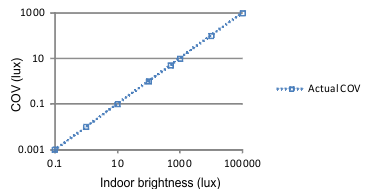
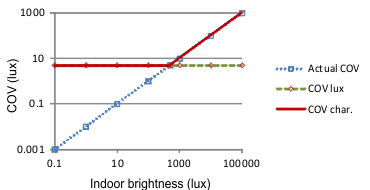
Change of value, COV | Change of value, COV is used to calculate the actual COV from the measured indoor brightness. The actual COV and the COV lux are used to calculate the COV characteristic. Range: Example for Change of value, COV: 1 % Indoor brightness: 100 [lux] -> actual COV: 1 [lux]
| 1 |
COV lux | COV lux defines the lower limit of the COV for sending an update of the indoor brightness. COV lux and Change of value, COV define the COV characteristic. COV lux can be used to avoid frequent updates of the indoor brightness at low light levels because of noise of the sensor. Range: Example of COV characteristic (COVchar.) with Change of value, COV: 1 and COV lux: 5
| 5 |
Minimum repetition time | Minimum repetition time defines the minimal time interval before the next value for indoor brightness can be sent. Range: | 10 |
Light switching sensor basic (LSSB)
Property | Description | Default value |
|---|---|---|
Rising edge | Rising edge defines the switching behavior if a rising edge is detected.
|
|
Falling edge | Falling edge defines the switching behavior of the pushbutton if a falling edge is detected.
|
|
 Inactive: No message is sent. The light is neither switched on nor switched off.
Light dimming sensor basic (LDSB)
Property | Description | Default value |
|---|---|---|
Dimming direction | Dimming direction defines how dimming up and dimming down are assigned to the buttons.
|
|
Shutter and blinds sunblind sensor basic (SSSB)
Property | Description | Default value |
|---|---|---|
Polarity inverse | Polarity inverse defines how moving up and moving down are assigned to the buttons.
|
|