Splitting application templates
Splitting an existing application template will generate a new application template based on the selected automation stations. By splitting an application template you can add new automation stations with a different configuration.
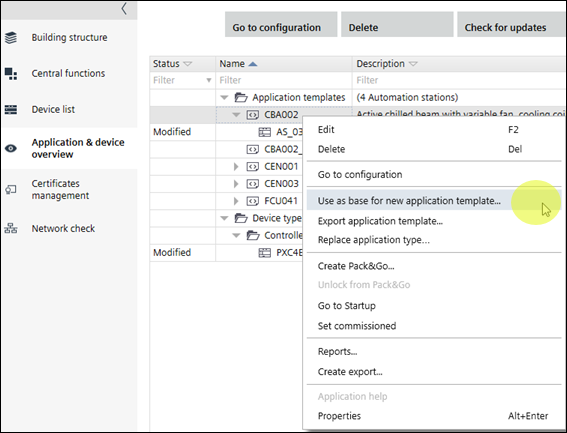
Split an application template
- An application template containing automation stations is created.
- Open Building > Application & device overview.
- Select at least one automation station of the application template that you want to split.
- Right-click and select Use as base for new application template.
- A copy of the application template is created and added to the project.
- The created application template opens in Configuration > Application Configuration where you can configure the parameters of the template.
- Configure the application template.
Configuring features (template)
- You have split an application template.

Splitting an application template does not affect the building structure. Automation stations in the building structures are not changed or moved.