[SELP_8MS] Profile and table value selection for 8 multistate values
Function block SELP_8MS includes four profile tables and supplies up to 8 configurable multistate values based on the desired profile and row.
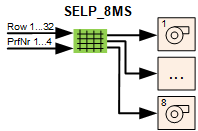
SELP_8MS includes four profile tables and reads the operating modes (multistate) as per the profile and row for up to eight plant components from the table and sends it to the corresponding outputs.
SELP_8MS consists of four tables for profile 1...4. Each table includes up to eight columns for plant components 1...8 and up to 32 rows for the desired plant component operating modes.
SELP_8MS includes the desired profile 1...4 on input [PrfNr] and the desired row on input [Row]. The operating modes for plant components 1...8 are read as per this information and sent as enumeration 1...x to outputs [Out1]...[Out8].
Output [PrRowMax] displays the number of the last row in the selected profile with a configuration value >1.
Pins and assignment in SELP_8MS
The pins from function block SELP_8MS are assigned in the table as follows:
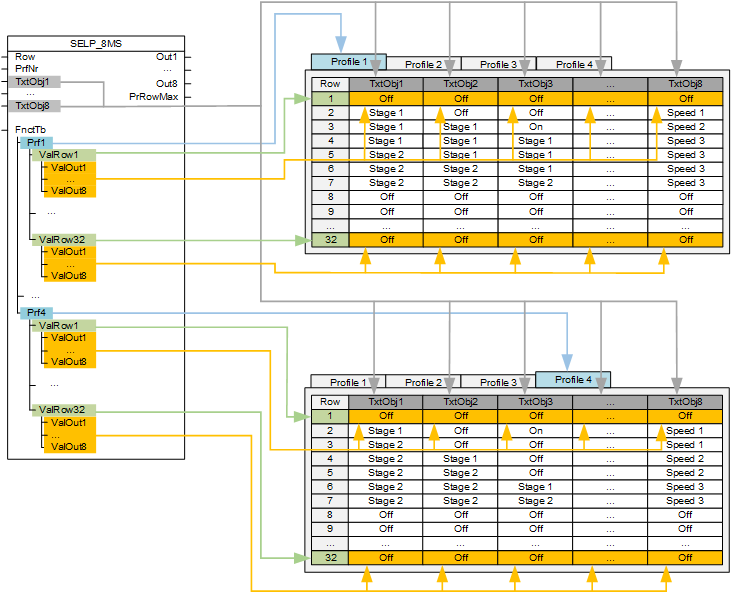
The table has two areas:
- Names
- Function table [FnctTb]
Names
Operating modes for up to eight plant components can be entered in the table. The names of the plant components can be entered in inputs [TxtObj1] to [TxtObj16].

Entry masks in the programming editor
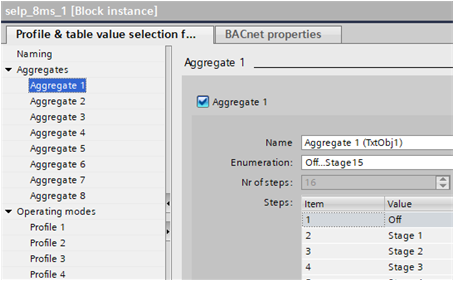
In the programming editor, function block Properties have the entry masks for plant components (in GUI "Aggregates").
Each required plant component 1...8 must be selected (i.e. check marked). This displays the settings and the plant component in the entry masks for profile1...4.
A name can be entered for each plant component 1...8 in field Name. The same name is used for all profiles 1...4.
You can select a predefined setting or 'Custom' under Enumeration. The selected setting is displayed as a selection menu in the cells for profiles 1...4.
Example
Boiler sequence operation with three heat generators:
For the three heat generators, Enumeration 'Off...stage 15' is selected for each aggregate under Aggregate 1..3.
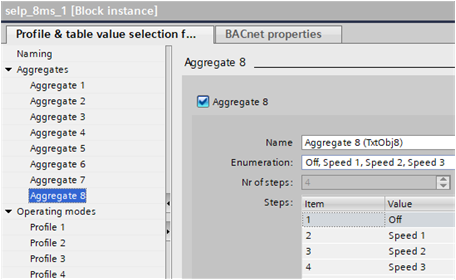
Aggregate 8 controls the pump. The pump can be a 3-stage pump or a separate pump group. Enumeration 'Off, Speed 1, Speed 2, Speed 3' is selected.

If [PrRowMax] is used for feedback messages, e.g. from the power balance, the rows with the last desired operating modes may only have rows with values 1 = 'Off'.
Function table
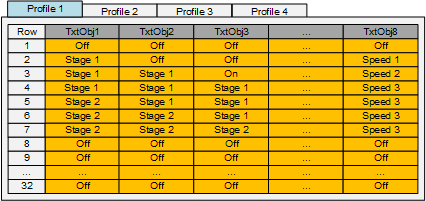
Function table [FnctTb] consists of four tables Profile 1...4. The operating mode for each row is set in each table for each plant component.
SELP_8MS includes the desired profile 1...4 on input [PrfNr] and the desired row on input [Row]. The operating modes for plant component 1...8 are read as per this information and sent as enumeration 1...x to outputs [Out1]...[Out8].
SELP_8MS sends enumerations 1...x to outputs [Out1]...[Out8]. Enumeration 0 is not supported. A value < 1 entered on [ValOut1]...[ValOut8] is replaced by the value 1.
The value at input [Row] is limited up to [PrRowMax] for the selected profile.
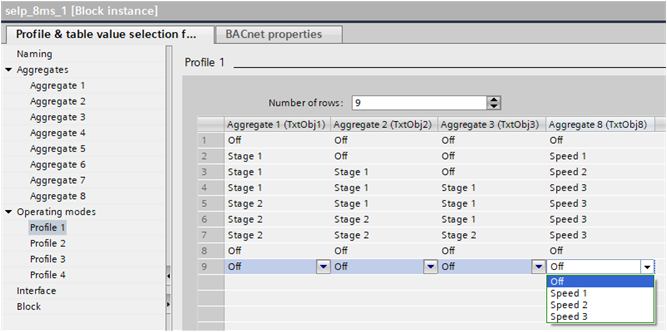
Entry masks in the programming editor
In the programming editor, function block Properties have the entry masks for plant components.
The operating modes can be set separately on each profile for each cell.
The selection menu in each cell corresponds to the setting Enumeration in the entry masks of plant components 1...8 (in GUI Aggregates 1...8).
Example: Possible switch-on strategy for three 2-stage heat generators and a pump group or 3-stage pump.
Example:
You have the following selection if on input [PrfNr] profile 1 and on input [Row] row 5 is requested:
- Aggregate 1 = Stage 2 ⇨ 3 is provided to [Out1]
- Aggregate 2 = Stage 1 ⇨ 2 is provided to [Out2]
- Aggregate 3 = Stage 1 ⇨ 2 is provided to [Out3]
- Aggregate 8 = Speed 3 ⇨ 4 is provided to [Out8]
Outputs for low and high rows
The outputs [MuxRowLo] and [MuxRowHi] provide information for lower and higher rows in the selected profile. If the current row is the first row in the profile, [MuxRowLo] provides information for the current row. If the current row is the last configured row in the profile, [MuxRowHi] provides information for the current row.
Information for lower and higher rows is encoded and multiplexed when it is provided at outputs [MuxRowLo] and [MuxRowHi]. To decode the information, DMUX_101 can be used. For a proper decoding, DMUX_101 must be configured with [NumOutR] = 0, [NumOutMs] = 8, [NumOutB] = 0.
Input | Description | Data type | Default value |
|---|---|---|---|
Row | Row Determines the row used in the profile table. | Integer | 1 |
PrfNr | Profile number Determines which profile table is used. | Integer | 1 1…4 |
TxtObj1...TxtObj8 | Text for object 1...Text for object 8 Description or name of the plant component. | String | ‘’ |
FnctTb | Function table Determines the operating modes of the plant components on each profile and each row. | Structure | - |
FnctTb | Profile 1…Profile 4 Selection of profile | Structure | - |
FnctTb | Value row 1...Value row 32 Selection of row | Structure | - |
FnctTb | Value output 1...Value output 8 Setting value for the operating mode for plant components 1...8 in a row. | Integer | 1 |
Output | Description | Data type | Default value |
|---|---|---|---|
Out1…Out8 | Output 1...Output 8 Output of enumeration for operating mode for plant components 1...8 | Integer | 1 |
PrRowMax | Present maximum row Displays the number of the last row where a value > 1 is entered. | Integer | 0 |
MuxRowLo | Low multiplex row Provides information for the lower row in the selected profile. | Real | 0.0 |
MuxRowHi | High multiplex row Provides information for the higher row in the selected profile. | Real | 0.0 |