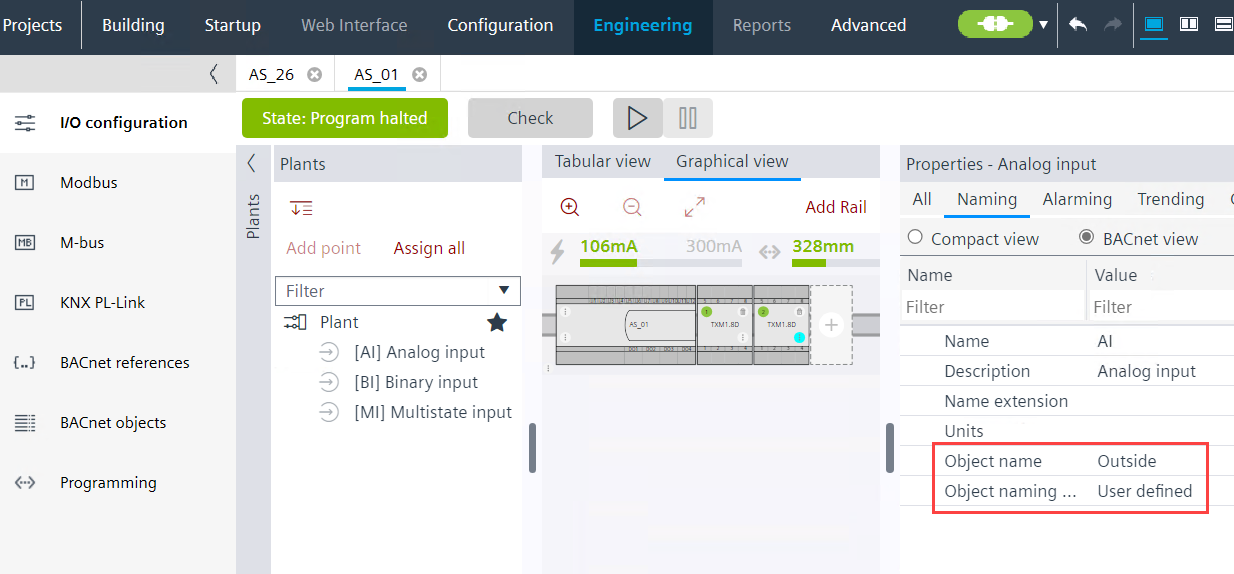
Modifying object name to user defined object name
This is a single workflow description, how to modify an object name outside of a hierarchy structure.
Note: If you change the standard name, for example, TSu to myTSu, the automatism in Desigo CC and Desigo Control Point does not work anymore. A re-engineering is requested and leads to additional costs on the management stations.
INFO: Use the functionality Changing BACnet object names and descriptions to be more efficient, if a lot of data points must be renamed.
- A plant with data points exists.
Creating plants
Creating I/O data points - (Optional) Activate the Show property on adding objects to get the Object name field visible and editable.
Plant automation tab
- Go to Building > Building structure.
- Right-click a device and select Go to engineering.
- Open the I/O configuration task.
- In the Plants navigation view, select a data point.
- Select the Properties view tab.
- Select the Naming tab and click BACnet view.
- From the Object naming rule drop-down list, select User defined.
Note: It is not advisable to use this function together with the user designation, because both functions use the same data source. This may prevent a consistent view of the data point description. - In the Object name text box, modify the name as required.