Onboard & Engineering & Commissioning a device remotely
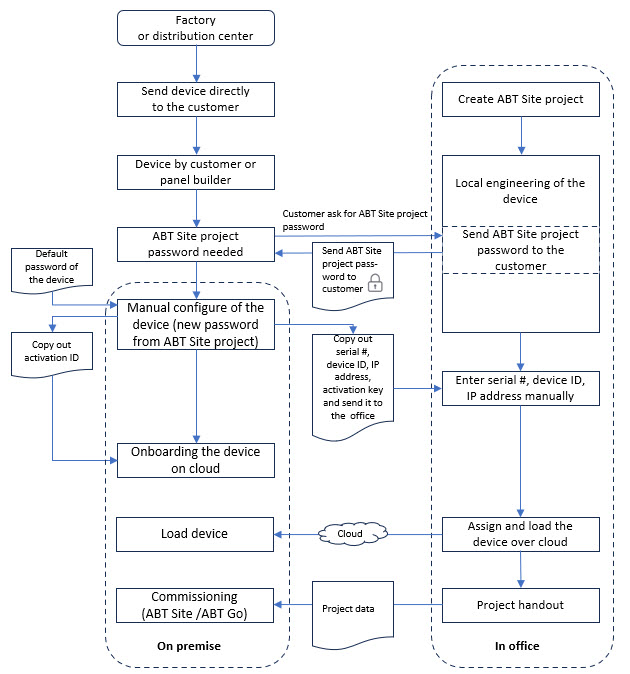
The customer takes an unconfigured device from the box and wants to bring it to the Cloud. Then the engineer in the project office is configures the device without a direct connection to the physical network of that device.
Advantages
- The engineering and onboarding can take place regardless of the project status.
- The device does not need to be configured in the office and sent to the customer at later time.
- The likelihood of an incorrect installation of the device in the control cabinet is reduced significantly.
Pre-condition
- The device is not configured.
- The device is directly delivered to the customer or cabinet builder.
- No engineering of the device is no required at that time of the project process.
- A Building X – Desigo Engineering Access Tool license is required.
- The customer is registered in Building X.
- The Internet connection on the device is established for onboarding to Building X.
Main steps
| What needs to be done | Who |
1. | Factory sends device directly to the customer or cabinet builder. | Siemens |
2. | Manually configure the unconfigured device Note: The ABT Site project password must be requested from the project engineer. | Customer on premise |
3. | Onboarding the device in Cloud. | Customer or Siemens (1) |
4. | Off site engineering of the device. | Engineering in the office |
5. | Assign and load into Cloud. | Engineering in the office |
6. | Commissioning. | Siemens on premise |
(1) Onboarding the device should/could be splitted in two steps, one for the work on site and one for the work off site.
Data exchange between customer and Siemens
To ensure a perfect exchange of data between the customer and Siemens, all columns must be completed correctly in an Excel table.
Example:
