Concepts in Desigo Room Automation
Desigo Room Automation allows for seamless interaction of HVAC, lighting, and shading mechanical and electrical installations. This results in energy-optimized operation (Energy efficiency class A) at maximum comfort in the rooms.
Levels from the view of building technical control
There are three levels:
- Primary plant
- Room automation (central functions, room and room segment)
- Management level
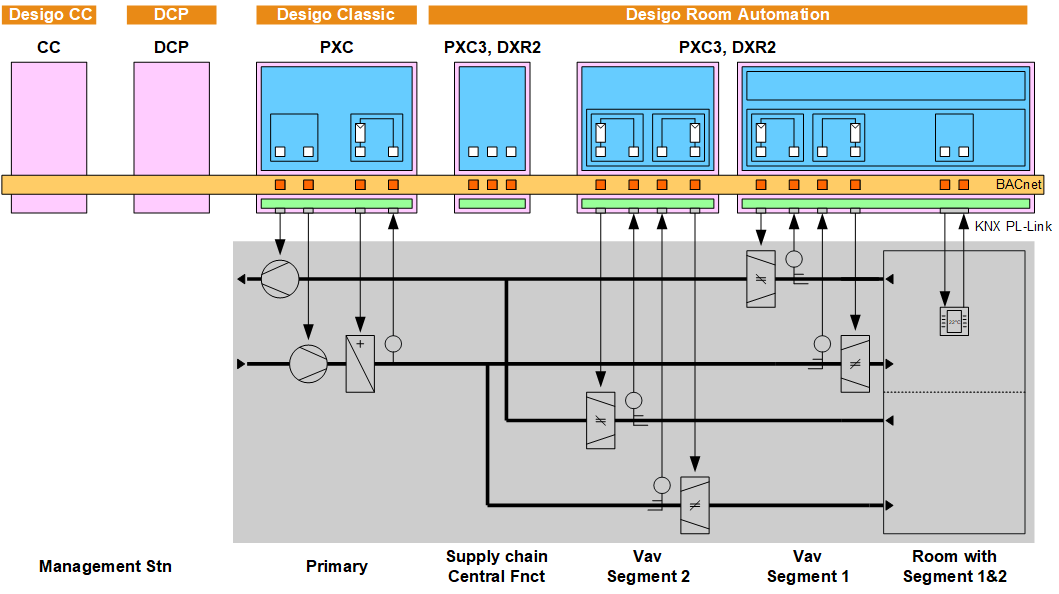
- The management level monitors and operates sections of buildings, buildings, and building groups. Access can be classified for different users (roles). See below, Operating and monitoring.
- The primary plant controls HVAC supply: Centralized air handling, heating circuit, cooling circuit. Requirements from the rooms are reported to the primary plant, forced and release signals from the primary plant act on the rooms.
Functionality at the primary level is beyond the scope of this documentation. - Central functions supply defaults for groups of rooms: For emergency, protection, service, central operation, and exterior shells (using daylight, shading).
Central functions - The supply chain collects demand information from the rooms to control the primary plant based on demand
- All superposed, coordinated tasks occur in the room, for example, formation of room operating mode with the associated setpoint, temperature control, influences on energy efficiency including thermal load by solar influence, that acts on shading.
- The room segment includes inputs (sensors, switches, buttons, presence detectors, etc.) and outputs (actuators for valves and dampers, actuating devices for fans, electric registers, blinds, and lights, etc.) as well as their interactions (request, locking).
- The sub-classification into room and room segment permits change in room use in an elegant manner. If partitions are removed, all the original room segment application functions can be coordinated to form a single room application function. Any unneeded room application functions are switched to "Unused". This is accomplished by simply changing the group assignment, e.g. on the management station.
Room/segment
Communication between levels
- Between room automation and primary plant: Communication via BACnet references.
- Between room automation and management level: Communication via BACnet references.
- Between central functions and rooms: Communication via grouping.
- Between room and segment(s): Communication via grouping.
Room/segment - From and to the field devices: Communication is freely selectable. Direct wiring on the room automation station terminals, a TX-I/O unit or a KNX PL-Link device, bus integration KNX PL-Link, DALI or Ethernet.
Software
The software elements are called application functions (AFs).
An application type is a maximum software solution for one room (consisting of room and room segment). There also exists an application type with all central functions.
The application type includes all application functions required to control HVAC, lighting, and shading. The requested functionality is achieved by activating the requisite AFs in the tool and setting parameter values.
Hardware
The functionality of application functions is independent of:
- the room automation stations (see below, engineering)
- sensors and actuators
- physical units
Units of measure, engineering units
Application library
The application library has four application types for rooms:
- HvacLgtShd11: Fan-Coil with outside air damper, radiator, heated/chilled ceiling
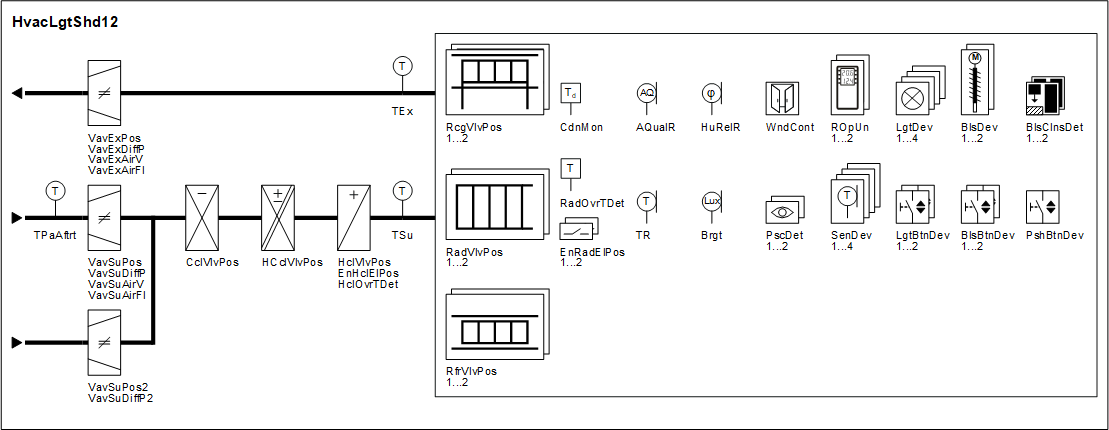
- HvacLgtShd12: VAV with radiator and heating/chilled ceiling
- HvacLgtShd13: Fan-powered Box with radiator and heated/chilled ceiling
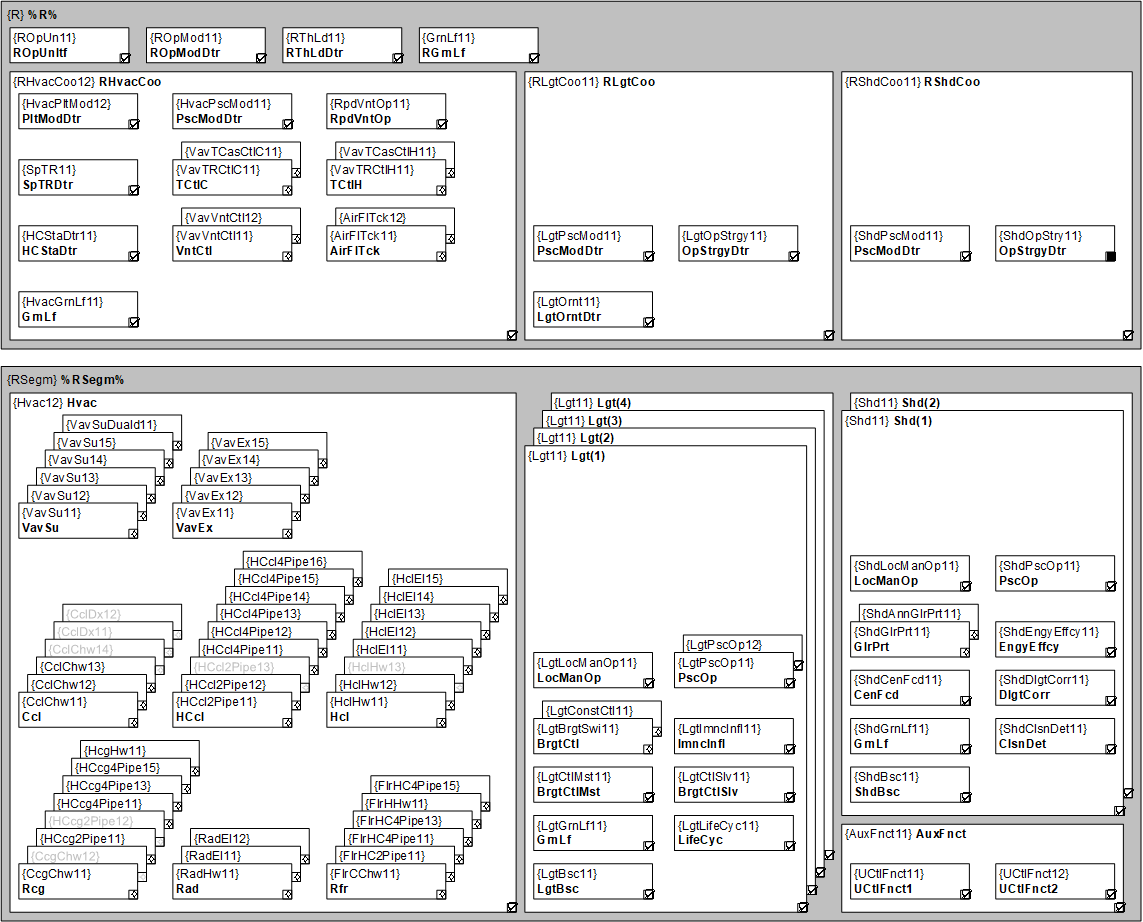
Moreover, each application type includes AFs for radiator, heated ceiling, as well as AFs to control 4 light zones and 2 shading zones.
An additional application type includes all central functions.
Central functions
The following illustration shows the application type HvacLgtShd12 (VAV) with all included AFs as well as a room with all field devices that can be connected:
Operation and monitoring
- The room user can intervene using the local room operator unit and select and modify operating mode, setpoint, scenes, etc. Push buttons or room operator unit are used to operate lighting and shading. The room operator can display room temperature, air quality, setpoints, fan speed, etc.
- System technicians and electricians access individual BACnet objects via web interface based on their access rights and tasks.
- Facility manager, service and maintenance personnel can monitor and operate setpoints, parameters, inputs, and outputs on the management station.
- The Desigo management station graphics library supports the most important room automation application data points. Select the corresponding object in the room and go to the web interface to access configuration extensions.
Engineering
Tools
A series of tested maximum solutions (application types) are available in the application library.
Tools ABT Site and ABT Pro can select (enable) functionality required in a project for a room within an application type. Parameters can set the function details. The result is saved as an application template and serves as a template for other rooms.
In the tool ABT Pro, the application library includes, in addition to the complete range of application types, all elements so that an application or even an application type can be freely compiled. A freely programmed application can then be configured by ABT Site.
Hardware
Applications operating on a room automation station.
- PXC3s do not have their own inputs and outputs. They reside on the TX-I/O modules or on the bus devices (KNX PL-Link, DALI, Ethernet).
- DXR2s have on-board inputs and outputs. The I/O mix is optimized for each device type for one or more application types (Fan coil, VAV, etc.). The KNX PL-Link room bus is used to control lighting and blinds.
One or more application types are preloaded on the DXR2. This significantly simplifies commissioning, since the entire application need not be downloaded to each room automation station, but rather only one application file with information on the selected functions and parameter values.
Parameter types
There are various parameter types for reasons of architecture, data traffic, and visibility on BACnet. In ABT Site, the type is not visible, the parameters are provided there that likely need be modified for a project. Additional parameters can be rendered visible at any time.
The different types are displayed at, to some extent, different locations in ABT Pro.
- Important parameters are designed as individual BACnet configuration values that are viewable on the management station and are often operated during operation (e.g. setpoints for room temperature and air quality), or parameters viewed for commissioning in the web interface of the device (e.g. to calibrate air components or lighting controls).
- BACnet configuration extensions (CnfExtn) are structured objects with a collection of parameters for a single application function. The parameters are visible as properties for the corresponding BACnet object. They cannot be adjusted online.
- Properties specific to the subsystem (properties for input and output objects) must also be visible and adjusted on BACnet if viewable during engineering with ABT Pro.
- Parameters that normally cannot or may not be changed, are only accessible on the Room programming editor charts.
Room automation functions and their engineering
Device / Function | DXR2.M... | DXR2.E... | PXC3.E... |
|---|---|---|---|
Bus | MS/TP | Ethernet | Ethernet |
Hardware |
|
|
|
Applications | Preloaded | Preloaded | Download or preloaded |
Configuration | ABT Site | ABT Site | ABT Site |
Programming | (Optional) | (Optional) | Freely programmable with ABT Pro |