Room and segment details
The room and segment Details pane has the following tabs:
- Details
- Checkout packages
- I/O assignment
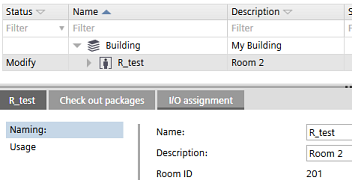
Details tab > Naming
Setting | Description |
|---|---|
Name | Name of the element. |
Description | Description of the element. |
Room ID | Room ID, only for rooms, read-only. You can find an overview of room ID ranges of all application templates in Settings > Number ranges > Room ID overview. |
Clicking Assign new room ID updates all segments assigned to the room (RCtl and ROpUnCtl).

You can only assign new room IDs to rooms, not to segments or central function.
Details tab > Usage
The Usage page displays a hierarchical table of rooms and segments, and their automation station.
Column | Description |
|---|---|
Name | Name of the element as defined in Settings > Naming defaults > Object names. |
Description | Description of the element as defined in Settings > Naming defaults > Object names. |
Tag | Group member tag in a room. |
Automation station | The used automation station. |
Enabled | Clear the check box if you want to disable the room or segment. |
Checkout packages tab
Check-out packages are displayed for building elements, areas, and devices. Check-out packages indicate the corresponding project paths that have to be writable. This allows the identification of the directories to be checked in or out from a project repository in a distributed engineering environment with Branch Office Server (BOS).
Only the top folders are listed because only the top folders have to be checked out.
Column | Description |
|---|---|
Folder | Relative path to the folders where the application templates stations are saved. |
Description | Name of the application template. |
Type | Type of project or template, e.g. application template or ABT Pro project. |
I/O assignment tab
Only visible for rooms. Provides information and functionalities for manually assigning I/Os of type based automation stations.
I/O assignment (Details pane)