Certificates
The Certificates task allows you to manage root certificates.
1 | Task selector | 2 | Default |
3 | Web certificates | 4 | BACnet/SC certificates |
5 | IEEE 802.1X certificates | 6 | Signing activities |
Icons | Description |
|---|---|
| Project root certificate. |
| ABT Site acts as a certificate authority. |
| Device with a valid root certificate. |
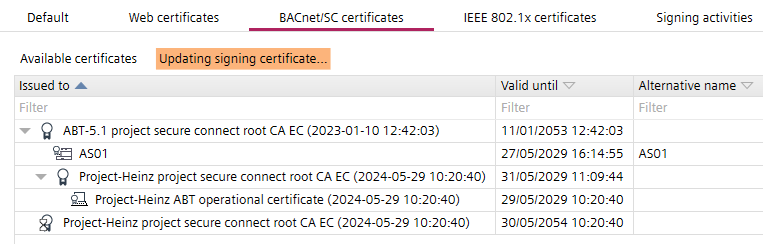
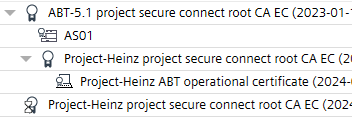
| Shows a temporary certificate during the root certificate update process. An additional
|
| Shows the hierarchical use of external CA with an ABT Site root certificate.
|
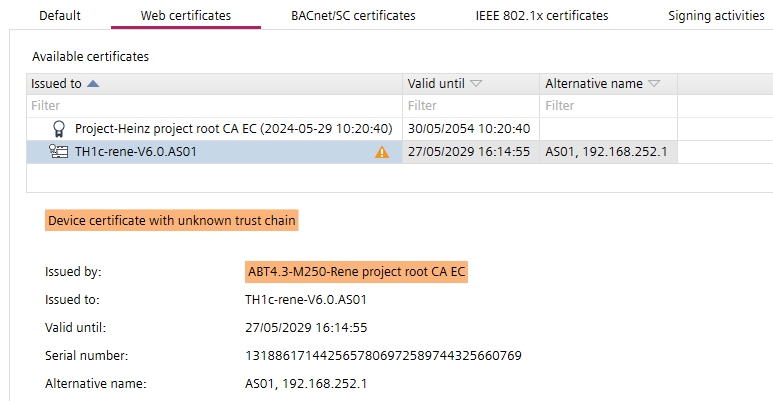
| Device certificate with unknown trust chain message displays. Additional information are highlighted to the issue.
|



① Task selector
Task | Description |
|---|---|
Information | |
Address defaults | |
Device defaults | |
User profiles | |
Naming defaults | |
Localization | |
I/O assignment templates | |
Number ranges | |
Certificates |
② Default
Task | Description |
|---|---|
Certificate issuer | Organization name: Specify the name of the organization who will issue the certificate. Organization department: Specify the name of the organizational department who will issue the certificate. Location: Specify the location of the organization. State: Specify the state of the organization. Country: Specify the country of the organization. Email address: Specify the email address of the organization. |
Certificate type: None, internal or external certificate. Certificate validity: Specifies for how long the certificate is going to be valid (in months). Default is 60 months. Expiration warning period: Set the time between expiry and the controller producing a notification to the user (in days). Default is 90 days. Note: IEEE802.1X certificates are only supported from device version V1.6 onwards (check the device version in the Details pane > System folder > Device version). | |
Web server certificates | |
BACnet/SC certificates | |
IEEE 802.1X certificates |
③ Web certificates
Web certificates shows the following certificate types:
- ABT Site main signed certificate
- Intermediate signed certificate
- Device certificate

Toolbar | Description |
|---|---|
Show details | Opens the Certificate dialog box from Windows. |
Import external signing certificate | Imports 3rd party root certificates into the project. |
Export signing certificates for web | Exports the ABT Site root certificate (the certificate of the certification authority), in order to install the root certificate to a client, for example, Web browser. |
Details view | Description |
|---|---|
Actions | |
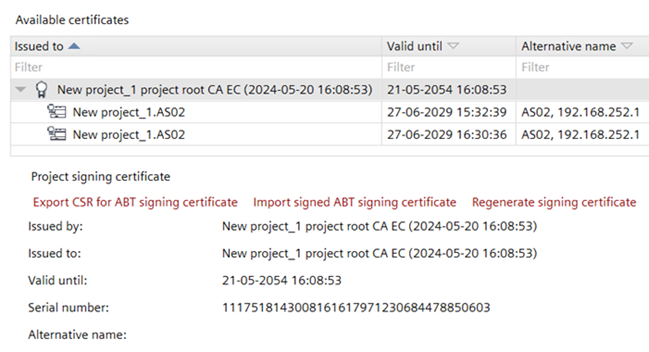
Export CSR for ABT signing certificate | Creates a root certificate for an external intermediate signing request. This file must be sent to a trustworthy authority, a certification authority that issues digital certificates. |
Import signed ABT signing certificate | Imports the external intermediate signed root certificate from an external trusted certificate authority. |
Regenerate signing certificate | You can regenerate the internal root certificate. The device certificates for the regenerated root certificate need to be regenerated also. Therefore, a download for each device must be carried out. Only enabled with Administrator rights. |
Delete imported signing certificate | Deletes the selected root certificate. |
Information | |
Issued by | Name of the certificate authority who has signed the certificate. |
Issued to | The entity receiving the certificate. |
Valid until | Expiration date of the certificate. |
Serial number | Contains information for the identification of the device such as the serial number. |
Alternative names | Alternative name of the subject. |
④ BACnet/SC certificates
BACnet/SC certificates shows the following certificate types:
- ABT Site main signed certificate
- Intermediate signed certificate
- Temporary signing certificate
- Device certificate
- ABT Site operational certificate

Toolbar | Description |
|---|---|
Show details | Opens the Certificate dialog box from Windows. |
Sign external CSR | Use this button to sign CSRs from 3rd party devices. |
Import external signing certificate | Imports 3rd party root certificates into the project. |
Export signing certificates for BACnet/SC | Exports the ABT Site root certificate (the certificate of the certification authority), in order to install the root certificate to a client. |
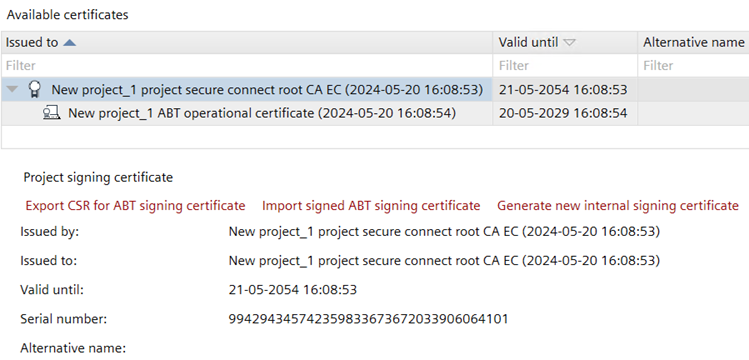
Details view | Description |
|---|---|
Actions | |
Export CSR for ABT signing certificate | Creates a root certificate for an external intermediate signing request. This file must be sent to a trustworthy authority, a certification authority that issues digital certificates. |
Import signed ABT signing certificate | Imports the external intermediate signed root certificate from an external trusted certificate authority. |
Generate new internal signing certificate | You can regenerate the internal root certificate. The device certificates for the regenerated root certificate need to be regenerated also. Therefore, a download must be carried out. Only enabled with Administrator rights. |
Export CSR for ABT operational certificate | Exports the signing request for the operational certificate. This removes the existing operational certificate keys from the project data and invalidates previous signing request. Note: This operation cannot be undone and the ABT Site is no longer a trusted device as long the new signing request is imported. |
Import signed ABT operational certificate | Imports the external signed root certificate from an external trusted certificate authority. |
Delete temporary root | Deletes the temporary root certificate. If all devices are updated with the new Main signed certificate, the Temporary signing certificate can be deleted. When deleted, a new ABT operational certificate is created at the same time. If an external certification authority has previously been used, this process must be repeated. |
Delete imported signing certificate | Deletes the selected root certificate. |
Information | |
Issued by | Name of the certificate authority who has signed the certificate. |
Issued to | The entity receiving the certificate. |
Valid until | Expiration date of the certificate. |
Serial number | Contains information for the identification of the device such as the serial number. |
Alternative names | Alternative name of the subject. |
⑤ IEEE 802.1X certificates
IEEE 802.1X certificates shows the following certificate types:
- ABT Site main signed certificate
- Intermediate signed certificate
- Device certificate

Toolbar | Description |
|---|---|
Show details | Opens the Certificate dialog box from Windows. |
Import external signing certificate | Imports 3rd party root certificates into the project. |
Export signing certificates for IEEE 802.1X | Exports the ABT Site root certificate (the certificate of the certification authority), in order to install the root certificate to a client. |
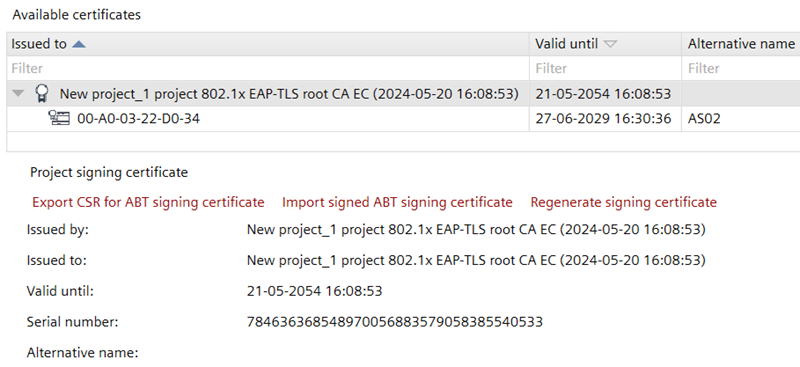
Details view | Description |
|---|---|
Actions | |
Regenerate signing certificate | You can regenerate the internal root certificate. The device certificates for the regenerated root certificate need to be regenerated also. Therefore, a download must be carried out. Only enabled with Administrator rights. |
Export CSR for ABT signing certificate | Creates a root certificate for an external intermediate signing request. This file must be sent to a trustworthy authority, a certification authority that issues digital certificates. |
Import signed ABT signing certificate | Imports the external intermediate signed root certificate from an external trusted certificate authority. |
Export CSR for ABT operational certificate |
|
Delete imported signing certificate | Deletes the selected root certificate. |
Information | |
Issued by | Name of the certificate authority who has signed the certificate. |
Issued to | The entity receiving the certificate. |
Valid until | Expiration date of the certificate. |
Serial number | Contains information for the identification of the device such as the serial number. |
Alternative names | Alternative name of the subject. |
⑥ Signing activities
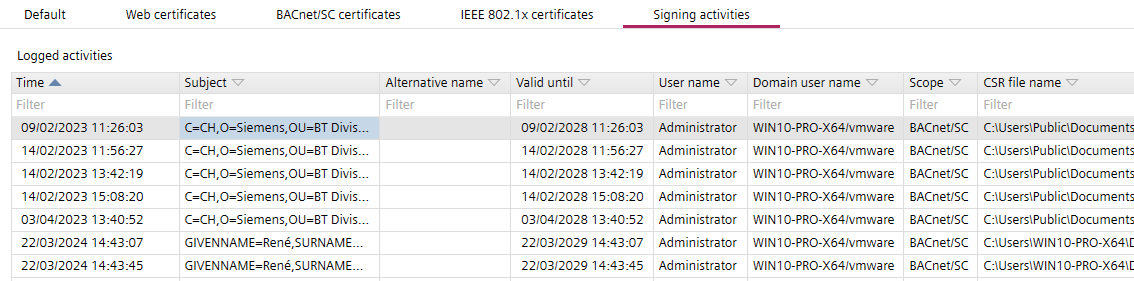
Column | Description |
|---|---|
Time | Time stamp of the activity. |
Subject | Subject of the activity. Contains information for the identification of the device such as the serial number. |
Alternative name | Alternative name of the subject. |
Valid until | Expiration date of the certificate. |
User name | Name of the user who performed the signing activity. |
Domain user name | The domain user name. |
Scope | The scope of the signing activity. |
CSR file name | Name of the CSR file. |