Duplicating RDG2 devices

Before one or more duplicates are created, it is recommended to complete the following tasks for the first RDG2 device to reduce the engineering effort later:
- Application type defined
- Parameter configured
- Heating/cooling demand activated
- Subordinate devices added
- RDG2 device chart modified
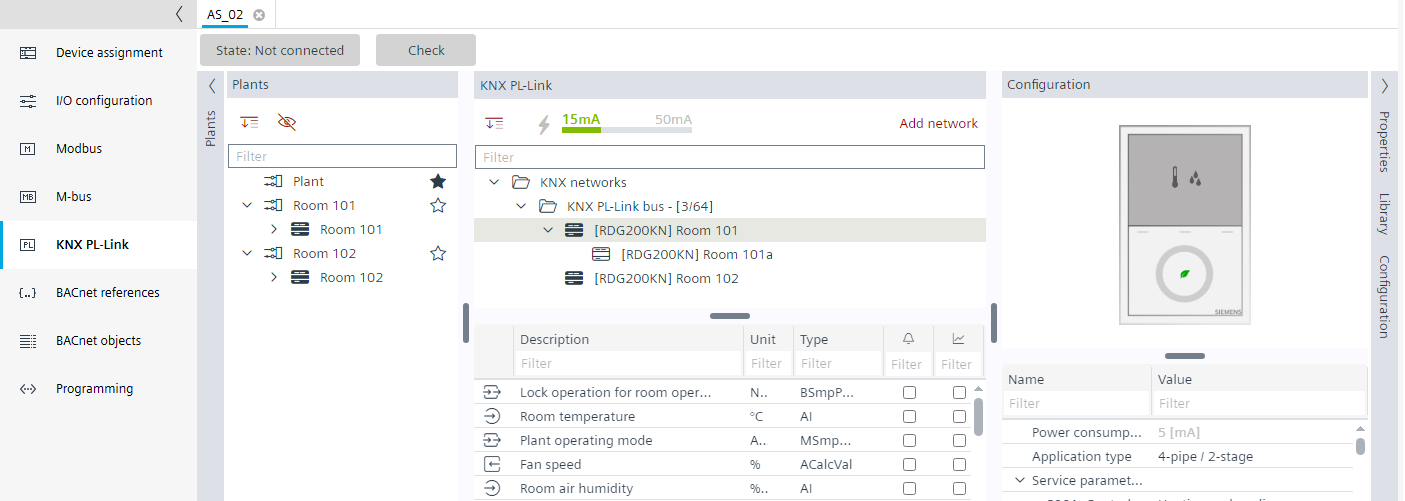
- Go to Building > Building structure.
- Right-click a device and select Go to engineering.
- Open the KNX PL-Link task.
- In the KNX PL-Link area, select the device.
Note: Duplicating the device or room and device in the Plants navigation view is not supported. - Right-click the RDG2 device and select Duplicate.
- An additional RDG2 device is added.
- The parameters and configuration are set according the selected RDG2 device.
- The subordinate devices are copied.
- The device chart is copied according to the selected RDG2 device.