[SplyAir21] Supply chain air, data exchange with rooms (TRA integration), via grouping mechanism
Program block, name / node subtype: [SplyAir21] Supply chain air, data exchange with rooms (TRA integration), via grouping mechanism
Library hierarchy: Coordination
Family: SplyAir
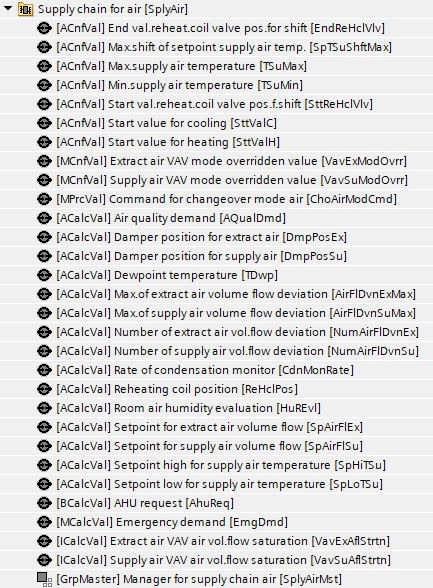
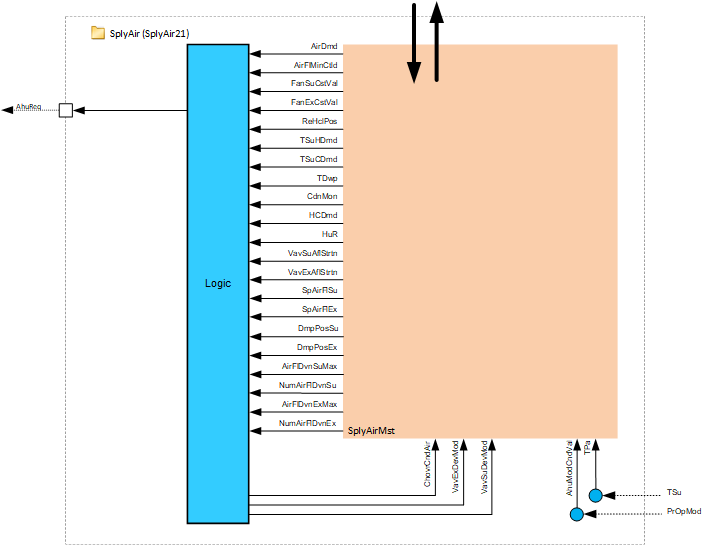
Project tree | Diagram |
|---|---|
|
|
|
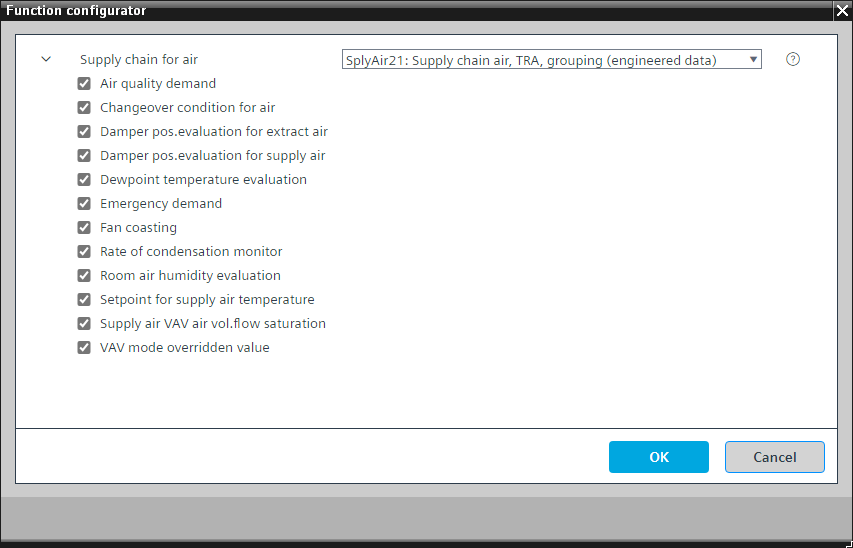
Configurator

Program blocks are stored in the library without I/Os. Use the auto-create and auto-connect functions to create I/Os and/or to connect them to the interface blocks, e.g., R_A, CMD_B. Alternatively, take the I/Os from the folder containing the predefined I/Os in the library and/or from the plant and connect them to the interface blocks.
SplyAir21 collects and analyzes air demand data of consumers in a room automation area through a group mechanism and provides the collected values to the air handling unit. It also collects data from the air handling unit and distributes it to the consumers in the room automation areas.
The most important functions in the program block are:
- AHU demand (consumer plant mode collection and conversion to AHU plant modes)
- Air quality demand
- Supply air temperature distribution
- Supply air fan coasting
- Extract air fan coasting
- AHU mode
- H/C changeover
- Supply air temperature setpoint
- Central VAV override
- Dew point evaluation and condensation monitoring
- Humidity evaluation
- Supply air VAV air volume flow saturation evaluation
- Extract air VAV air volume flow saturation evaluation
- Setpoint for supply air volume flow
- Setpoint for extract air volume flow
- Supply air damper position evaluation
- Extract air damper position evaluation
- Supply air volume flow deviation evaluation
- Extract air volume flow deviation evaluation
NOTICE

Correct safety equipment required
Avoid property damage and unsafe conditions. The AHU installer must accommodate independent pressure relief dampers and relief logic as necessary to avoid damage to the ductwork and equipment. For example, see the supply chain relief function (SplyRlfFnct11) in SplyAir11 of Desigo room automation.
- Emergency functions must be activated via compliant communication.
- Suitable safety equipment must be installed, e.g., fire dampers.
- The safety emergency functions do not replace safe equipment.
Name | Description | Type | Alarm / Notification class | Trend / Type | |
|---|---|---|---|---|---|
SplyAirMst | Manager for supply chain air | GrpMaster: Group manager | N/A | N/A | |
AhuReq | Air handling unit request | BCalcVal: Binary calculated value | N/A | No | |
Description |
|---|
|
Emergency demand Element that belongs to this option: Emergency demand | MCalcVal: Multistate calculated value |
Air quality demand Element that belongs to this option: Air quality demand | ACalcVal: Analog calculated value |
Fan coasting |
Setpoint for supply air temperature Elements that belong to this option: Reheating coil position | ACalcVal: Analog calculated value Setpoint high for supply air temperature | ACalcVal: Analog calculated value Setpoint low for supply air temperature | ACalcVal: Analog calculated value Maximum shift of setpoint supply air temperature | ACnfVal: Analog configuration value Start value reheating coil valve position for shift | ACnfVal: Analog configuration value End value reheating coil valve position for shift | ACnfVal: Analog configuration value Start value for heating | ACnfVal: Analog configuration value Start value for cooling | ACnfVal: Analog configuration value Min. supply air temperature | ACnfVal: Analog configuration value Max. supply air temperature | ACnfVal: Analog configuration value |
VAV mode override Elements that belong to this option: Supply air VAV mode overridden value | MCnfVal: Multistate configuration value Extract air VAV mode overridden value | MCnfVal: Multistate configuration value |
Dew point temperature evaluation Element that belongs to this option: Dewpoint temperature | ACalcVal: Analog calculated value |
Rate of condensation monitor Element that belongs to this option: Rate of condensation monitor | ACalcVal: Analog calculated value |
Changeover condition for air Element that belongs to this option: Command for changeover mode air | MPrcVal: Multistate process value |
Room air humidity evaluation Element that belongs to this option: Room air humidity evaluation | ACalcVal: Analog calculated value |
Supply air VAV air volume flow saturation Element that belongs to this option: Supply air VAV air volume flow saturation | ICalcVal: Integer calculated value |
Extract air VAV air volume flow saturation Element that belongs to this option: Extract air VAV air volume flow saturation | ICalcVal: Integer calculated value |
Setpoint for supply air volume flow Element that belongs to this option: Setpoint for supply air volume flow | ACalcVal: Analog calculated value |
Setpoint for extract air volume flow Element that belongs to this option: Setpoint for extract air volume flow | ACalcVal: Analog calculated value |
Damper position evaluation for supply air Element that belongs to this option: Damper position for supply air | ACalcVal: Analog calculated value |
Damper position evaluation for extract air Element that belongs to this option: Damper position for extract air | ACalcVal: Analog calculated value |
Supply air volume flow deviation evaluation Elements that belong to this option: Maximum of supply air volume flow deviation | ACalcVal: Analog calculated value Number of supply air volume flow deviation | ACalcVal: Analog calculated value |
Extract air volume flow deviation evaluation Elements that belong to this option: Maximum of extract air volume flow deviation | ACalcVal: Analog calculated value Number of extract air volume flow deviation | ACalcVal: Analog calculated value |
AHU demand
SplyAir21 collects and evaluates air demand values from consumers and calculates a desired operating mode for the air handler. The largest number of air demands wins.
Air demands for Protection, Economy, Pre-Comfort, Comfort and rapid ventilation are counted as Comfort air demand.
Example:
- Number of Protection AirDmds = 3
- Number of Comfort AirDmds = 2
- Number of night cooling AirDmds = 4
Since Protection and Comfort are counted together as Comfort, there are 5 Comfort air demands (3 + 2 = 5). Number of Comfort air demands = 5. Number of night cooling air demands = 4.
Result: AhuDmd = Comfort. The winning AHU demand is sent to the AHU.
The default AHU operating mode is 'Off'. SplyAir21 sets the minimum threshold number of air demands necessary to activate the primary AHU. The default for this minimum number of air demands is 4 with a hysteresis of 2. Both are hard coded in the chart.
Plant mode conversion
It is part of the mandatory function "Ahu demand" and is programmed in the chart "Demand for air handling unit". The following table shows the conversions of consumer plant modes for the areas to plant modes from the AHU.
Enumeration of consumer plant mode area | Consumer plant mode area | Ahu21 plant mode |
|---|---|---|
|
1 | Off | Off |
2 | Protection | On |
3 | Economy | On |
4 | Pre-Comfort | On |
5 | Comfort | On |
6 | Warm-up | Not supported |
7 | Cool down | Not supported |
9 | Condensation overflow protection | Off |
10 | Free cooling | On |
11 | Night cooling | Not supported |
12 | Ventilation | On |
13 | Equipment temperature protection | Off |
The program blocks AhuPltMod21 and AhuPltMod22 have the option 'External On' which is prepared to connect to the mandatory object AhuReq by Auto-connect.
AHU emergency demand
Emergency demand signals can be used to override normal operation logic in plant mode selection for the primary AHU. Emergency demands are fire modes such as fire shut down and smoke extraction functions.
Air quality demand
SplyAir21 receives the air quality demands from the room automation area consumers and averages the 10 highest values.
Supply air temperature distribution
SplyAir21 collects the measured temperature of the supply air from the air handler and distributes it to the room automation consumers by group data exchange. The effect on consumers is outside the scope of this coordinator.
The function block [R_A] is prepared to connect to the 'Supply air temperature' by Auto-connect.
Supply air fan coasting
The supply air fan coasting signal [FanSuCst] is a binary signal that indicates whether the AHU supply air fan is coasting down. SplyAir21 collects the signal and distributes the value to the consumers by group data exchange.
The function block R_B is prepared to connect to the 'Fan command' by Auto-connect.
Extract air fan coasting
The extract air fan coasting signal [FanExCst] is a binary signal that indicates whether the AHU extract air fan is coasting down. SplyAir21 collects the signal and distributes the value to the consumers by group data exchange.
The function block R_B is prepared to connect to the fan command by Auto-connect.
AHU mode
SplyAir21 passes a binary signal from the AHU to area consumers indicating whether the air handling is active. SplyAir21 collects the signal and distributes it to the areas by group data exchange.
The function block R_M is prepared to connect to the 'Present operating mode' of the plant by Auto-connect.
H/C changeover
SplyAir21 evaluates the heating/cooling demand from the room automation area consumers and determines the H/C changeover condition of the central air handling system. The evaluated changeover condition (ChovrCndAir) is distributed via SplyAir group data exchange to the area consumers with priority 15.
ChovrCndAir is the enumerated mode command for the air changeover condition, which impacts the supply air temperature setpoint calculation. If it is set to heating, the setpoint for the AHU supply temperature is shifted up. If it is set to cooling, the setpoint is shifted down. See the Supply air temperature setpoint section for additional information.
During heating, the cooling controllers in the areas are disabled. During cooling, the heating controllers in the areas are disabled. Additional enumerations for ChovrCndAir are Neutral (heating and cooling controllers both enabled) and Neither (heating and cooling controllers both disabled).
Changeover determination logic:
Using group data exchange, the system evaluates the number of area consumers requesting heating and the number of area consumers requesting cooling. The SplyAir grouping tag 'HCDmd' reads the results and the largest number wins.
Example: 50 segments require cooling, 30 segments require heating; The evaluation = Cooling.
The result is distributed by the SplyAir grouping tag 'ChovrCndAir' to enable or disable the controllers accordingly in the area consumers.
ChovrCndAir can be overridden via BACnet with a higher priority. The automatic changeover determination logic described above commands this object with priority 15.
Supply air temperature setpoint
SplyAir21 provides the value of the supply air setpoint dependent on the air changeover condition (ChovrCndAir). When the central AHU can supply hot or cold air for heating or cooling, the setpoint is shifted accordingly as follows:
ChovrCndAir = Heating
Supply air setpoint on the left (hotter)
ChovrCndAir = Cooling
Supply air setpoint on the right (cooler)
ChovrCndAir = Neither
Both VAV heating and cooling control in the rooms are blocked. The supply air setpoints are: [SpHiTSu] = TSuMax
[SpLoTSu] = TSuMin
ChovrCndAir = Neutral
Both VAV heating and cooling control in the rooms are enabled. The supply air setpoints are: [SpHiTSu] = SttValC
[SpLoTSu] = SttValH
To manage reheating efficiency in the room area consumers, the reheater positions are collected and evaluated. The average of the 10 highest positions with a heating coil position > 5 % shifts the supply air temperature when ChovrCndAir = Heating or cooling.
Change the alternative for 'Sensors, setpoints and control' from AhuTCtl21 to AhuTCtl22. AhuTCtl22 is prepared to connect to 'Setpoint high for supply air temperature' and to 'Setpoint low for supply air temperature' by Auto-connect.
Central VAV override
SplyAir21 allows a technician or balancer to override VAV supply and extract air units to support commissioning and balancing operations. Multistate BACnet objects for overriding both supply and extract air VAV units are provided (VavSuModOvrr and VavExModOvrr).
Enumeration:
- 1: Off
- 2: Control mode
- 3: Maximum air volume flow
- 4: Minimum air volume flow
- 5: Smoke control air volume flow setpoint
If the 'Enable' objects (EnVavSuModOvrr and EnVavExModOvrr) are set to 1: Yes, the override commands are distributed to the respective area consumers via group data exchange with priority 8. The default override command is 2: Control mode. The command is applied to the device mode object of the corresponding application function such that:
- If the output from the area controller for the consumer is for damper position, the override applies to damper position.
- If the output from the area controller is a volume flow setpoint, the volume flow setpoint is overridden.
Dew point evaluation and condensation monitoring
To avoid condensation, SplyAir21 can be used to collect and evaluate dew point temperatures and active condensation monitors in chilled ceiling area consumers.
Dew point evaluation:
The evaluation algorithm for dew point temperatures is the average of the 2 highest values in the range of 0 to 50 [°C] / 122 [°F]. The value and the associated disturbance information are used at the primary air handling unit for dehumidification. Applications that control humidity often work at the air handler level and use one value to represent conditions in all areas.
Condensation monitoring:
SplyAir21 divides the number of active condensation monitors by the total number of condensation monitors and converts the result to a percent value (this is the 'Rate of condensation monitor').
The intended use of the condensation information is for programs that adjust the water content of the supply air to prevent condensation in the areas.
Humidity evaluation
SplyAir21 collects the measured relative humidity values from the room automation areas and sets a representative value. This value is derived from the average of the 10 highest values.
The intended use of the information is to help the primary AHU determine when to humidify or dehumidify.
Supply air VAV air volume flow saturation evaluation
SplyAir21 collects and evaluates the area consumer saturation signals and counts the number of 'starved' consumers.
Criteria for an area to send a saturation signal:
- Damper position exceeds a configured damper saturation level
- Air flow error exceeds a configured air flow error level
- Both conditions stay true for more than a configured delay interval
The intended use of the information is for programs that optimize AHU fan speed through duct static pressure reset to save energy.
Extract air VAV air volume flow saturation evaluation
SplyAir21 collects and evaluates the area consumer saturation signals and counts the number of starved consumers.
Criteria for an area to send a saturation signal:
- Damper position exceeds a configured damper saturation level
- Air flow error exceeds a configured air flow error level
- Both conditions stay true for more than a configured delay interval
The intended use of the information is for programs that optimize AHU fan speed through duct static pressure reset to save energy.
Supply air volume flow deviation evaluation
SplyAir21 collects the supply air volume flow deviation from the consumers and averages the 10 highest values. It also counts the number of consumers with deviation.
Extract air volume flow deviation evaluation
SplyAir21 collects the extract air volume flow deviation from the consumers and averages the 10 highest values. It also counts the number of consumers with deviation.
Setpoint for supply air volume flow
SplyAir21 sums the supply air volume flow setpoints of the consumers.
Setpoint for extract air volume flow
SplyAir21 sums the extract air volume flow setpoints of the consumers.
Supply air damper position evaluation
SplyAir21 collects the supply air damper position values from the consumers and averages the 10 highest values.
Extract air damper position evaluation
SplyAir21 collects the extract air damper position values from the consumers and averages the 10 highest values.
The two pairs of function blocks R_A and WP_REAL are prepared to connect to the objects 'Setpoint for supply air pressure' and 'Setpoint for extract air pressure' by Auto-connect.