Pack & Go workflow
A Pack & Go file is a compressed data container which stores engineering data configured in ABT Site. The Pack & Go file can be used to transfer engineering data from an engineering PC to a commissioning PC.
Typical workflow in 3 steps
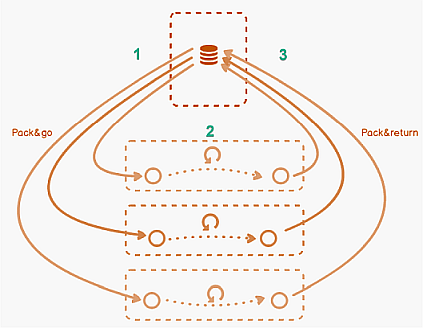
- The project leader creates, engineers ABT Site project, and delivers the work package (Pack & Go file) to a technician.
- The technician does engineering and commissioning on site with ABT Site and delivers the work package (Pack & Return file) back to the project leader.
- The project leader merges engineering and commissioning data by importing back the work package.
The Pack & Go container can also be passed on and engineered by a third party. New application templates and up to 25 devices can be added on site.
You can find further information on using Pack & Go containers for installaing and balancing ABT projects in the following topics.
Installing an ABT project (with subcontracting)
Balancing air/water (with Pack & Go)
After creating a Pack & Go file the building hierarchy, the device and the corresponding appplication template are locked in the original project. The original project is the project from where the Pack & Go file was created.
Restriction on locked devices and templates (inside original project)
- The template configuration cannot be changed
- Instance parameters cannot be changed
- Instance properties (naming, BACnet IP / BACnet MS/TP etc.) cannot be changed