[CenOpMod21] Central operating mode, data exchange with rooms (TRA integration), via grouping mechanism
Program block, name / node subtype: [CenOpMod21] Central operating mode, data exchange with rooms (TRA integration), via grouping mechanism
Library hierarchy: Coordination
Family: CenOpMod
Project tree | Diagram |
|---|---|
|
|
|
Configurator
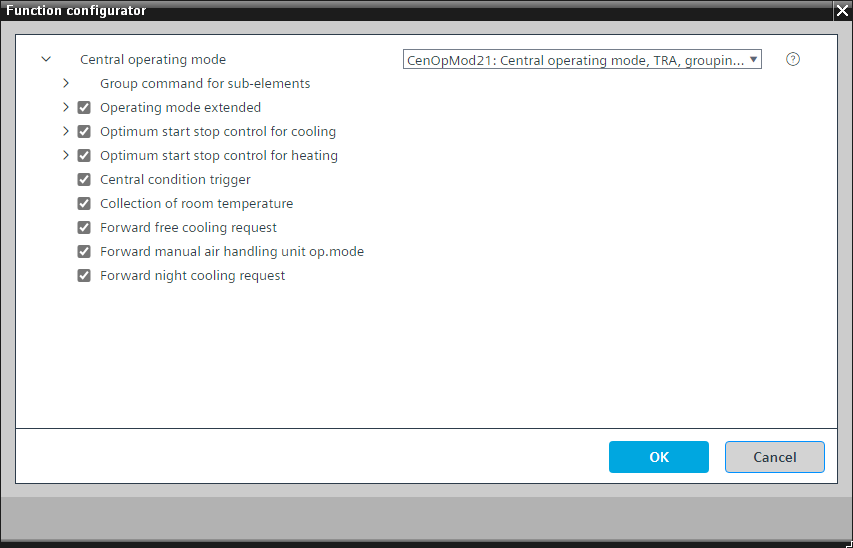

Program blocks are stored in the library without I/Os. Use the auto-create and auto-connect functions to create I/Os and/or to connect them to the interface blocks, e.g., R_A, CMD_B. Alternatively, take the I/Os from the folder containing the predefined I/Os in the library and/or from the plant and connect them to the interface blocks.
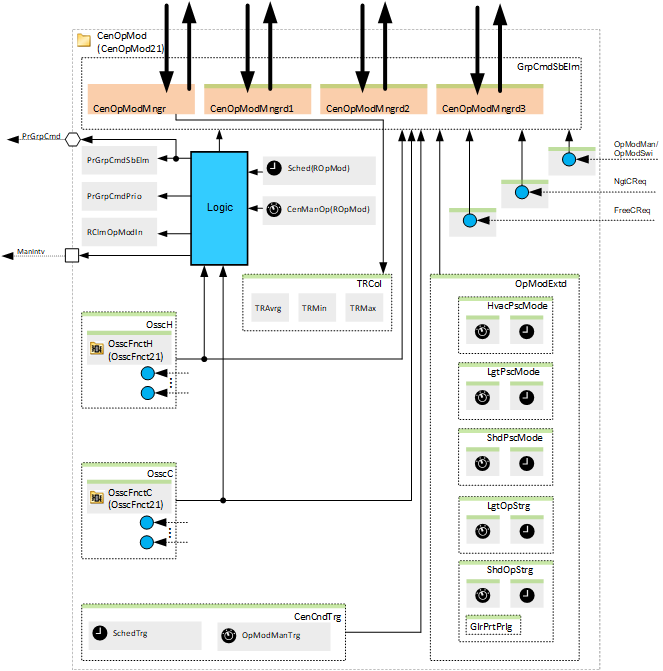
CenOpMod21 distributes central commands and operating modes to the connected room automation areas via group mechanism. The commands may originate from a scheduler or a primary operating unit.
The most important functions in the program block are:
- Central operating mode command evaluation
Possible sources include: - Scheduler
- Manual operating mode selection
- Night cooling and/or free cooling request
- Warm-up and/or cool-down request (from optimal start/stop functionality)
- Manual operation of an air handling unit
- Central condition trigger
Name | Description | Type | Alarm / Notification class | Trend / Type | |
|---|---|---|---|---|---|
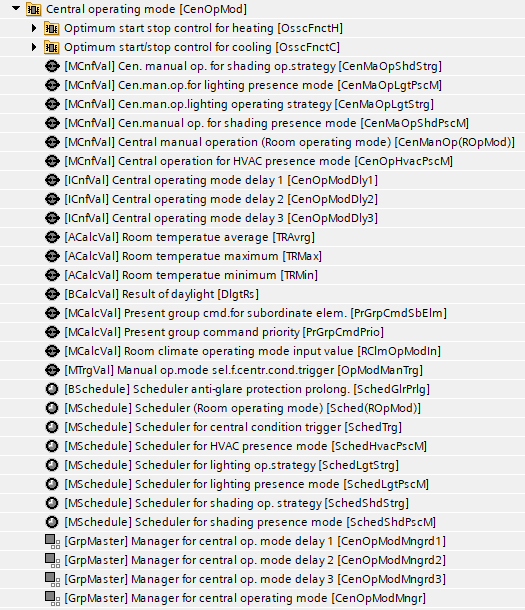
PrGrpCmdSbElm | Present group command for subordinate elements | MCalcVal: Multistate calculated value | N/A | Yes, 4 | |
PrGrpCmdPrio | Present group command priority | MCalcVal: Multistate calculated value | N/A | Yes, 4 | |
RClmOpModIn | Room climate operating mode input value | MCalcVal: Multistate calculated value | N/A | N/A | |
CenManOp(ROpMod) | Central manual operation (Room operating mode) | MCnfVal: Multistate configuration value | N/A | N/A | |
Sched(ROpMod) | Scheduler (Room operating mode) | MSchedule: Multistate scheduler | N/A | N/A | |
CenOpModMngr | Manager for central operating mode | GrpMaster: Group manager | N/A | N/A | |
CenOpModMngrd1 | Manager for central operating mode delay 1 | GrpMaster: Group manager | N/A | N/A | |
CenOpModMngrd2 | Manager for central operating mode delay 2 | GrpMaster: Group manager | N/A | N/A | |
CenOpModMngrd3 | Manager for central operating mode delay 3 | GrpMaster: Group manager | N/A | N/A | |
Description |
|---|
|
Group command for sub-elements delay 1 Elements that belong to this option: Central operating mode delay 1 | ICnfVal: Integer configuration value |
Group command for sub-elements delay 2 Elements that belong to this option: Central operating mode delay 2 | ICnfVal: Integer configuration value |
Group command for sub-elements delay 3 Elements that belong to this option: Central operating mode delay 3 | ICnfVal: Integer configuration value |
Central condition trigger Elements that belong to this option: Manual operating mode selector for central condition trigger | MCnfVal: Multistate configuration value Scheduler for central condition trigger | MSchedule: Multistate scheduler |
Room temperature collection Elements that belong to this option: Room temperature average | ACalcVal: Analog calculated value Room temperature minimum | ACalcVal: Analog calculated value Room temperature maximum | ACalcVal: Analog calculated value |
Forward manual air handling unit operating mode |
Forward night cooling request |
Forward free cooling request |
Optimum start stop control for heating |
Optimum start stop control for cooling |
Operating mode extended |
More details about the option "Optimum start stop control for heating"
Optional elements
Name | Description | Type | Alarm / Notification class | Trend / Type | |
|---|---|---|---|---|---|
|
OsscFnctH | Optimum start stop control for heating | N/A | N/A | ||
Further options
Description |
|---|
|
Forward OSSC request |
Temporary comfort after warm-up |
If the option "Optimum start stop control for heating" is active, the following signals are read (Create BACnet reference):
- RefRoom'RHvacCoo'PltOpModDtr'PltOpMod
- RefRoom'RHvacCoo'TR
- RefRoom'RHvacCoo'SpTRDtr'SpHCmf
- RefRoom'RHvacCoo'TCtlH'DSpHPcf
- RefSegm'HVAC'xxx'xxxHwDmd or RefSegm'HVAC'xxx'xxxDevMod or RefSegm'HVAC'xxx'xxxAirDmd
- CenWthStn'TOa
- Hcr'HydCrt'HwDmd
Based on these signals, the OSSC logic calculates and issues a warm-up request to the rooms. The option "Forward OSSC request" must be deactivated.
More details about the option "Optimum start stop control for cooling"
Optional elements
Name | Description | Type | Alarm / Notification class | Trend / Type | |
|---|---|---|---|---|---|
|
OsscFnctC | Optimum start stop control for cooling | N/A | N/A | ||
Further options
Description |
|---|
|
Forward OSSC request |
Temporary comfort after cool down |
If the option "Optimum start stop control for cooling" is active, the following signals are read (Create BACnet reference):
- RefRoom'RHvacCoo'PltOpModDtr'PltOpMod
- RefRoom'RHvacCoo'TR
- RefRoom'RHvacCoo'SpTRDtr'SpCCmf
- RefRoom'RHvacCoo'TCtlH'DSpCPcf
- RefSegm'HVAC'xxx'xxxChwDmd or RefSegm'HVAC'xxx'xxxDevMod or RefSegm'HVAC'xxx'xxxAirDmd
- CenWthStn'TOa
- Ccr'HydCrt'ChwDmd
Based on these signals, the OSSC logic calculates and issues a cool-down request to the rooms. The option "Forward OSSC request" must be deactivated.
In case of external logic for OSSC (e.g., in the cooling circuit), this option must be deactivated and the option "Forward OSSC request" must be activated. The option reads the cool-down request from the external logic and forwards it to the rooms.
More details about the option "Operating mode extended"
Optional elements
Name | Description | Type | Alarm / Notification class | Trend / Type | |
|---|---|---|---|---|---|
|
CenOpHvacPscM | Central operation for HVAC presence mode | MCnfVal: Multistate configuration value | N/A | N/A | |
SchedHvacPscM | Scheduler for HVAC presence mode | MSchedule: Multistate scheduler | N/A | N/A | |
CenMaOpLgtPscM | Central manual operation for lighting presence mode | MCnfVal: Multistate configuration value | N/A | N/A | |
SchedLgtPscM | Scheduler for lighting presence mode | MSchedule: Multistate scheduler | N/A | N/A | |
CenMaOpShdPscM | Central manual operation for shading presence mode | MCnfVal: Multistate configuration value | N/A | N/A | |
SchedShdPscM | Scheduler for shading presence mode | MSchedule: Multistate scheduler | N/A | N/A | |
CenMaOpLgtStrg | Central manual operation for lighting operating strategy | MCnfVal: Multistate configuration value | N/A | N/A | |
SchedLgtStrg | Scheduler for lighting operating strategy | MSchedule: Multistate scheduler | N/A | N/A | |
CenMaOpShdStrg | Central manual operation for shading operating strategy | MCnfVal: Multistate configuration value | N/A | N/A | |
SchedShdStrg | Scheduler for shading operating strategy | MSchedule: Multistate scheduler | N/A | N/A | |
Further options
Description |
|---|
|
Anti-glare protection prolongation |
The options in "Operating mode extended" can overwrite (e.g., according to the central scheduler) the settings for presence mode or operating strategy in the room.
For example, the setting in the rooms for "Lighting presence mode" is "Consider present&absent" for the room operating mode "Economy". At night (e.g., from 10 p.m. to 5 a.m.), this may not be desired, because security personnel are moving through the building and have their own flashlights and do not want the lights to come on and show where they are. In this case, the central function sends "None" to "Lighting presence mode" at that time (e.g., from 10 p.m. to 5 a.m.).
The option "Anti-glare protection prolongation" calculates the sunrise and sunset times, and adds some time before sunrise and after sunset and on a weekday, and overwrites the "Shading operating strategy" for the room operating mode "Economy" to "Anti-glare protection".
Central operating mode command evaluation
The central operating mode command is run with priority 15, if it is coming out of a scheduler, or with priority 8, if the manual operating mode selection is active.
Night cooling, free cooling, warm-up and cool-down requests
CenOpMod21 can receive night cooling, free cooling, warm-up and/or cool-down requests (or calculate warm-up and/or cool-down requests with its own optional OSSC logic) from the air handling unit or from other logic and transfer them to the room automation. The plant operating mode in the area is switched if area conditions permit.
Manual central air handler mode
In addition, the plant operating mode of the area can be switched to Comfort via the manual air handler mode at priority 7. For that, the OpModMan or OpModSwi from the air handler must be connected to the corresponding interface (Option: Forward manual air handling unit operating mode).
Central condition trigger
CenOpMod21 can distribute a central condition trigger (1: None, 2: Energy efficiency condition, 3: Comfort condition) to the room automation areas. Depending on the trigger type, the manual operation is reset due to the sent trigger. For example, sending an energy efficiency trigger resets the manually set area temperature setpoints and the lighting and shading manual operation depending on how the parameterization is set in the area.
Room temperature collection
CenOpMod21 can collect and evaluate the room temperatures from the room automation via grouping mechanism.
Delayed operation
There are three more group managers for delayed operation. The goal is to distribute the rooms to more group managers and then make sure that not all rooms change their operating mode at the same time.
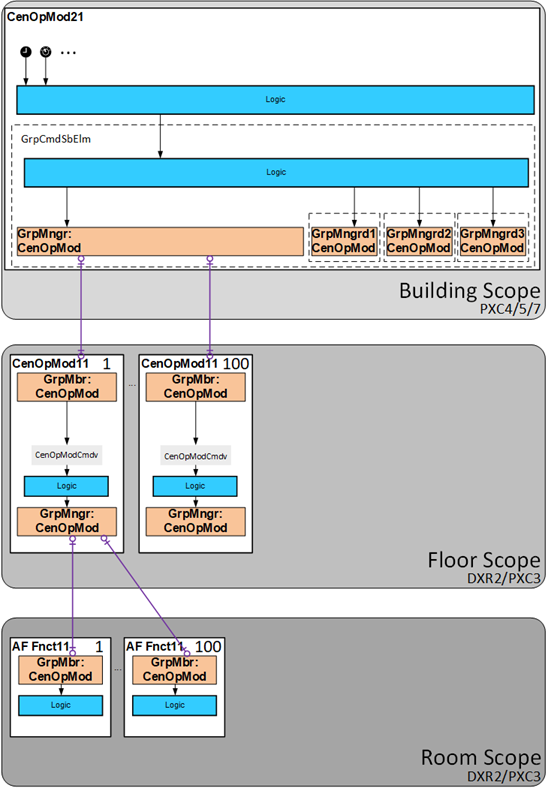
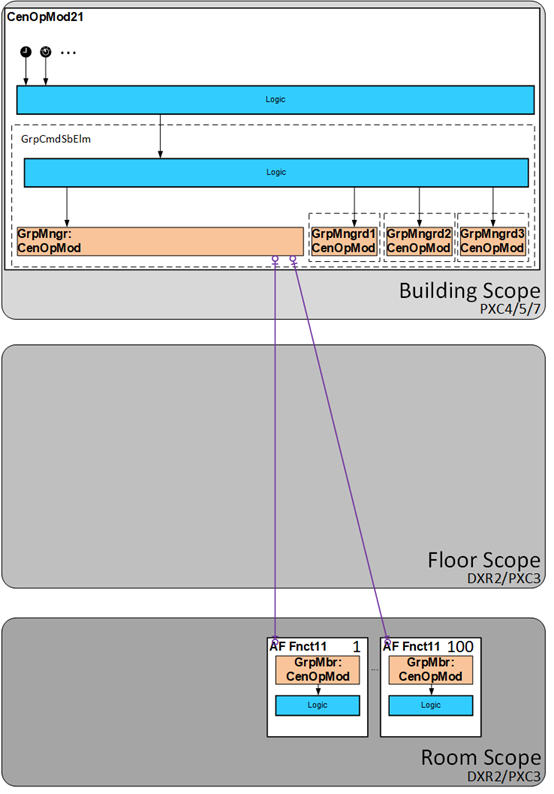
CenOpMod21 belongs to the building scope and can be used in two ways:
- For commanding subordinate central functions in the floor scope.
- For commanding subordinate room controllers in the room scope.
The following diagram shows an overview of the two ways.
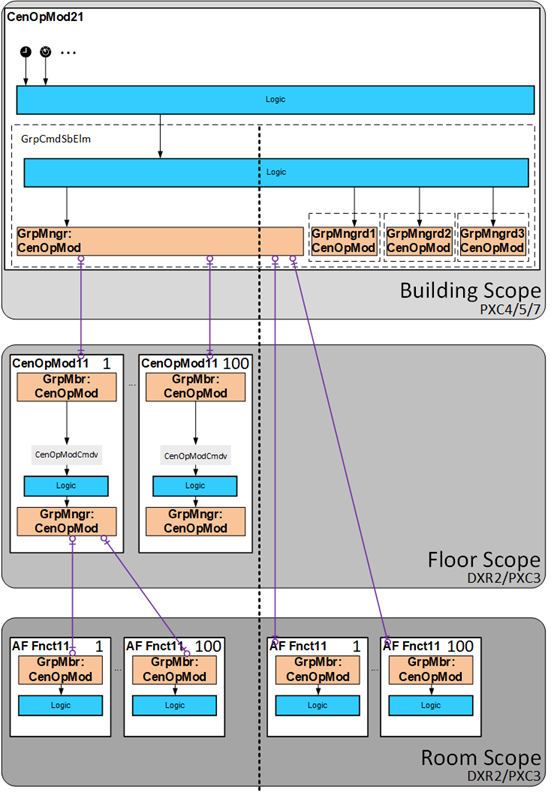
It is unlikely to have both options in parallel. The following two topologies are possible.
Cascading of the central functions is necessary. | Cascading of the central functions is not necessary. |
|
|