[HcrPltMod21] Plant operating mode determination for heating circuit, for room heating
Program block, name / node subtype: [HcrPltMod21] Plant operating mode determination for heating circuit, for room heating
Library hierarchy: Heating equipment
Family: HcrPltMod
Project tree | Diagram |
|---|---|
|
|
*SttUpAlmHdl21a in controllers with system version < 1.5 |
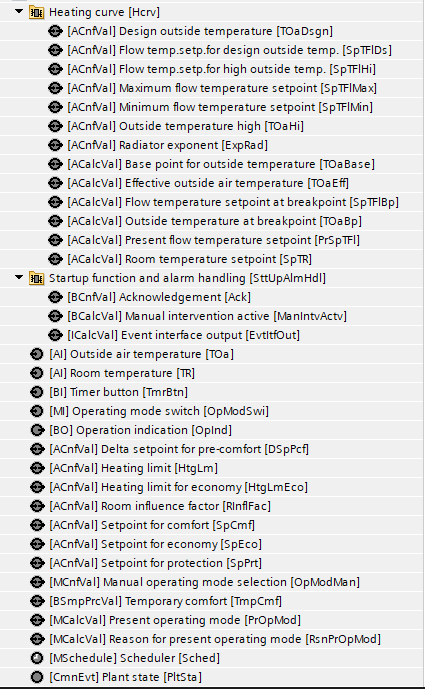
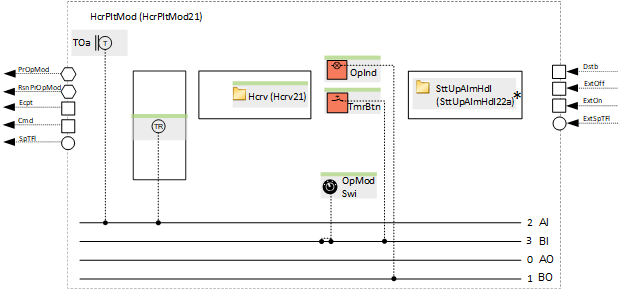
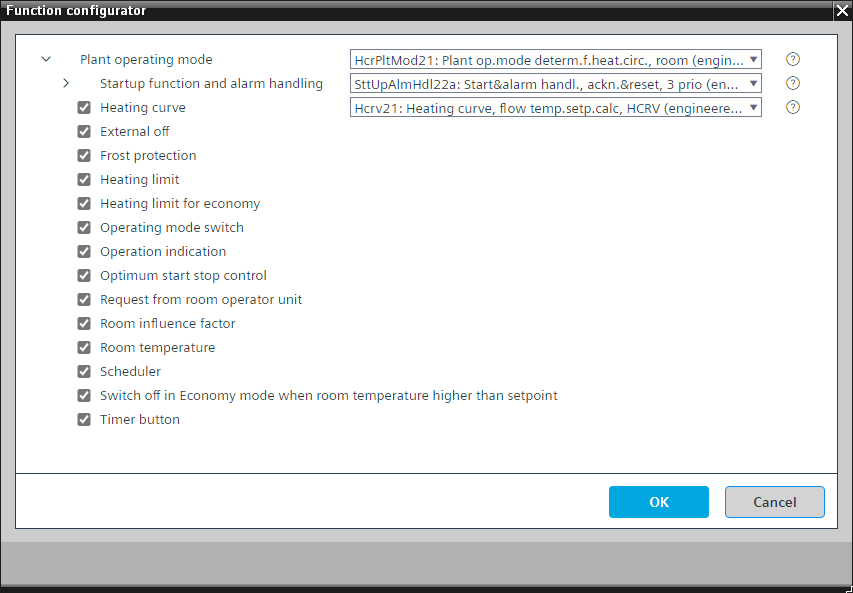
Configurator

Program blocks are stored in the library without I/Os. Use the auto-create and auto-connect functions to create I/Os and/or to connect them to the interface blocks, e.g., R_A, CMD_B. Alternatively, take the I/Os from the folder containing the predefined I/Os in the library and/or from the plant and connect them to the interface blocks.
Determines the plant operating mode by considering various possible sources (e.g., scheduler, manual operation, room unit).
Possible operating modes
Operating mode | Description |
|---|---|
Protection | The hydraulic circuit is off (the pump is off and the valve is closed). The room setpoint for Protection is active. The room frost protection can temporarily switch the operating mode to Comfort to heat up the room. |
Economy | The hydraulic circuit is on (the pump is on and the valve is following the output of the temperature controller). The room setpoint for Economy is active. |
Pre-Comfort | The hydraulic circuit is on (the pump is on and the valve is following the output of the temperature controller). The room setpoint for Pre-Comfort (calculated from the room setpoint for Comfort minus the delta setpoint for Pre-Comfort) is active. |
Comfort | The hydraulic circuit is on (the pump is on and the valve is following the output of the temperature controller). The room setpoint for Comfort is active. |
Off | The hydraulic circuit is off (the pump is off and the valve is closed). The room frost protection is inactive. This operating mode is only active for a very short time during startup after power on or if the parameter for the function that prevents the plant from running is switched on. |
The operating mode is shown on BACnet with a multistate calculated value "Present operating mode" with the states "Protection", "Economy", "Pre-Comfort", "Comfort", and "Off".
A parameter in the program is preset to prevent the plant from running. This is useful for testing data points. It must be switched off to start the plant.
"Startup function and alarm handling" controls the startup behavior of the plant after power-on. There is a delay after startup, "DlySttUp", of about 50 seconds. Do not change this delay. Change the delay, "DlyOn", so that it is different for each plant. This ensures that plants start one after another and do not overload the electrical system. There is also a collection and aggregation of all faults and alarms from the plant. If a local alarm lamp and/or reset button is required, an alternative can be selected.
Outside air temperature
The outside temperature [TOa] is used unfiltered and filtered. Two different attenuated signals result from the filtering.
Signal name | Description | Filter constant | Use |
|---|---|---|---|
|
TOa | Outside temperature | Unfiltered |
|
TOaEff | Effective outside air temperature | 1h |
|
TOaBldg | Outside temperature, strongly filtered | 50h (Building constant) |
|
This program block has the following optional functions:
Option: Heating curve
Calculates the setpoint for the flow temperature based on a heating curve (Hcrv21). It uses the function block HCRV.
Different room setpoints (depending on the operating mode) are fed to the heating curve and influence (increase or decrease) the calculated flow temperature setpoint.
A setpoint correction for the flow temperature is connected to the optional room influence.
Option: External off
Interface that can be connected to a program logic for shutting down the plant.
It goes into Protection mode.
Option: Frost protection
Performs room frost protection.
It switches on the plant (it goes into "Comfort") if the room temperature drops below the setpoint for Protection. It switches off the plant (it goes into "Protection") again with a hysteresis of, e.g., 2 K.
This option can only be applied successfully together with the optional room temperature
Option: Heating limit
The heating limit is defined by an analog configuration value.
The plant is enabled for automatic operation, e.g., by the scheduler, when both filtered outside temperatures are below the heating limit value. The plant is not enabled for automatic operation if one of the two values exceeds the heating limit value.
Option: Heating limit for economy
The heating limit for Economy is defined by an analog configuration value.
The plant is enabled for operation in Economy mode if the economy mode is requested, e.g., by the scheduler, and both filtered outside temperatures are below the heating limit value for economy. The plant is not enabled for operation in Economy mode if one of the two values exceeds the heating limit value.
Option: Operating mode switch (1xMI=2xBI)
Reads the state of an operating mode switch, normally at the front of the electrical panel, and has the states "Auto", "Protection", and "Comfort".
Option: Operation indication (1xBO)
Commands a lamp (usually green) that turns on if the plant is running or that blinks if a switching operation is in progress.
Option: Optimum start stop control
Performs optimum start stop control (using the function block OSSC) when the plant is in automatic mode (no manual intervention or external on or off) and released by the optional heating limit functionality.
This option can only be applied successfully together with the optional room temperature
Option: Request from room operator unit
A binary simple process value that can be read/written from the device chart of a room unit. It can switch on the plant.
Option: Room influence factor
The heating limit for Economy is defined by an analog configuration value.
The difference between the room setpoint and the room temperature is multiplied by the room influence factor. The resulting value is connected to the optional heat curve and influences the flow temperature setpoint.
This option can only be applied successfully together with the optional room temperature
Option: Room temperature (1xAI)
Creates an analog input for the room temperature and reads its signal.
Option: Scheduler
Scheduler of type MSCHED with the states "Protection", "Economy", "Pre-Comfort", and "Comfort" that switches the plant off and on.
Option: Switch-off in Economy mode when room temperature higher than setpoint
If the current operating mode is Economy and the room temperature exceeds the Economy setpoint, the hydraulic circuit is switched off with a hysteresis of, e.g., 2 K.
This option can only be applied successfully together with the optional room temperature
Option: Timer button (1xBI)
Reads the state of a timer button and switches the plant on for a specified time (adjustable in the program).
Name | Description | Type | Alarm / Notification class | Trend / Type | |
|---|---|---|---|---|---|
OpModMan | Manual operating mode selection | MCnfVal: Multistate configuration value | N/A | Yes, 4 | |
PrOpMod | Present operating mode | MCalcVal: Multistate calculated value | No | Yes, 4 | |
RsnPrOpMod | Reason for present operating mode | MCalcVal: Multistate calculated value | No | Yes, 4 | |
SttUpAlmHdl | Startup function and alarm handling | [SttUpAlmHdl22a] Startup & alarm handling, acknowledge & reset, 3 priorities | N/A | N/A | |
TOa | Outside air temperature | AI: Analog input | No | Yes, 2 | |
SpPrt | Setpoint for protection | ACnfVal: Analog configuration value | N/A | N/A | |
SpEco | Setpoint for economy | ACnfVal: Analog configuration value | N/A | N/A | |
SpCmf | Setpoint for comfort | ACnfVal: Analog configuration value | N/A | N/A | |
DSpPcf | Delta setpoint for pre-comfort | ACnfVal: Analog configuration value | N/A | N/A | |
Name | Description | Type | Alarm / Notification class | Trend / Type | |
|---|---|---|---|---|---|
OpModSwi | Operating mode switch | MI: Multistate input | No | Yes, 4 | |
Sched | Scheduler | MSchedule: Multistate scheduler | N/A | N/A | |
HtgLm | Heating limit | ACnfVal: Analog configuration value | N/A | N/A | |
HtgLmEco | Heating limit for economy | ACnfVal: Analog configuration value | N/A | N/A | |
Hcrv | Heating curve | [Hcrv21] Heating curve, flow temperature setpoint calculation, with HCRV | N/A | N/A | |
OpInd | Operation indication | BO: Binary output | No | Yes, 3 | |
TmrBtn | Timer button | BI: Binary input | No | Yes, 4 | |
TR | Room temperature | AI: Analog input | No | Yes, 2 | |
RInflFac | Room influence factor | ACnfVal: Analog configuration value | N/A | N/A | |
Description |
|---|
Request from room operator unit |
Frost protection |
Switch off in Economy mode when room temperature is higher than setpoint. |
Optimum start stop control |
External off |