[TwnPu24] Twin pump, pressure-controlled
Program block, name / node subtype: [TwnPu24] Twin pump, pressure-controlled
Library hierarchy: Universal equipment
Family: Pu
Project tree | Diagram |
|---|---|
|
|
|
Configurator

Program blocks are stored in the library without I/Os. Use the auto-create and auto-connect functions to create I/Os and/or to connect them to the interface blocks, e.g., R_A, CMD_B. Alternatively, take the I/Os from the folder containing the predefined I/Os in the library and/or from the plant and connect them to the interface blocks.
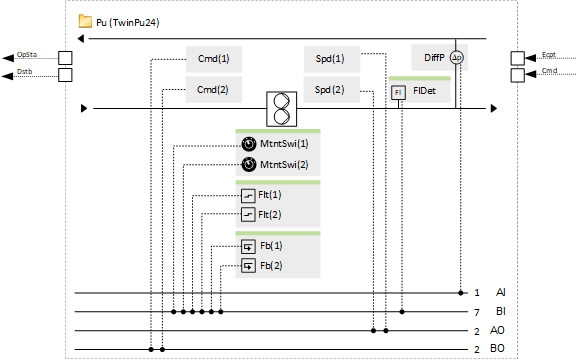
Controls a variable speed twin pump and performs pressure control.
When the twin pump is on, one pump motor is running, and the other one is off. A program logic (function block ROT_8) measures the operating hours of both motors and switches on the motor with fewer operating hours when the pump is switched on.
If one motor has a problem, the program switches to the other motor. Only if both motors have a problem, a calculated value object "Twin pump fault" generates an alarm.
There is a filter function for the measured value for pressure. However, its time constant is set to a short value, e.g., 1 second. The reason for this is that there is already a pre-filtering with the setting for the COV for the predefined IO, e.g., 5 kPa, and, in addition, the PID controller has a preset neutral zone, e.g., 6 kPa.
A minimum speed, e.g., 10 %, is preset with the property "Controller output minimum" of the BACnet object of the controller. The speed can be adjusted.
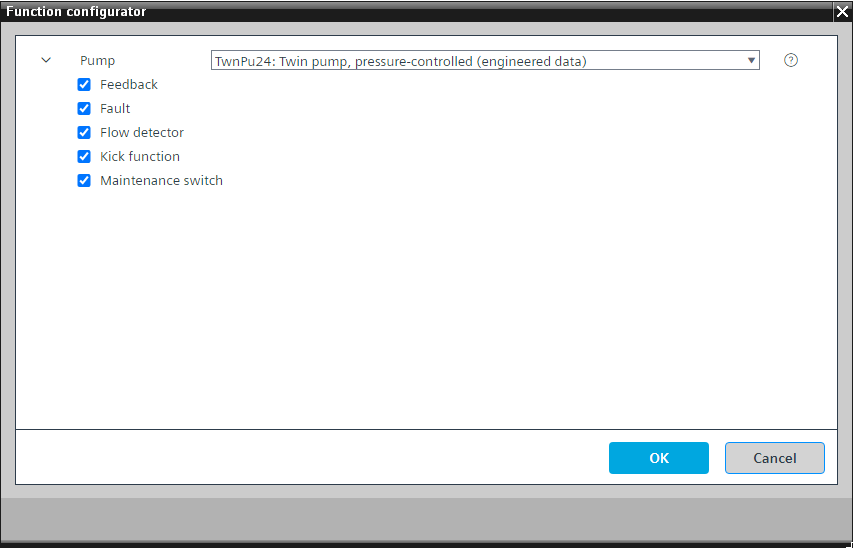
This program block has the following optional functions:
Option: Fault (1xBI)
Reads the fault signal from the pump control unit and generates an alarm.
Each motor has a fault signal.
Option: Feedback (1xBI)
Reads the feedback signal, e.g., from a pump control unit, and generates an alarm if feedback is missing when the pump must run.
Each motor has a feedback signal.
Option: Flow detector (1xBI)
Reads the signal from a flow detector.
A program logic has two value objects for each motor that go into alarm if no flow is detected when a motor should be running. If one motor starts and no flow is detected, its value object goes into alarm and the logic switches it off and switches on the other motor. If both value objects are in alarm, then the "Twin pump fault" generates an alarm.
You can suppress the alarming for the binary input "Flow detector" (property "Suppress event detection" = Yes) to not generate too many alarms.
Option: Kick function
Prevents standstill damage by generating a pulse that starts the pump at a configured time with a defined pulse length after a minimum off time has elapsed.
This is configured in the program.
Option: Maintenance switch (1xBI)
Reads the signal from the maintenance switch and generates an alarm. If active, then the outputs of the pump are stopped with very high priority (priority 2).
Each motor has a maintenance switch signal.
Name | Description | Type | Alarm / Notification class | Trend / Type | |
|---|---|---|---|---|---|
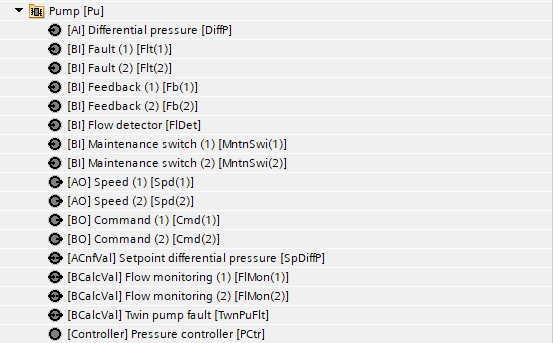
Cmd(1) | Command (1) | BO: Binary output | No | Yes, 4 | |
Cmd(2) | Command (2) | BO: Binary output | No | Yes, 4 | |
Spd(1) | Speed (1) | AO: Analog output | No | Yes, 2 | |
Spd(2) | Speed (2) | AO: Analog output | No | Yes, 2 | |
TwnPuFlt | Twin pump fault | BCalcVal: Binary calculated value | Yes, 4 | No | |
DiffP | Differential pressure | AI: Analog input | No | Yes, 2 | |
SpDiffP | Setpoint differential pressure | ACnfVal: Analog configuration value | No | Yes, 4 | |
PCtr | Pressure controller | Ctr: Controller | N/A | N/A | |
Rot | Rotation | ROT_8: Rotation | N/A | N/A | |
Name | Description | Type | Alarm / Notification class | Trend / Type |
|---|---|---|---|---|
Maintenance switch | ||||
MntnSwi(1) | Maintenance switch (1) | BI: Binary input | Yes, 5 | No |
MntnSwi(2) | Maintenance switch (2) | BI: Binary input | Yes, 5 | No |
Fault | ||||
Flt(1) | Fault (1) | BI: Binary input | Yes, 4/5 | No |
Flt(2) | Fault (2) | BI: Binary input | Yes, 4/5 | No |
Feedback | ||||
Fb(1) | Feedback (1) | BI: Binary input | Yes, 4 | No |
Fb(2) | Feedback (2) | BI: Binary input | Yes, 4 | No |
FlDet | Flow detector | BI: Binary input | Yes, 4 | No |
Description |
|---|
Kick function |