[CenOpMod24] Central operating mode
Program block, name / node subtype: [CenOpMod24] Central operating mode
Library hierarchy: Coordination
Family: CenOpMod
Project tree | Diagram |
|---|---|
|
|
|
Configurator

Program blocks are stored in the library without I/Os. Use the auto-create and auto-connect functions to create I/Os and/or to connect them to the interface blocks, e.g., R_A, CMD_B. Alternatively, take the I/Os from the folder containing the predefined I/Os in the library and/or from the plant and connect them to the interface blocks.
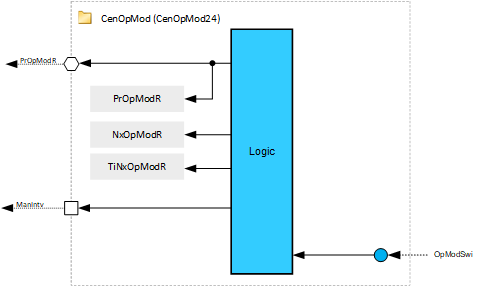
CenOpMod24 calculates central commands and operating modes that can be read by room automation, e.g., RDG26xxKN thermostats. The commands may originate from a scheduler or a primary operating unit.
The most important functions in the program block are:
- Central operating mode command evaluation
- Scheduler
- Manual operating mode selection
- Manual central air handler mode
- Central condition trigger
Name | Description | Type | Alarm / Notification class | Trend / Type | |
|---|---|---|---|---|---|
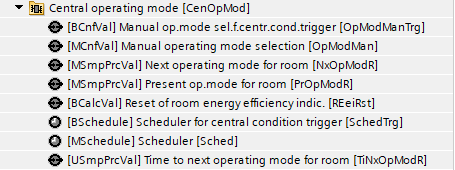
OpModMan | Manual operating mode selection | MCnfVal: Multistate configuration value | N/A | N/A | |
PrOpModR | Present operating mode for room | MSmpPrcVal: Multistate simple process value | N/A | Yes, 4 | |
Sched | Scheduler | MSchedule: Multistate scheduler | N/A | N/A | |
NxOpModR | Next operating mode for room | MSmpPrcVal: Multistate simple process value | N/A | N/A | |
TiNxOpModR | Time to next operating mode for room | USmpPrcVal: Unsigned simple process value | N/A | N/A | |
Description |
|---|
|
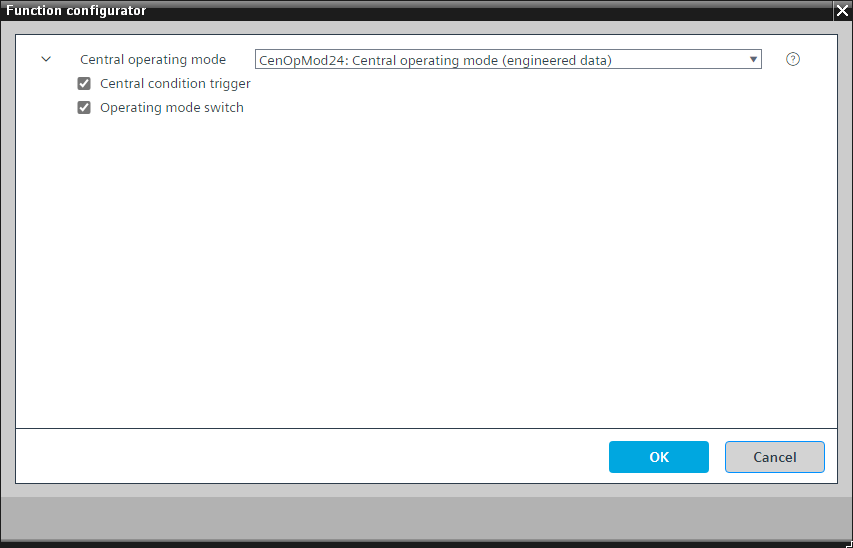
Operating mode switch |
Central condition trigger Elements that belong to this option: Manual operating mode selector for central condition trigger | MCnfVal: Multistate configuration value Scheduler for central condition trigger | MSchedule: Multistate scheduler Reset of room energy efficiency indicator | BCalcVal: Binary calculated value |
Central operating mode command evaluation
The central operating mode command comes from a scheduler or from the manual operating mode selection and is written to the Present operating mode for room.
Manual central air handler mode
In addition, the plant operating mode of the area can be switched to Comfort via the manual air handler. For that, the OpModMan or OpModSwi from the air handler must be connected to the corresponding interface (Option: Operating mode switch).
Central condition trigger
CenOpMod24 can distribute a central condition trigger by activating the Reset of room energy efficiency indicator.