[CenFcd21] Central facade function for automatic
Program block, name / node subtype: [CenFcd21] Central facade function for automatic
Library hierarchy: Coordination
Family: CenFcd
Project tree | Diagram |
|---|---|
|
|
Configurator
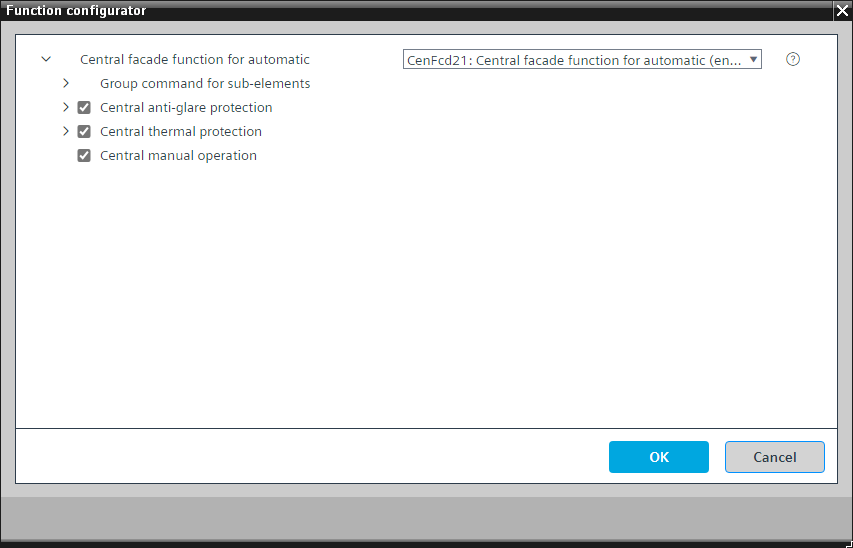

Program blocks are stored in the library without I/Os. Use the auto-create and auto-connect functions to create I/Os and/or to connect them to the interface blocks, e.g., R_A, CMD_B. Alternatively, take the I/Os from the folder containing the predefined I/Os in the library and/or from the plant and connect them to the interface blocks.
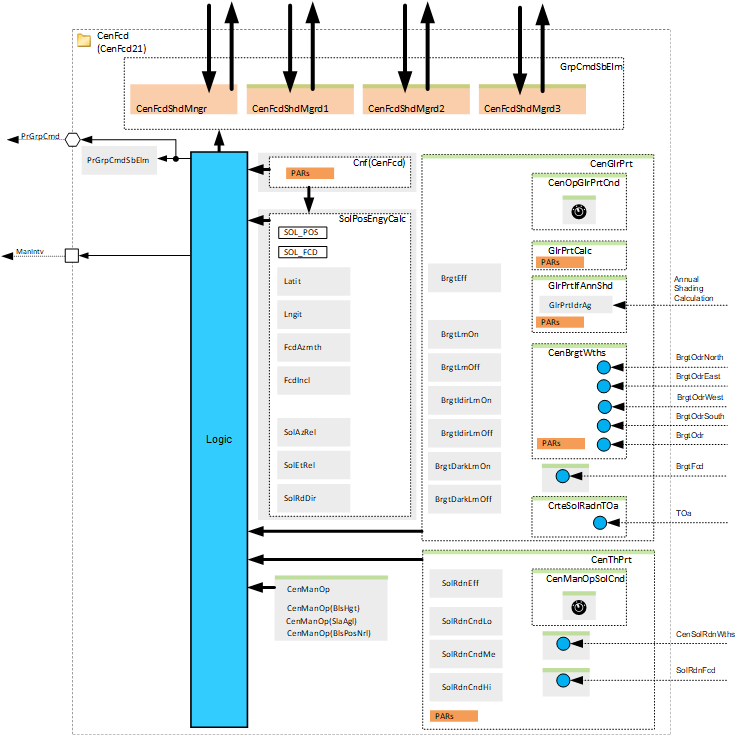
CenFcd21 manages central information used for automatic functions in a facade segment and distributes it either to subordinate application functions (AF) CenFcdShd11 or directly to the connected rooms.
A facade segment has windows with the same:
- azimuth and slope
- shading product
- sun, e.g., shadows from above
- shadows from the horizon and neighboring buildings
This is relevant if you do not use the option "Anti-glare protection calculation with interface for annual shading calculation".
Name | Description | Type | Alarm / Notification class | Trend / Type | |
|---|---|---|---|---|---|
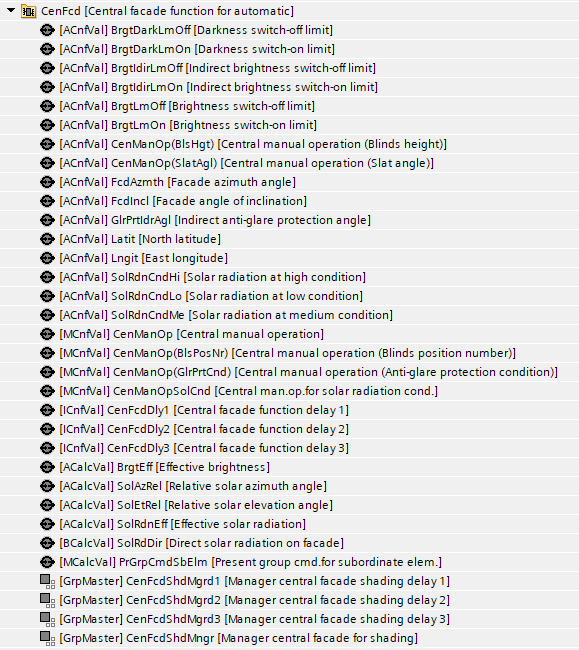
PrGrpCmdSbElm | Present group command for subordinate elements | MCalcVal: Multistate calculated value | N/A | Yes, 4 | |
SolAzRel | Relative solar azimuth angle | ACalcVal: Analog calculated value | N/A | N/A | |
SolEtRel | Relative solar elevation angle | ACalcVal: Analog calculated value | N/A | N/A | |
SolRdDir | Direct solar radiation on facade | ACalcVal: Analog calculated value | N/A | N/A | |
Lngit | East longitude | ACnfVal: Analog configuration value | N/A | N/A | |
Latit | North latitude | ACnfVal: Analog configuration value | N/A | N/A | |
FcdIncl | Facade angle of inclination | ACnfVal: Analog configuration value | N/A | N/A | |
FcdAzmth | Facade azimuth angle | ACnfVal: Analog configuration value | N/A | N/A | |
CenFcdShdMngr | Manager central facade for shading | GrpMaster: Group manager | N/A | N/A | |
Solar angle
The solar angle on the facade (Relative solar azimuth angle, Relative solar elevation angle) is calculated from the geographic location, facade orientation, and date and time. It determines whether the sun is shining on the facade sector.
The following values are provided as BACnet objects for monitoring:
- Relative solar azimuth angle (SolAzRel)
- Relative solar elevation angle (SolEtRel)
- Direct solar radiation on facade (SolRdDir)
Optionally, information from the annual shading computer can be used to account for shadows from buildings and the horizon.
More settings (Parameters in the chart "Configuration (Central facade function for automatic)")
Parameter | Description | Default value |
|---|---|---|
BlsTypCnf | Configuration blinds type 1: Blinds, position number | 1: Blinds, position number |
SolAglLeft | Solar position angle range left -90...90 [°] | 85 [°] |
SolAglRight | Solar position angle range right -90...90 [°] | 85 [°] |
SolAglUp | Solar position angle range up -90...90 [°] | 85 [°] |
SolAglDwn | Solar position angle range down -90...90 [°] | 85 [°] |
SlatPosHrz | Slat position horizontal Theoretical slat percentage to horizontally position slats. -200...200 [%] Blinds height is the total mechanical range of the blinds. | 20 [%] |
SlatPosVrt | Slat position vertical Theoretical slat percentage to vertically position slats. -200...200 [%] Slat angle in % is the total mechanical range for a blinds height of 100%. | 100 [%] |
HgtSolPosHi | Height for high solar position 0...100 [%] | 40 [%] |
HgtSolPosLo | Height for low solar position 0...100 [%] | 60 [%] |
SolEtOpn | Solar elevation for opening Height 0 % -90...90 [°] | 60 [°] |
DlyOffSolDirHi | Switch-off delay for direct solar radiation by high solar position 0...3600 [s] | 1200 [s] |
DlyOffSolDirLo | Switch-off delay for direct solar radiation by low solar position 0...3600 [s] | 60 [s] |
Limits to direct solar radiation
The following factors limit radiation through windows:
- The wall thickness (angle range left and right). You can configure this using SolAglLeft and SolAglRight.
- The wall thickness above balconies. You can configure this with SolAglUp.
- The horizon. You can configure this with SolAglDwn.
Delay after direct solar radiation
Glare does not stop immediately when the sun stops shining on the facade. Glare depends on solar elevation and on local conditions, e.g., reflections, bright surfaces, rounded edges.
You can define a switch-off delay in the function, where the function calculates the value based on time and facade orientation:
- DlyOffSolDirHi (at vertical solar radiation)
- DlyOffSolDirLo (at horizontal solar radiation)
Blinds type (strategy)
You can configure the blinds type and its response.
Strategy | Description |
|---|---|
1 | Blinds, position number (P-position) Control blinds with 4 different slat positions (P-positions). It defines a slat angle in the lowered position (height 100 %). Positions must be predefined in the actuator. They do not need to be specifically set. This strategy is suitable for almost all standard blinds. |
2 | Blinds, angle The strategy is used only if the actuator does not support position numbers. Control is by height (always 100 %) and the corresponding slat angle. |
3 | Blinds, height, and angle Blinds are adjusted based on sunlight in height as well as slat angle. The strategy is suitable for special applications, e.g., for blinds that move from bottom to top. This requires detailed planning at the object. |
4 | Awnings, height (shadow edge) The awning height is controlled based on solar position, so that the shadow edge is always at the same location in the room. This requires detailed planning at the object. |
Strategy 1: P-position
Projected solar angle | Slats angle | P-position |
|---|---|---|
0°...10° | 60° | P1: Visual protection |
10°...25° | 45° | P2: Anti-glare, sun position low |
25°...40° | 25° | P3: Anti-glare, sun position high |
40°...90° | 0° | P4: Open |
Strategy 2 and 3: Slats angle as function of project solar elevation
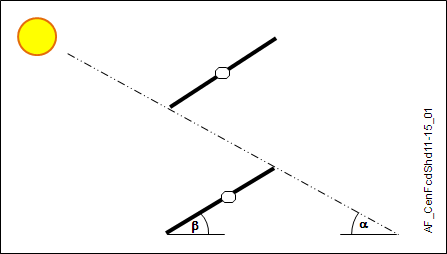
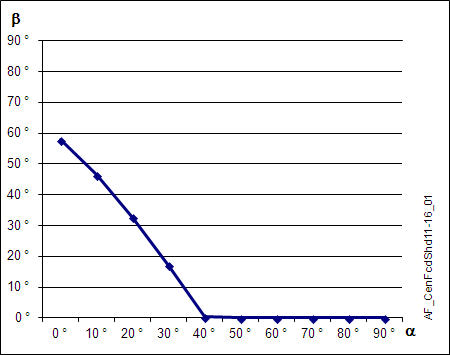
Strategy 3 and 4: Height position as a function of relative solar elevation
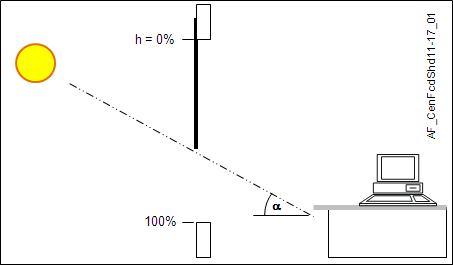
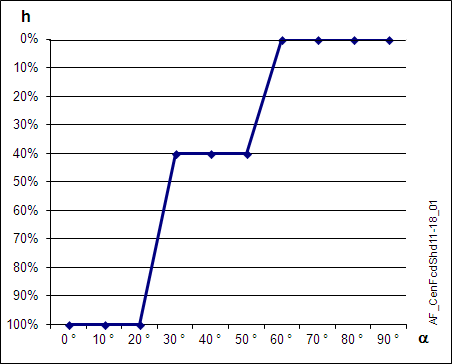
These values are examples. You can configure them as follows for the individual room layout. On-site measurements serve as the basis.
Solar elevation | Height |
|---|---|
0...30 [°] | 100 [%] (closed) |
30...50 [°] | HgtSolPosLo (default 60 %) |
50...SolEtOpn [°] (default 60°) | HgtSolPosHi (default 40 %) |
SolEtOpn...90 [°] (default 60°) | 0 [%] (open) |
The function calculates a new value up to a maximum of 8 times per day. This provides solid anti-glare without disturbing the user with frequent actuator movements.
Description |
|---|
Group command for sub-elements delay 1 Elements that belong to this option: Central operating mode delay 1 | ICnfVal: Integer configuration value Manager central facade shading delay 1 | GrpMaster: Group manager |
Group command for sub-elements delay 2 Elements that belong to this option: Central operating mode delay 2 | ICnfVal: Integer configuration value Manager central facade shading delay 2 | GrpMaster: Group manager |
Group command for sub-elements delay 3 Elements that belong to this option: Central operating mode delay 3 | ICnfVal: Integer configuration value Manager central facade shading delay 3 | GrpMaster: Group manager |
Central manual operation Elements that belong to this option: Central manual operation | MCnfVal: Multistate configuration value Central manual operation (Blinds height) | ACnfVal: Analog configuration value Central manual operation (Slat angle) | ACnfVal: Analog configuration value Central manual operation (Blinds position number) | MCnfVal: Multistate configuration value |
Central anti-glare protection Elements that belong to this option: Effective brightness | ACalcVal: Analog calculated value Brightness switch-on limit | ACnfVal: Analog configuration value Brightness switch-off limit | ACnfVal: Analog configuration value Indirect brightness switch-on limit | ACnfVal: Analog configuration value Indirect brightness switch-off limit | ACnfVal: Analog configuration value Darkness switch-on limit | ACnfVal: Analog configuration value Darkness switch-off limit | ACnfVal: Analog configuration value |
Central thermal protection Elements that belong to this option: Effective solar radiation | ACalcVal: Analog calculated value Solar radiation at high condition | ACnfVal: Analog configuration value Solar radiation at medium condition | ACnfVal: Analog configuration value Solar radiation at low condition | ACnfVal: Analog configuration value |
More details about the option "Central anti-glare protection"
Further options
Description |
|---|
Central manual operation for anti-glare protection condition Elements that belong to this option: Central manual operation (Anti-glare protection condition) | MCnfVal: Multistate configuration value |
Anti-glare protection calculation |
Anti-glare protection calculation with interface for annual shading calculation Elements that belong to this option: Indirect anti-glare protection angle | ACnfVal: Analog configuration value |
Central brightness from weather station |
Central brightness from facade |
Additional criterion based on solar radiation and outside temperature |
Use either "Anti-glare protection calculation" or "Anti-glare protection calculation with interface for annual shading calculation"
Use either "Central brightness from weather station" or "Central brightness from facade".
Parameters in "Anti-glare protection calculation"
Name | Default value |
|---|---|
Enable indirect angle | 0 |
Indirect angle | 90° |
Maximum light sensitivity delay (at ADA_DLY) | 1 h |
Minimum light sensitivity delay (at ADA_DLY) | 15 min |
Switch-on delay brightness | 1 min |
Parameters in "Anti-glare protection calculation with interface for annual shading calculation"
Name | Default value |
|---|---|
Maximum light sensitivity delay (at ADA_DLY) | 1 h |
Minimum light sensitivity delay (at ADA_DLY) | 15 min |
Switch-on delay brightness | 1 min |
Parameters in "Central brightness from weather station"
Name | Default value |
|---|---|
Angle correction | 0° |
Minimum sensors count for calculation | 3 |
Switch-on delay brightness | Reduction factor |
More details about the option "Central thermal protection"
Optional elements
Name | Description | Type | Alarm / Notification class | Trend / Type | |
|---|---|---|---|---|---|
CenManOpSolCnd | Central manual operation for solar radiation condition | MCnfVal: Multistate configuration value | N/A | N/A | |
Further options
Description |
|---|
Central solar radiation from weather station |
Solar radiation from facade |
Use either "Central solar radiation from weather station" or "Solar radiation from facade".
Parameters in "Central thermal protection"
Name | Default value |
|---|---|
Solar radiation switch-on delay | 20 min |
Solar radiation switch-off delay | 20 min |
Delayed operation
There are three more group managers for delayed operation. The goal is to distribute the rooms to more group managers and make sure that not all rooms change their operating mode at the same time.
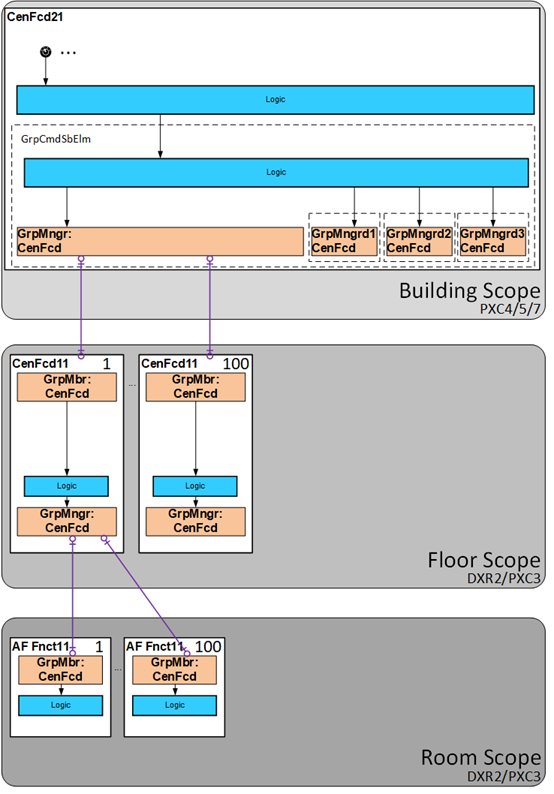
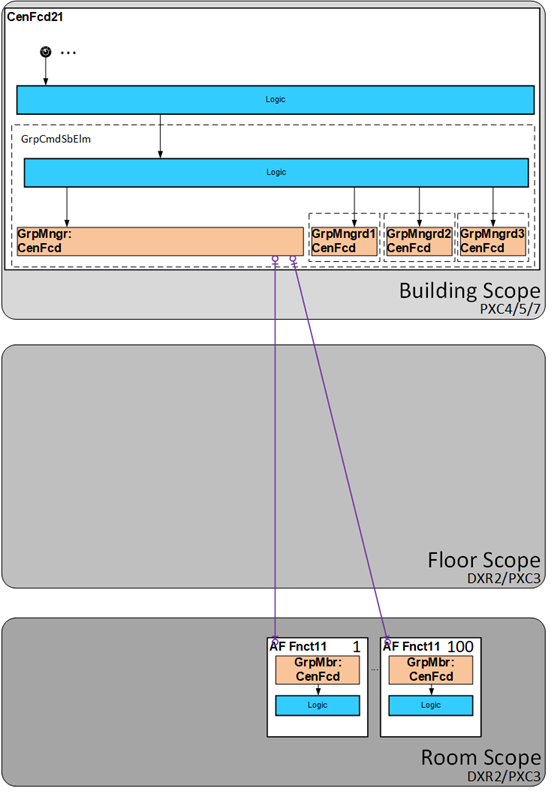
CenFcd21 is part of the building scope and can be used in two ways:
- For commanding of subordinate central functions in the floor scope
- For commanding of subordinate room controllers in the room scope
The following diagram provides an overview of the two ways.
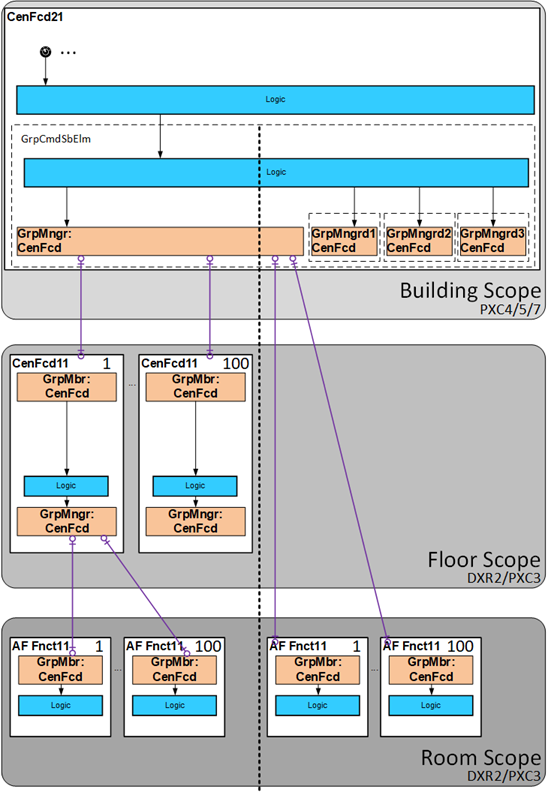
It is unlikely to have both options in parallel. There are two possible topologies:
Cascading of the central functions is necessary. | Cascading of the central functions is not necessary. |
|
|