[SttUpAlmHdl22] Startup & alarm handling, acknowledge & reset, I/Os, 3 priorities
Program block, name / node subtype: [SttUpAlmHdl22] Startup & alarm handling, acknowledge & reset, I/Os, 3 priorities
Library hierarchy: Universal equipment
Family: SttUpAlmHdl
Project tree | Diagram |
|---|---|
|
|
|
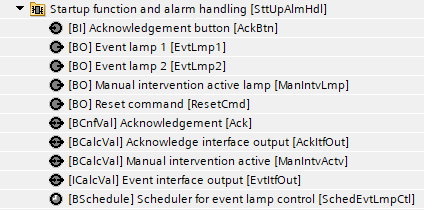
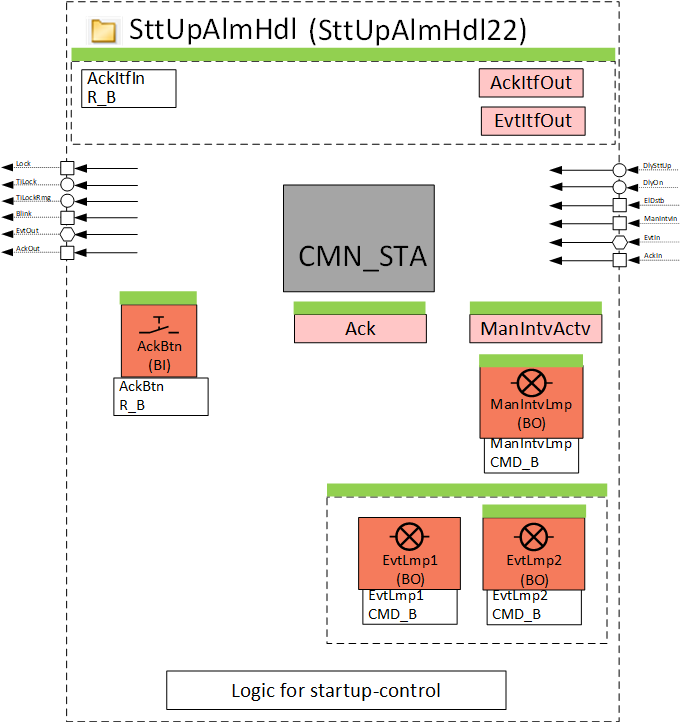
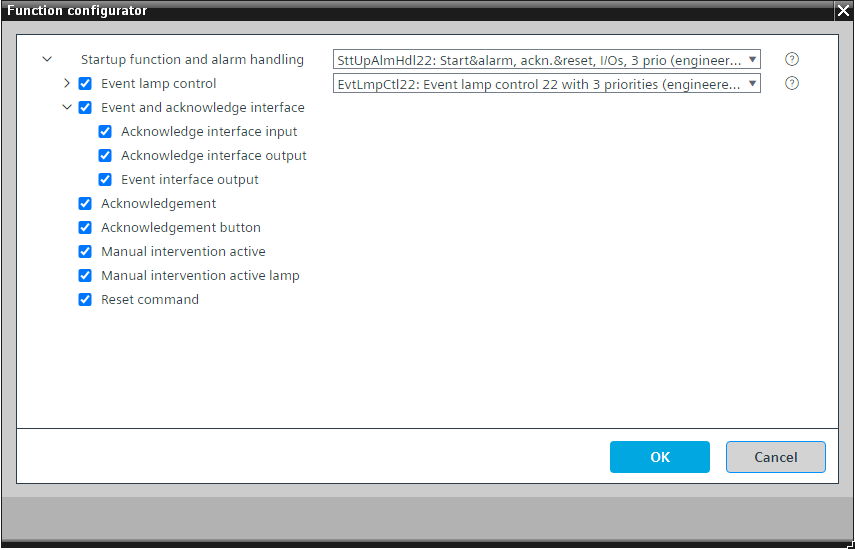
Configurator

Program blocks are stored in the library without I/Os. Use the auto-create and auto-connect functions to create I/Os and/or to connect them to the interface blocks, e.g., R_A, CMD_B. Alternatively, take the I/Os from the folder containing the predefined I/Os in the library and/or from the plant and connect them to the interface blocks.
Controls the startup behavior of the plant after power on.
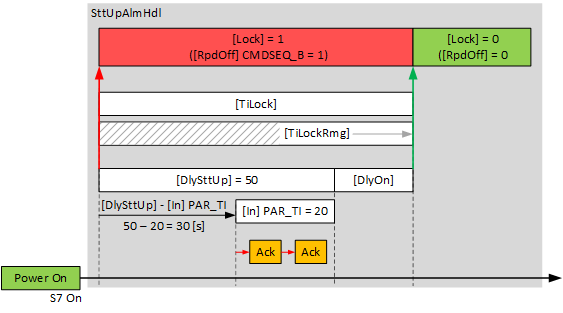
There is a delay, "DlySttUp", of about 50 seconds after startup. Do not change this delay. Change the delay, "DlyOn", to be different for each plant. This ensures that the plants start one after the other and do not overload the electrical system.
Reads the aggregation of all faults and alarms from the plant and interprets it for the program.
Startup behavior
The following functionality is available for an automatic startup of the plant, e.g., after a loss and subsequent return of power:
- Fixed switch-on times. These can be set on input [DlySttUp]. The output [Lock] is "True" and the plant remains switched off. The plant remains off to ensure that communications are reliable and cross-check references are triggered.
- Automatic acknowledge (2x) of possible pending alarms during a fixed switch-on delay.
- Additional adjustable delay for staged plant ramp-up. This can be set on input pin [DlyOn].
- Output [TiLock] displays the entire period of the delay, i.e., [DlySttUp] + [DlyOn].
- Output [TiLockRmg] displays the remaining time until the output [Lock] is set to "False".
Collection and aggregation of all faults and alarms from the plant
With device version 1.5 or higher, every BACnet object of type "Structured view", e.g., plant, has new properties:
- Aggregation Flags
- Last-Event-Timestamp
- Acknowledged Transitions
- Event-Notification-Inhibit-Command
All alarms, faults, and manual interventions (out of service, overridden, commanded) are collected and displayed at these new properties. The information for the filter level for the notification class objects is considered and the alarms and faults are displayed in groups in the "Aggregation Flags" for the corresponding filter level (High, Medium, or Low).
SttUpAlmHdl22 contains a function block CMN_STA that connects to the structured view object (most likely a plant) and reads "Aggregation Flags" and "Last-Event-Timestamp" to represent the number of alarms, faults, and manual interventions at its outputs, and writes to "Acknowledged Transitions" and "Event-Notification-Inhibit-Command" to acknowledge (and reset) the alarms and faults belonging to this structured view or to suppress the event notification of the objects belonging to this structured view.
Principle:
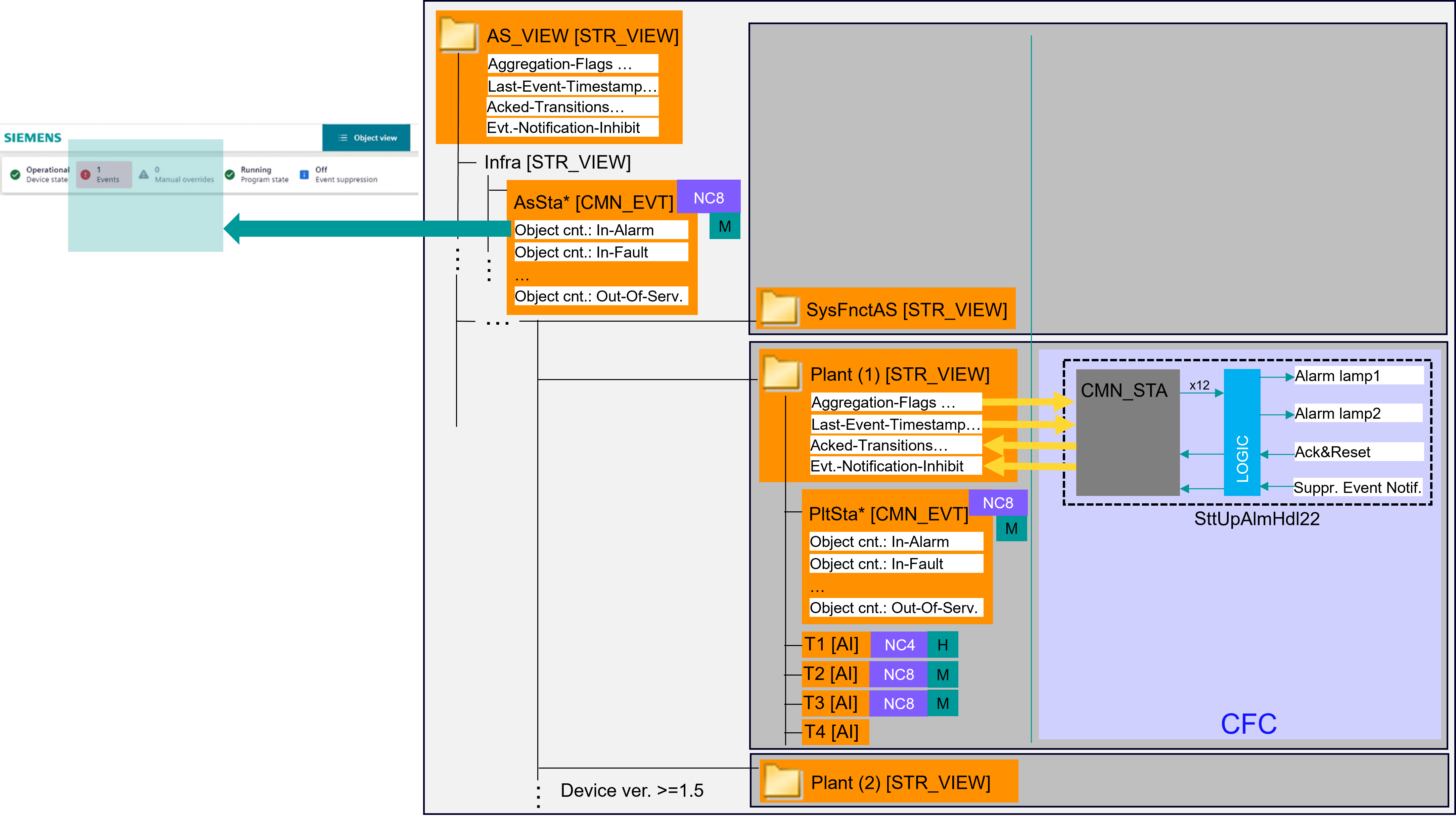
Key
NCx | Notification class |
H | Filter level: High |
M | Filter level: Medium |
Details of the properties of the structured view objects and inputs and outputs of CMN_STA:
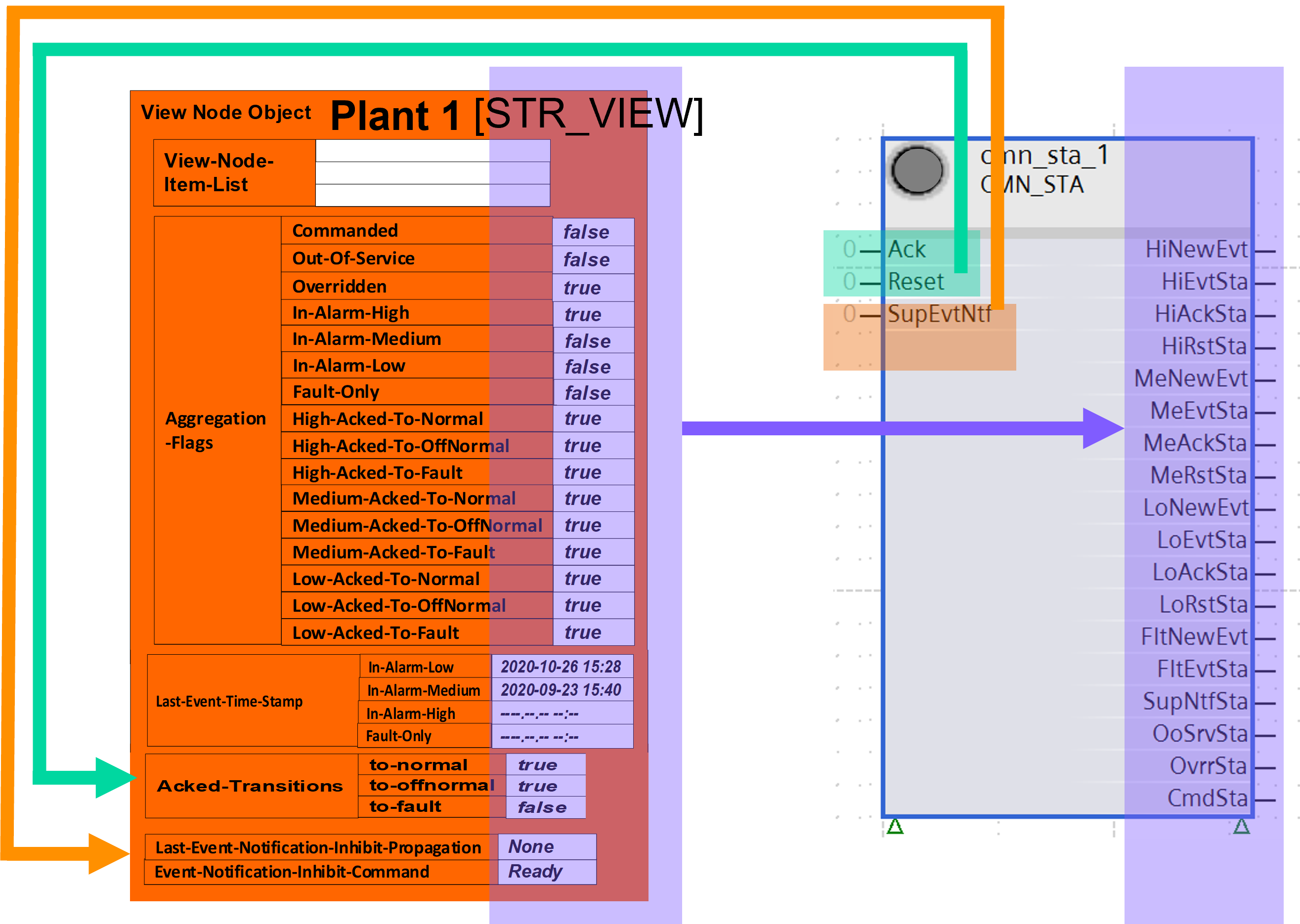
Connection between the structured view object and CMN_STA:
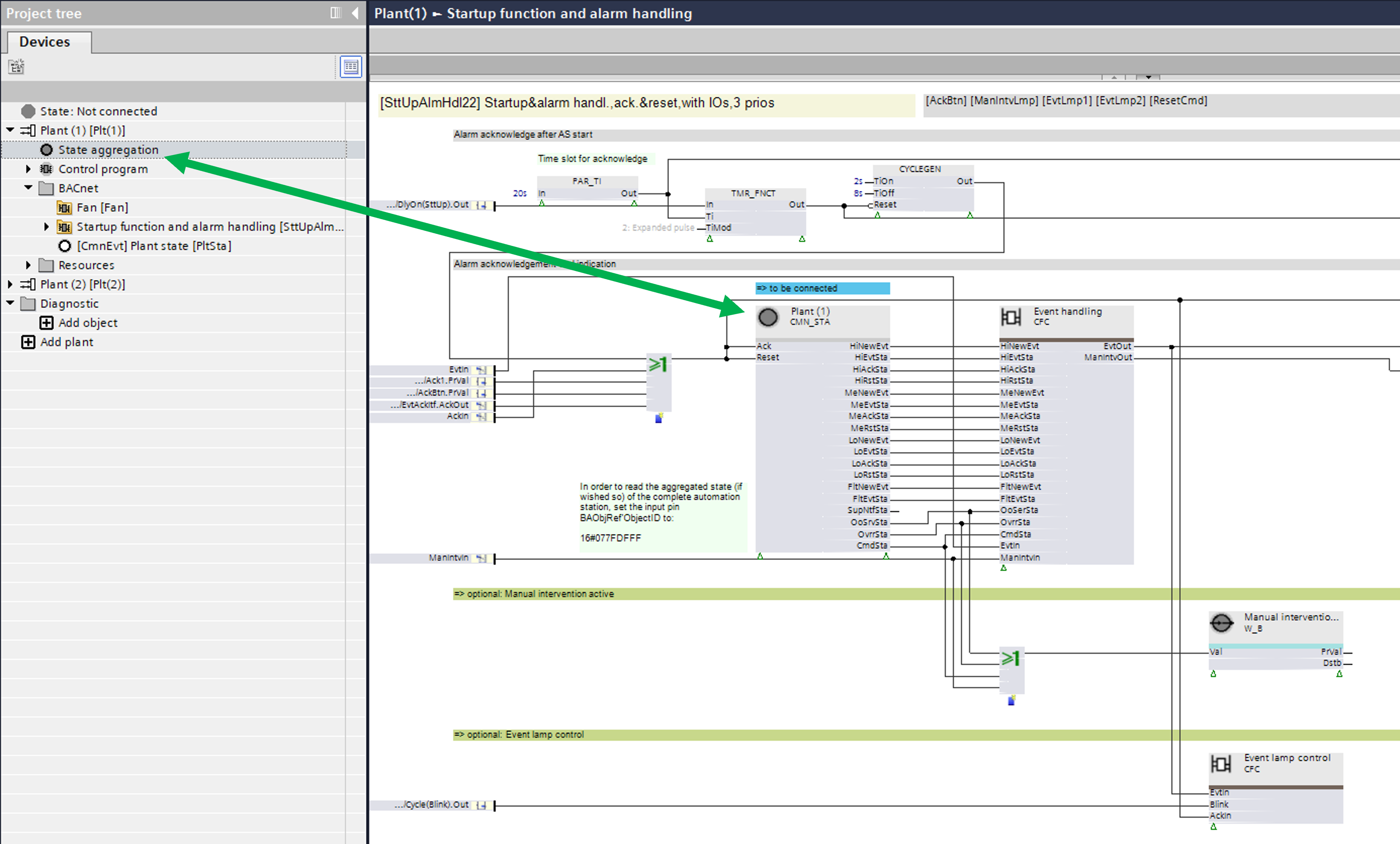
The "State aggregation" node represents the structured view object "Plant(1)". You can drag the node onto CMN_STA. When "Plant(1)" is connected to CMN_STA, the node changes its color from white to gray.
This program block has the following optional functions:
Option: Event lamp control (2xBO)
Controls one or two alarm lamps (EvtLmpCtl22). The behavior of the lamps (blinking, steady, or off) provides information about the aggregated alarms and faults and their states.
Option: Event and acknowledge interface
Provides information about the aggregated alarms, faults, manual interventions and their states in the form of a double integer value object. This value represents the 0 or 1 states of the output pins of CMN_STA that are converted to a double integer value.
It can receive and send acknowledgement signals.
Option: Acknowledgement
A software button for acknowledgement for all objects that belong to this structured view.
Option: Acknowledgement button (1xBI)
Reads the signal from a button for acknowledgement for all objects that belong to this structured view.
Option: Manual intervention active
Interprets some of the pins of CMN_STA and generates an alarm in case of manual intervention (out of service, overridden, or commanded) on one or more objects belonging to this structured view.
Option: Manual intervention active lamp (1xBO)
Turns on a lamp, e.g., with orange color, in case of manual intervention (out of service, overridden, or commanded) on one or more objects belonging to this structured view.
Option: Reset command (1xBO)
Turns on a binary output for hardware reset.
SttUpAlmHdl22 and its subsets
SttUpAlmHdl22 is not used in any base solution in the library. SttUpAlmHdl22 has three program block subsets that are optimized for different uses.
If you need to extend a subset, e.g., own acknowledge button and alarm lamp(s) for a plant, select SttUpAlmHdl22 with the "Function configurator" and configure it for the required functionality.
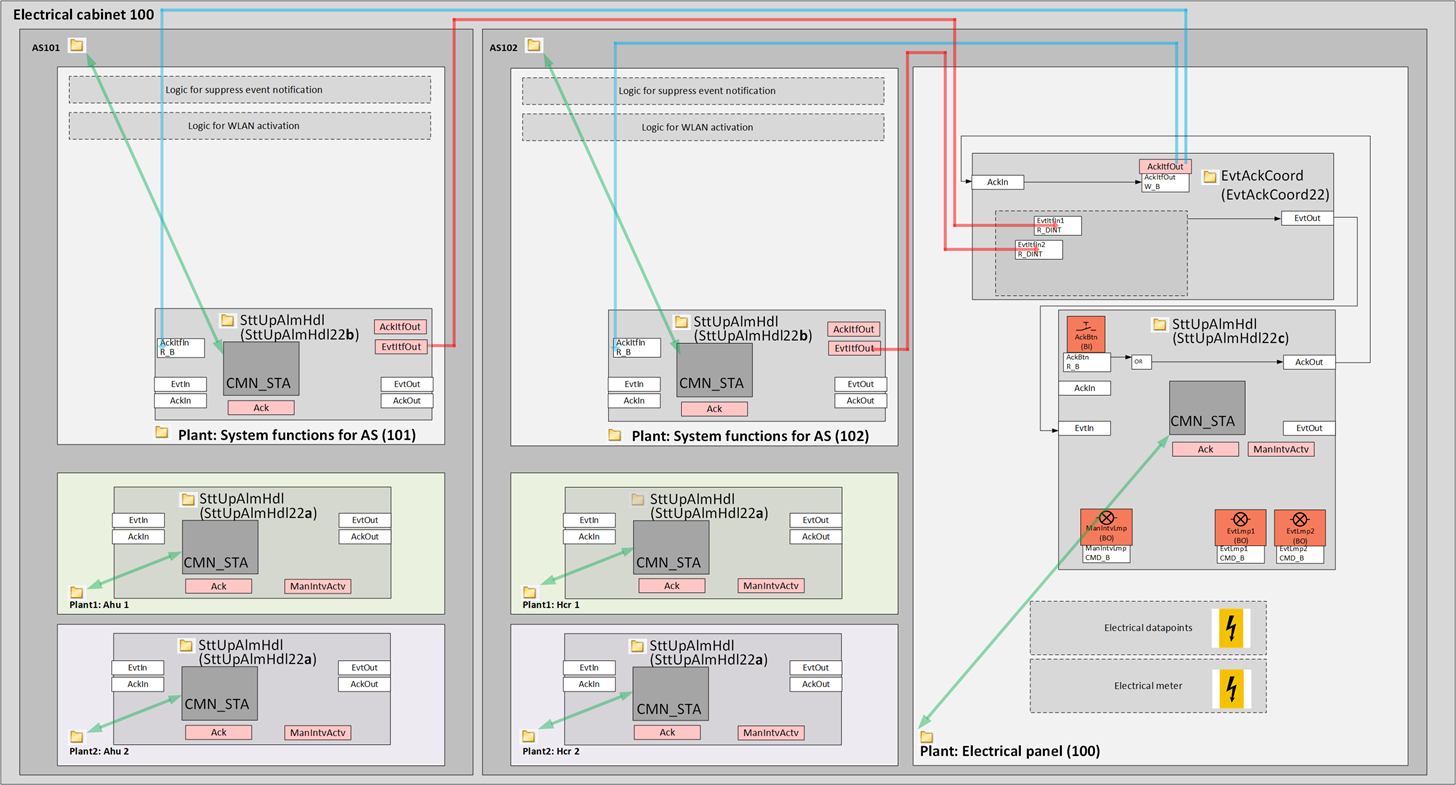
The following diagram shows SttUpAlmHdl22 and its subsets: SttUpAlmHdl22a, SttUpAlmHdl22b, SttUpAlmHdl22c.
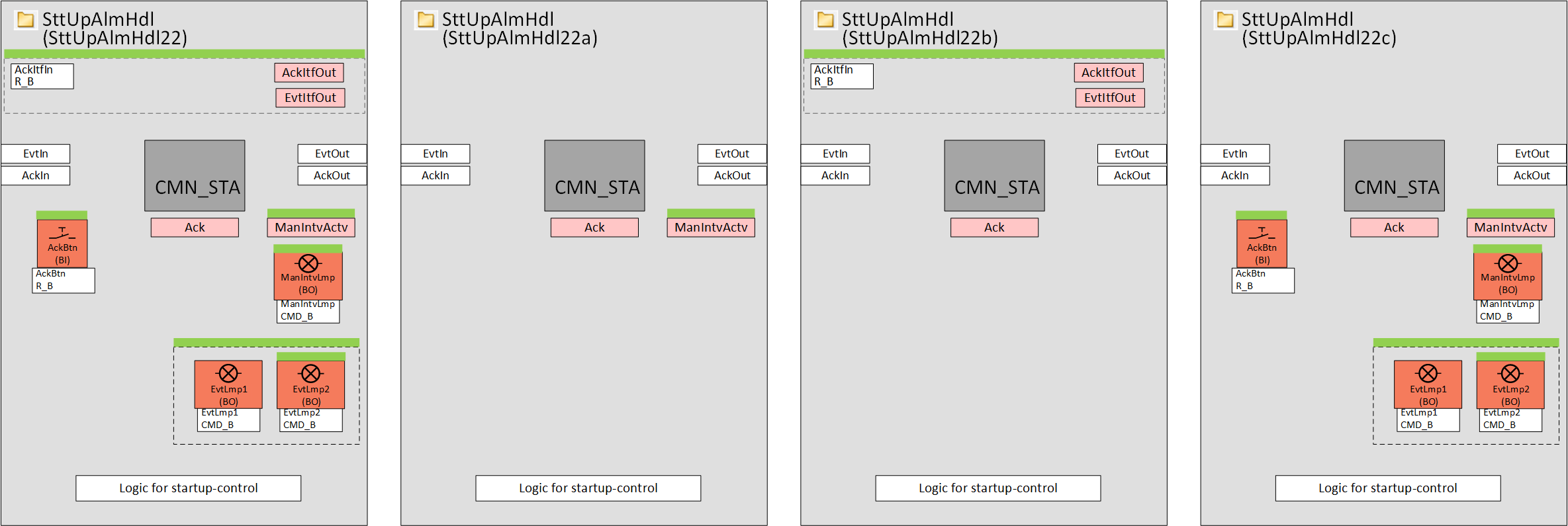
SttUpAlmHdl22a is optimized for use in plants.
SttUpAlmHdl22b is optimized for use in the plant SysFnctAS21x.
SttUpAlmHdl22c is optimized for use in the plant ElPnl21x.
Example of an electrical cabinet with two automation stations
Events are collected at device level with SttUpAlmHdl22b (with CMN_STA connected to AS_VIEW) in the plant SysFnctAs21x and forwarded (via EvtItfOut) to EvtAckCoord22 in the plant ElPnl21x. From there they are transferred to SttUpAlmHdl22c which contains the lamps.
The acknowledge button in SttUpAlmHdl22c is transferred to AckItfOut in EvtAckCoord22 and from there it is read by AckItfIn in SttUpAlmHdl22b in the plant SysFnctAS21x and transferred to AS_VIEW via CMN_STA.
Name | Description | Type | Alarm / Notification class | Trend / Type | |
|---|---|---|---|---|---|
EvtLmpCtl | Event lamp control | N/A | N/A | ||
Ack | Acknowledgement | BCnfVal: Binary configuration value | No | No | |
AckBtn | Acknowledgement button | BI: Binary input | No | Yes, 4 | |
ResetCmd | Reset command | BO: Binary output | No | Yes, 4 | |
ManIntvActv | Manual intervention active | BCalcVal: Binary calculated value | Yes, 8 | No | |
ManIntvLmp | Manual intervention active lamp | BO: Binary output | No | No | |
Description |
|---|
|
Event and acknowledge interface Elements that belong to this option: Acknowledge interface input EvtItfOut | Event interface output | ICalcVal: Integer calculated value AckItfOut | Acknowledge interface output | BCalcVal: Binary calculated value |