RDG2 integration workflow
Engineering- and commissioning overview for KNX PL-Link on PXC4/5/7
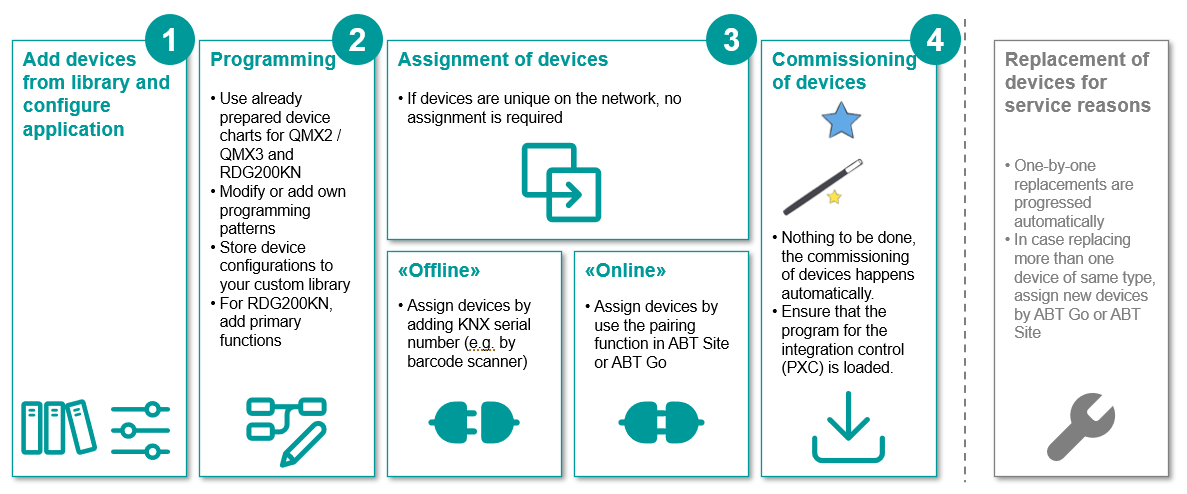
Workflow RDG2 devices
1 | Define building structure for a KNX PL-Link topology. | |
2 | Add a PXC4/5/7 device to the building structure. | |
3 | Add a RDG2 device to the KNX PL-Link network. | |
4 | Configure the RDG2 device. | |
5 | (Optional) Configure the RDG2 window contact and the presence detector. | |
6 | Configure the RDG2 heating/cooling coil demand with zones. | |
7 | Modify the RDG2 device chart. | |
8 | Add RDG2 subordinate devices. | |
9 | Duplicate RDG2 devices. | |
10 | Add the serial number to the device (offline) or later in step 13 online. | |
11 | (Optional) Adapt the RDG2 device chart with the window contact or/and presence detector. | Adapting the RDG2 device chart with the window/presence detector contact |
12 | (Optional) Defining the aggregation of the heating coil hot water demand and cooling coil chilled water demand for each zone. | |
13 | (Optional) Adapt the RDG2 device chart for heating/cooling demand. | |
14 | Connect the device. | |
15 | Load the configuration to the device. Note: The RDG2 firmware download is not supported by ABT Site. | |
16 | Use the Play button to go online and assign the serial number if not already done in step 9. | |
17 | For the graphical representation of a RDG2 device in Desigo CC, the data points for the Logical View must be defined. | |
18 | Enable KNX/IP tunneling for DXR2 and PXC3 | |
19 | Not all delivered RDG2 versions support the full functionality of PXC4/5/7. Note: The RDG2 firmware download is not supported by ABT Site. | |
20 | Disable KNX/IP tunneling for DXR2 and PXC3 |
- Video on YouTube: Integrating RDG200 KNX thermostats "plug & play" on Desigo PXC 4/5/7
Note: The video does not explain how to configure the subordinate devices and the heating/cooling demand. - Video RDG200KN quick configuration
Further information
- Adding and renaming RDG2 manager device
- Configuring the RDG2 application type
- Configuring a RDG2 window contact or/and presence detector
- Configuring the RDG2 heating/cooling coil demand with zones
- (Optional) Modifying the RDG2 device chart
- Adding RDG2 subordinate devices
- Duplicating RDG2 devices
- Adding the serial number to the device (offline)
- Adapting the RDG2 device chart with the window/presence detector contact
- Defining the aggregation of the demand signal
- Adapting the RDG2 device chart for heating/cooling demand
- Preparing RDG2 devices for Desigo CC graphics
- Checking the RDG2 runtime version compatibility
- Additional procedures